
You have a task that splits in two: fix the API, then update the frontend that calls it. Or one that splits in five: review five modules for the same bug. You could open five terminals and paste five prompts. Or you could ask the agent to do the splitting, and let it hand pieces to other agents.
Claude Code has three ways to do that, and they differ in what the helpers share with each other: the conversation, the files, the machine. With the wrong one, two agents overwrite the same file, or you pay for five context windows to do the work of one. Below is what each option shares, what its docs say it costs, and where a separate machine per agent fits. We make Sessionboxer, so the last part is about our own product, including what it does not do.
Subagents: helpers that report back
A subagent is a helper the main conversation starts with the Agent tool. The docs say each one "runs in its own context window with a custom system prompt, specific tool access, and independent permissions." It does its job and returns a summary. Your main conversation sees the result and none of the noise: the forty files it read, the test output it scrolled through.
Subagents can nest. By default a subagent may start its own subagents, up to three layers below the main conversation, and CLAUDE_CODE_MAX_SUBAGENT_SPAWN_DEPTH changes that. By default, when 20 subagents are running, the next one fails with Concurrent subagent limit reached. The docs also say there is no limit on the total number of subagents over a session.
The part to watch is the working directory. A subagent "starts in the main conversation's current working directory", which means your checkout. Two subagents that edit files edit the same files. If you want each one on its own copy, set isolation: worktree in its definition, and it gets a temporary git worktree that is cleaned up if it changes nothing.
Use subagents when only the result matters: search the codebase for every caller of a function, read a long log, review one module and list what is wrong. If you want to give the easy searches less thinking and the hard reviews more, Claude Code 2.1.292 added effort per subagent, which we covered in choosing effort for each subagent.
Agent teams: helpers that talk to each other
Agent teams are experimental and off by default. You turn them on with CLAUDE_CODE_EXPERIMENTAL_AGENT_TEAMS=1 in your environment or settings.json. Then the main session becomes a team lead, and the helpers are teammates: separate Claude Code instances with a shared task list and a mailbox each. Teammates claim tasks and message each other by name, so they can argue about a finding without routing everything through the lead.
The docs are direct about the cost. Teams "use significantly more tokens than a single session", because each teammate has its own context window. They recommend teams for research, review and new features, and a single session or subagents for "sequential tasks, same-file edits, or work with many dependencies."
Three details from the docs matter if you leave a team running:
- Teammates start with the lead's permission mode. If the lead runs with
--dangerously-skip-permissions, so do all the teammates. - Claude Code does not ask you before it launches a teammate. With teams on, a subagent that Claude names when it spawns it becomes a teammate, so a team can form when you did not ask for one.
- The files are shared. The best-practices section says that two teammates editing the same file "leads to overwrites", and suggests giving each teammate its own set of files.
There are limits too. A session has one team, teammates cannot start teams of their own, and /resume does not bring back in-process teammates.
Separate sessions that send each other messages
The third option is several ordinary sessions. You start them yourself, often one per worktree, and Claude Code's cross-session messaging lets them pass notes: "the schema migration finished", "I changed the response shape of /orders". The docs say a message is "a piece of text one Claude writes to another, never the sender's conversation history or files." It needs Claude Code 2.1.224 or later on macOS and Linux.
This keeps you in charge of the split. Each session has its own conversation and, with worktrees, its own copy of the code. What they still share is your computer: the same home directory, the same logins, the same ports and the same Docker. Two sessions that both start a dev server on port 3000 will collide, and worktrees do not help with that. We went through those collisions in running several coding agents in parallel.
A quick comparison
| Subagents | Agent teams | Separate sessions | |
|---|---|---|---|
| Who starts helpers | The main agent | The lead | You |
| Context | Own window, summary returns | Own window each | Own conversation each |
| Talk to each other | Mostly through the caller | Directly, plus a task list | Text messages |
| Files | Your checkout, or a worktree | Your checkout | Whatever you give each one |
| Machine | Yours | Yours | Yours |
All three run on the same computer, with your permissions. For read-only work that is fine. Once helpers install packages, run servers or run with prompts off, you want a wall between each of them and your laptop, and between each other.
How Sessionboxer does it
Sessionboxer runs each session in its own box: a Docker container with its own copy of the repositories, its own terminals and its own desktop. Every box has a built-in MCP server called sessionboxer. With it, the agent knows which session it is in, and if you allow it, it can create other sessions, message them and wait for their reply. The child can run a different agent, as long as that agent is connected, so a Claude Code session can start a Codex session.
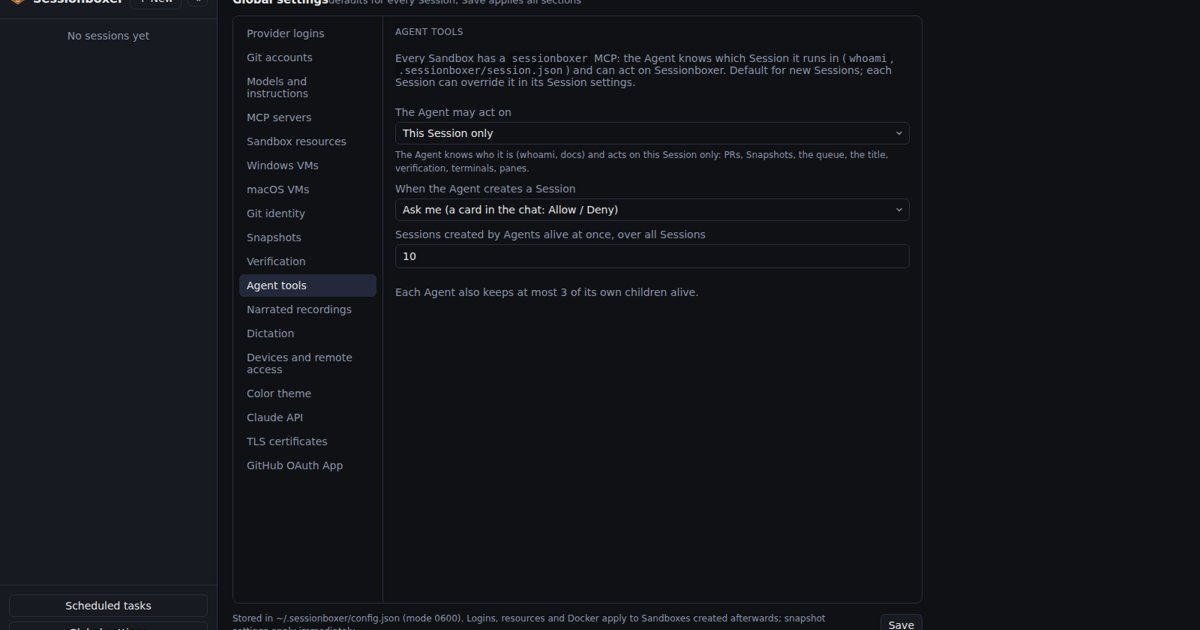
When the agent calls session_create, Sessionboxer shows a card in your chat by default: "Claude Code wants to create a Session 'Backend tests'", with Allow and Deny. A card nobody answers in 10 minutes counts as denied. The new session shares nothing with the parent except its first prompt, so the agent has to write the whole task into it. It shows up in the sidebar as child of the parent.
The parent then uses session_message and session_wait. In the child's chat, its prompt appears as from Session X (its Agent), never as your words. session_get returns the other session's status and its last reply, never its whole conversation. The agent can also fork itself with session_fork, which takes a snapshot first so the fork starts with the same files and packages. With a handoff document, the fork can run a different agent; the snapshots, forks and handoffs page explains how that works.
Limits hold for a runaway or prompt-injected agent, whatever the policy:
- at most 3 alive sessions created by one agent (stopped ones do not count);
- a global cap on agent-created sessions, 10 by default;
- a chain of agents prompting agents stops after 4 hops;
- one message in flight from one session to another, and no messages to itself.
The policy is a setting, globally and per session: Off, This Session only or All Sessions. The box has no route to Sessionboxer's API and no token. Calls go through the box's own daemon, so a box can only ever speak for its own session. The chapter on the agent and Sessionboxer has the details, and the MCP tools reference lists every tool with its parameters and limits.
What Sessionboxer does not do
There is no shared task list and no team mailbox. Agents in different sessions coordinate through messages and replies, which suits a few large pieces of work and does not suit ten agents splitting a task by the minute. For that, agent teams inside one session are the closer fit.
Each child is a full session with its own container, so it takes longer to start than a subagent, and it uses its own memory and CPU. Its usage counts like any other session's. Children do not see each other's files. Their work comes back as a reply, a branch or a pull request, and merging it is still your job, or the parent agent's.
Which one to pick
Start with subagents for work that reads more than it writes, such as searches, reviews and log digging. Turn on agent teams when the helpers need to discuss findings and each one can own its own files. Use separate sessions when each piece deserves its own branch, or when the helpers will install things, run servers or run with prompts off. Then give each one its own machine, and keep the approval card on.