Self-hosted · Linux or macOS · Claude Code, Codex, Cursor and Devin
Run coding agents in boxes.
Each session gets its own Docker container with a full Linux desktop, and the agent works in it like a
person would: terminal, editor, browser, mouse and keyboard. You watch the screen live, browse and edit
the files, open terminals, and step in when you want to.
Install
curl -fsSL https://sessionboxer.talayolabs.com/install.sh | sh
Needs Docker
(how to install it on macOS, Windows or Linux). Or brew install talayolabs/tap/sessionboxer,
npx sessionboxer serve, docker compose up or a desktop app — see
Install.
Sessionboxer in 49 seconds: five agents at work at the same time, each in its own virtual, isolated
machine, then six features on real screenshots. Device photos from Wikimedia Commons:
Linux PC by Syced (CC0),
Pixel 6a by Nisiguti (CC BY-SA 4.0),
MacBook Air by KKPCW (CC BY-SA 4.0),
Dell OptiPlex 745 by Ace_Combat_769 (CC BY-SA 4.0),
server rack by Edmondo (CC BY-SA 3.0).
MP4
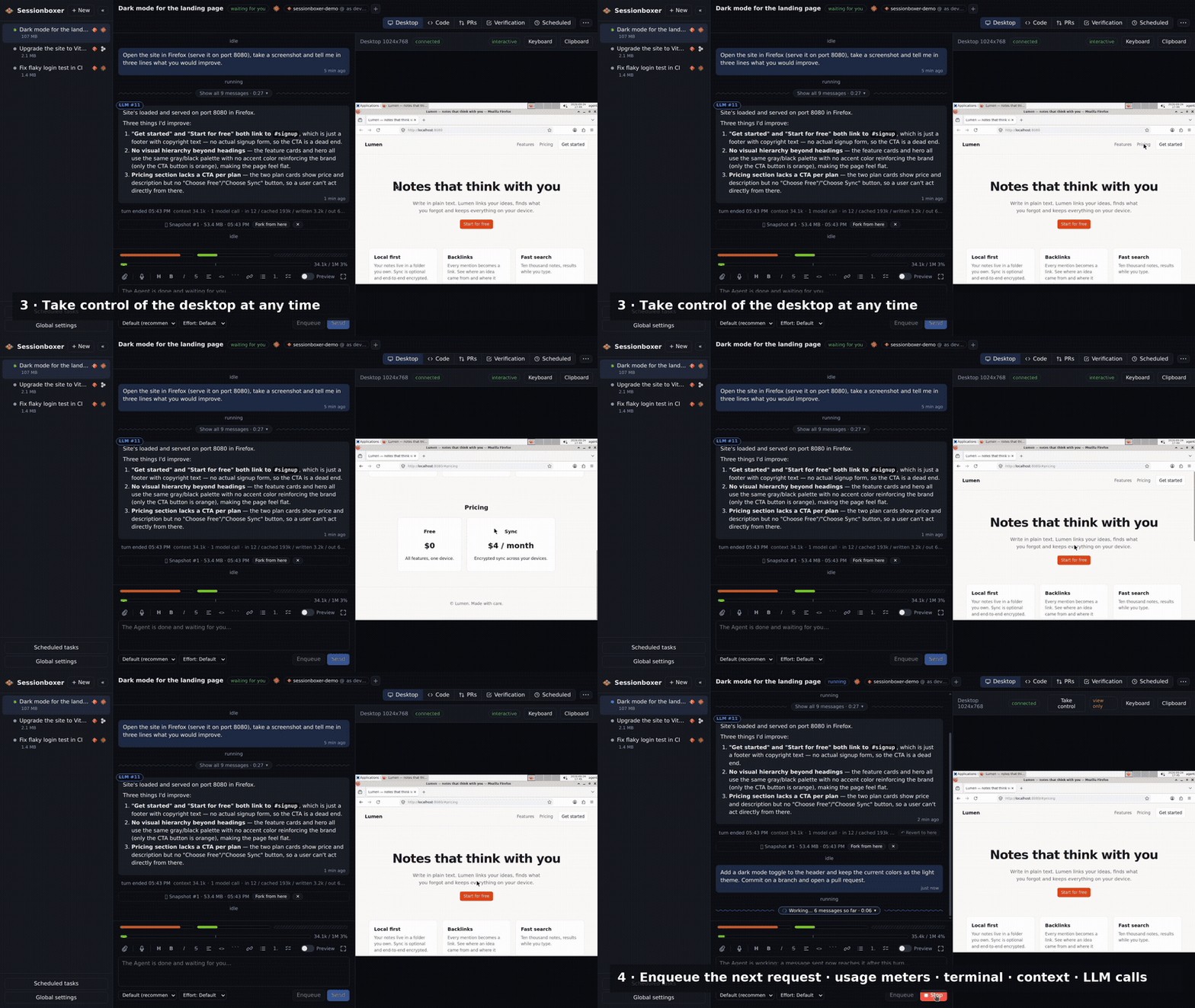
Seven minutes through the UI (v1.1.0, before Cursor): a new session with a repository and a first prompt; the box
boots with a Linux desktop; the agent's turn folded into one line, opened to see every step; taking
control of the desktop; enqueuing the next request while it works; usage meters, terminal, context
and LLM calls; VS Code in the UI's theme; a pull request with checks, comments and auto-merge; forks
that continue, start a new chat or hand off to another agent; several repositories with their own
accounts; scheduled tasks; themes; dictation; pairing a phone.
GIF · MP4
What you get
The container is the safety boundary. Everything the agent does happens in there, and everything you
need to follow it is in one browser tab.
A prompt box with the agent, the repositories and Start under it. Click your agent's logo for the
three commands that connect it on your OS; GitHub or Bitbucket is one more click. The rest of a
session's settings sit behind Advanced….
Every conversation runs in its own container with its own copy of the code. Nothing the agent does
touches your machine; delete the session and it is all gone.
Pick the environment under the prompt: Docker · Linux, QEMU · Windows or QEMU · macOS. For the last
two a VM boots next to the box and the agent runs inside it, with its repositories, terminal
and MCP servers; you watch and take over the Windows or Mac desktop from the same pane.
The container runs a Linux desktop with Firefox. The agent can take screenshots, click, type and
drag (the cursor glides to its target like a hand would), so it can test web apps, read
documentation or use any GUI tool. You see the same screen in the browser and can take the
controls at any time.
Inside the box the agent runs with all permissions granted, so it doesn't stop every few seconds
to ask whether it may run a command. The container is the safety boundary.
Full VS Code running inside the box (with its AI features switched off: the agent in the chat is
the one you talk to), and as many shells as you want. Files named in the chat open in the editor
at that line.
A gauge under the prompt box shows how full the agent's context window is (green to red,
rotting past half), how many times the conversation was compacted, and what each turn
cost; a Context pane breaks the window down by system prompt, tools, MCP servers, memory files
and messages.
Ask for a screen recording of a feature and the agent records the box's desktop to an .mp4 you
can play right there, with captions it wrote as it worked and, optionally, narration spoken by a
local text-to-speech model. Images, SVGs, PDFs and Markdown with Mermaid diagrams show up the
same way.
Take a snapshot of the box after any turn (or after every one). Fork a new session from it and
choose what the fork does with the conversation: continue it, start a new one on the same files,
or hand off — the first agent writes a handoff and another agent (Claude Code → Codex, say) picks
up from it. Revert the chat to an earlier turn and what followed stays as a branch.
Paste a GitHub or Bitbucket Data Center PR URL, or let the agent open one, and it is watched: a
table of comments, review threads and reviews, the checks on the head commit (failed / running /
passed, a notification when one fails), and buttons to turn any item into a prompt, have the agent
address it, or fix and push. Auto-merge merges when the checks pass and says what it is waiting
for (an approval, say) while they don't.
For Claude Code sessions, a recorder in the box keeps every request to the Anthropic API and its
response, byte for byte. Each bubble gets an LLM #n label that opens the request,
the response, a parsed tree and a diff against the previous call.
Add MCP servers in Global settings (a command to run in the box or an HTTP URL, secrets write-only),
switch them per session, toggle them mid-conversation. GitHub's own MCP server connects with one
click through the GitHub CLI's login, and the box is logged in as that account too.
A built-in sessionboxer MCP server tells the agent which session it runs in and
answers questions from the guide. If you allow it, the agent attaches pull requests, takes
snapshots, opens a Terminal for you, or creates and messages other sessions — each action marked
in the chat, creation behind an Allow / Deny card.
Plug a phone, a board or a dongle into the machine and hand it to one session from the header
menu. The agent gets that device and nothing else on the bus, follows it through resets and
Android's debugging prompt, and can adb install the build it just made.
Start from one or several git URLs (each with its own GitHub account, if you have more than one),
an empty directory or a copy of a folder on your machine, and pull the agent's changes back with a
preview of what would change. Sessionboxer uses your own Claude, ChatGPT, Cursor or Devin account; there
is no Sessionboxer account and nothing leaves your machine except the agent's own traffic.
Attach files by dropping or pasting them; they are uploaded into the box and handed to the model
when it accepts them. Enqueue the next request while the agent works and it goes out as
soon as the agent is free (pause the queue if you'd rather not). Dictate a prompt with the mic:
whisper.cpp runs offline on your machine. A command line (sessionboxer new .) boxes
the current directory.
Behind Cloudflare WARP, Zscaler or another TLS-inspecting proxy, the CA certificates your machine
trusts beyond the public ones are copied into every box, so HTTPS from the agent, MCP servers and
the image build works like from your machine. Point Claude Code at your company's Claude proxy from
Global settings.
Run a prompt on a cron schedule, in its time zone, with a plain-words preview and the next runs:
into an existing session ("check the failing nightly build") or a new one from a template that
stops when the turn ends ("triage the new issues every morning"). The runs and their outcomes are
listed with the task.
The agent's messages of a turn fold into one line — a spinner, the message count and the time it
has been at it — and only its summary stays when the turn ends; open the fold to see every step,
thought and screenshot as it happened. Each message carries its time (12 min ago, the
exact date on hover).
After each turn, the agent plans a few end-to-end test cases for what it just did, runs them on
the desktop with mouse, keyboard and browser, fixes what fails and records a captioned video of
it. The Verification pane shows each case, its state and the video, and Run now starts a
run whenever you like. On by default; switch it off per session or globally.
Three small bars above the context gauge show how much of your plan's windows are used (Claude's
session, week and Opus windows; Codex's 5-hour and weekly limits), with the reset time on hover.
When the agent refuses a turn for lack of credit, a no-entry bar counts down to the reset;
Continue resends the prompt, Auto-continue does it for you as soon as credit is back.
Eleven light and dark themes (Sessionboxer, GitHub, Catppuccin, Solarized, Dracula, Nord, One
Dark), or follow the system with a light and a dark pick. The whole UI follows — chat, terminal,
diagrams — and the VS Code in the box switches to the same palette live.
Each card opens a page with screenshots, things you can do with the feature and how other products
compare. All features →
How it works
One process listens on your machine. Each session is a container it talks to over a private Docker
network; nothing in a box is published to the host.
Your browserWeb UIchat · live desktop (noVNC) · VS Code · terminals · Context · PRs
HTTP + WebSockets on 127.0.0.1:4000
Host · one processControl Plane
Node (Hono + WebSockets, dockerode, SQLite). Creates containers, relays the ACP message stream,
proxies noVNC, terminals and VS Code under stable URLs, stores the chat history and takes
snapshots.
private sessionboxer Docker network · no published ports
Docker container · one per sessionSandbox
Sandbox Daemon — ACP client; also serves files and shells
Agent — claude-agent-acp or devin acp, all permissions granted
Desktop — Xvfb + XFCE + x11vnc + noVNC, Firefox
computer-use MCP — screenshot, click, type, record
Workspace — /workspace, seeded from a git URL or your folder
Docker daemon — optional, Sysbox when available
Docker containerSandboxAnother session, another box. Forks start a new box from a snapshot.
Docker containerSandbox…
The agent runs inside the Sandbox,
not on the host, so there is no remote tool layer to escape from and the container is the blast radius.
The Daemon speaks Agent Client Protocol
to the agent, so the UI and the history are agent-neutral and a new provider is an adapter install plus a provider entry.
The desktop is plain X11
driven by Sessionboxer's own computer-use MCP server, mirroring Anthropic's computer toolset.
All four run inside the box over ACP, with the same desktop tools. You bring your own account; tokens
are handed only to the containers of sessions that use that agent and are never stored in snapshots. A
fork can switch agent mid-way through a handoff.
Claude Code
Through claude-agent-acp, with your Claude subscription: run
claude setup-token and paste the result in Global settings.
Model, Effort and Fast mode pickers; changes apply when the current turn ends.
Standing instructions appended to its system prompt on every start.
Branches keep its memory exact: the session is forked at that turn.
Exact model API calls recorded in the box and shown per bubble as LLM #n.
Context breakdown by system prompt, tools, MCP servers, memory files, skills and messages.
Usage bars for the session, weekly and Opus windows; 1M-context models keep their full window.
Codex
Through codex-acp, with your ChatGPT subscription: run codex login on
your machine and paste ~/.codex/auth.json in Global settings. It lives on tmpfs in the
box; refreshed tokens are stored back.
Model and reasoning-effort pickers; changes apply when the current turn ends.
Standing instructions prepended to the first message of each conversation.
Usage bars for the 5-hour and weekly limits, read after each turn.
Same desktop, VS Code, terminals, snapshots, PRs and verification as the others.
Cursor
Through the Cursor CLI's own agent acp, with your Cursor subscription: run
agent login on your machine and paste or import the auth.json it writes in
Global settings (an API key from the Cursor dashboard works too). It lives on tmpfs in the box;
refreshed tokens are stored back.
Model picker with the models your plan has, as its CLI lists them; changes apply when the current turn ends.
Standing instructions prepended to the first message of each conversation.
Its questions and plans are answered so a turn never waits on a dialog.
Same desktop, VS Code, terminals, snapshots, PRs and verification as the others.
Devin
Through the Devin CLI's devin acp, with your Devin account: run
devin auth login and paste the token from its credentials file in Global settings.
The model catalog your account has, grouped by family; pick an effort level by model.
Standing instructions prepended to the first message of each conversation.
Branches hand it a transcript of the conversation up to that point.
Compaction details read from its own session database in the box.
Context breakdown by system prompt, tools, messages and free space, estimated.
Compared with
Hosted agents give you a machine in their cloud on their account. Sessionboxer gives the same kind of
machine on yours, with the agent and subscription you already have.
Sessionboxer
Devin
Cursor Cloud Agents
Codex cloud
Claude Code on the web
OpenHands
T3 Code
Runs on your machine or your server
✓
✗
✗
✗
✗
✓
✓
Your existing subscription, no new account
✓
✗
✗
✗
✗
API key
✓
Agents
Claude Code Codex Cursor Devin
Devin
Cursor
Codex
Claude Code
own agent, any model
Claude Code, Codex, Cursor, others
Isolated sandbox per session
Docker, / VM
VM
VM
container
VM
Docker
✗ (your machine)
Desktop the agent drives with mouse and keyboard
✓
browser
✓
—
—
browser
✗
Watch the screen live and take over
✓
✓
✓
—
—
—
✗
VS Code and terminals inside the sandbox
✓
✓
—
—
—
—
your own
Several repositories in one session
✓
✓
✓
—
—
—
—
Snapshot and fork the whole machine
✓
—
—
—
—
—
✗
Revert the conversation, branches
✓
—
—
—
—
—
—
Pull requests: follow, address, auto-merge
✓
follow, address
address
address
address
address
✗
See the exact model API calls
✓
—
—
—
—
—
—
Offline dictation
✓
—
—
—
—
—
—
Phone
PWA + push
web
iOS app
ChatGPT app
Claude app
web
iOS, Android
Open source
MIT
✗
✗
✗
✗
MIT
MIT
From each product's public documentation, September 2026; ✓ = offered, ✗ = not offered, — = not found in the docs.
Corrections welcome as
an issue.
Remote access from a phone or another machine
Sessionboxer listens on 127.0.0.1:4000 and every browser logs in once with the access
token or a pairing code. Pair another device in Global settings shows a QR code and picks how the
phone reaches this machine: the local network, a Cloudflare quick tunnel, the Sessionboxer tunnel
(a stable https://<name>.tunnel-sessionboxer.talayolabs.com address) or your own
server over SSH.
The phone gets the same session in a one-column layout with a touch desktop, and push
notifications when the agent finishes or a pull request gets a comment. Paired devices are listed
in Global settings and can be revoked there.
Install Docker first
Every session is a Docker container, so the machine that runs Sessionboxer needs a Docker engine with
the docker compose plugin. All three installs below include it. When
docker compose version answers, come back to Get started.
macOS Apple silicon or Intel
OrbStack, with Homebrew
brew install --cask orbstack
open -a OrbStack           # finish its setup once
docker compose version
OrbStack is lighter and reaches the boxes
by their own address, like Linux does; on Apple silicon it may ask to install Rosetta, say yes.
Docker Desktop for Mac
(brew install --cask docker) works too. Either one needs a Mac that can run virtual
machines, so not a Mac that is itself a VM. Open the app once and wait until it says it is running,
then install Sessionboxer.
Windows 10 or 11, with WSL2
PowerShell as administrator
wsl --install              # reboot when it asks
winget install -e --id Docker.DockerDesktop
wsl -e docker compose version
WSL2 gives Windows a
Linux kernel;
Docker Desktop for Windows
runs the engine on it. In Docker Desktop, keep Use the WSL 2 based engine on and turn on
WSL integration for your
distribution. Then open a WSL terminal (wsl) and run the Sessionboxer commands from
Get started in it: the one-liner is a shell script and Sessionboxer itself
runs on Linux, so on Windows it lives inside WSL.
Linux Debian, Ubuntu, Fedora, Raspberry Pi OS…
Docker Engine, Docker's script
curl -fsSL https://get.docker.com | sh
sudo usermod -aG docker $USER   # then log out and in
docker compose version
get.docker.com installs Docker Engine, the
docker compose plugin and Buildx from Docker's repositories on every common
distribution; the
per-distribution instructions
do the same by hand. The usermod line lets your user talk to the daemon without
sudo, which Sessionboxer needs (post-install steps).
Already have Docker? docker info has to work as your user, and docker compose version
has to print a 2.x version: the old standalone docker-compose (1.x, with a dash) is not
enough. Colima works with DOCKER_HOST=unix://$HOME/.colima/default/docker.sock; the
macOS notes in the guide have the details.
Get started
1
Requirements
Linux with Docker Engine, or macOS with OrbStack or Docker Desktop (Windows: WSL2) — install Docker
Node.js 22+ for the npm install; Docker Compose is enough otherwise
A Claude Code subscription, a ChatGPT subscription (Codex), a Cursor subscription and/or a Devin account
Optional: Sysbox, for Docker inside sessions without a privileged container
2
Install and start
Run the one-liner above (it picks npm or Docker Compose), or one of the commands below. Start the
server and open the login link it prints: http://127.0.0.1:4000/#pair=… logs your
browser in once. Sessionboxer only listens on localhost.
The Sandbox image (ghcr.io/talayolabs/sessionboxer-sandbox, a few GB, amd64 and
arm64) is pulled the first time the server starts.
3
Connect your agent
On the first screen, click the logo of the agent you subscribe to:
Claude Code,
Codex,
Cursor or
Devin. The dialog
shows the three steps for your OS (install the CLI, run claude setup-token or
codex login or the like, paste the result). Add GitHub or Bitbucket if the code is
private, type the first prompt, Start.
How the first screen works →
Installs the release with Homebrew's Node, no npm to think about; brew upgrade
updates it. The same package has the sessionboxer new . command line. Port 4000 taken?
SESSIONBOXER_PORT=4001 sessionboxer serve.
the tap
npm any machine with Node
Node 22+ and Docker
npx sessionboxer serve
Or npm i -g sessionboxer once and sessionboxer serve. Port 4000 taken?
SESSIONBOXER_PORT=4001 sessionboxer serve.
sessionboxer on npm
Docker Compose home server, VPS, Pi, Coolify
Docker only
curl -fsSLO https://raw.githubusercontent.com/talayolabs/sessionboxer/v1.4.0/docker-compose.yml
docker compose up -d
docker compose logs control-plane   # the login link (-d hid it)
docker compose exec control-plane sessionboxer token   # the token, for other browsers
The Control Plane runs from ghcr.io/talayolabs/sessionboxer with the Docker socket
mounted, so sessions are sibling containers. That socket is root on the host: run it on a machine
you would trust the agent's boxes with anyway. .env sets the port, bind address, public
URL and a fixed token.
Desktop app no Node, no terminal
An app that starts the Control Plane and stays in the tray. Needs Docker like the others. Version 1.4.0:
Not code-signed yet: macOS says the download is “damaged” until you clear its quarantine flag
(command under Remote access), Windows needs More info → Run anyway.
All files of the release
From source to hack on it
git, Node 22+ and Docker
git clone https://github.com/talayolabs/sessionboxer.git
cd sessionboxer && npm install && npm run build
npm start                # pulls the Sandbox image…
npm run build:image      # …or build it here (~5 GB)