
The first time you run two coding agents at once, it feels like cheating. One is fixing the flaky test, the other is writing the migration, and you are reading email. The second time, one of them runs npm install while the other runs npm test, both in the same folder, and you spend the afternoon figuring out who broke what.
Parallel agents are easy to start and hard to run well. Here is what we have learned, and what the people who do it at scale say.
Why one folder is not enough
Two agents in the same working directory share everything: files, node_modules, the dev server port, the git index. Agent A's half-finished edit is in agent B's test run. Agent B's git stash eats agent A's work. Cursor's team put it bluntly: local agents quickly run into conflicts and compete with each other, and with you, for the computer's resources.
So each agent needs a boundary. There are three common ones, and they are not interchangeable.
Boundary one: git worktrees
git worktree add ../feature-x gives you a second checkout of the same repository on a second branch. Each agent gets its own files and its own branch, and merging is normal git.
What it does not separate: processes, ports, installed packages, the database, anything outside the repository. If both agents start the dev server you get a port clash. If one changes a dependency, the other's node_modules is now wrong. A good write-up on Agentastic recommends worktrees for normal features, fixes and docs, and something heavier for dependency changes or service-heavy work.
Worktrees are cheap and fast. Use them when the tasks only touch files.
Boundary two: a container per agent
A container gives each agent its own filesystem, processes, ports and packages. The agents can both run the dev server on port 3000 because each has its own port 3000. One can upgrade Node without the other noticing. If you turn on Docker inside the box, each one can even run its own docker compose up.
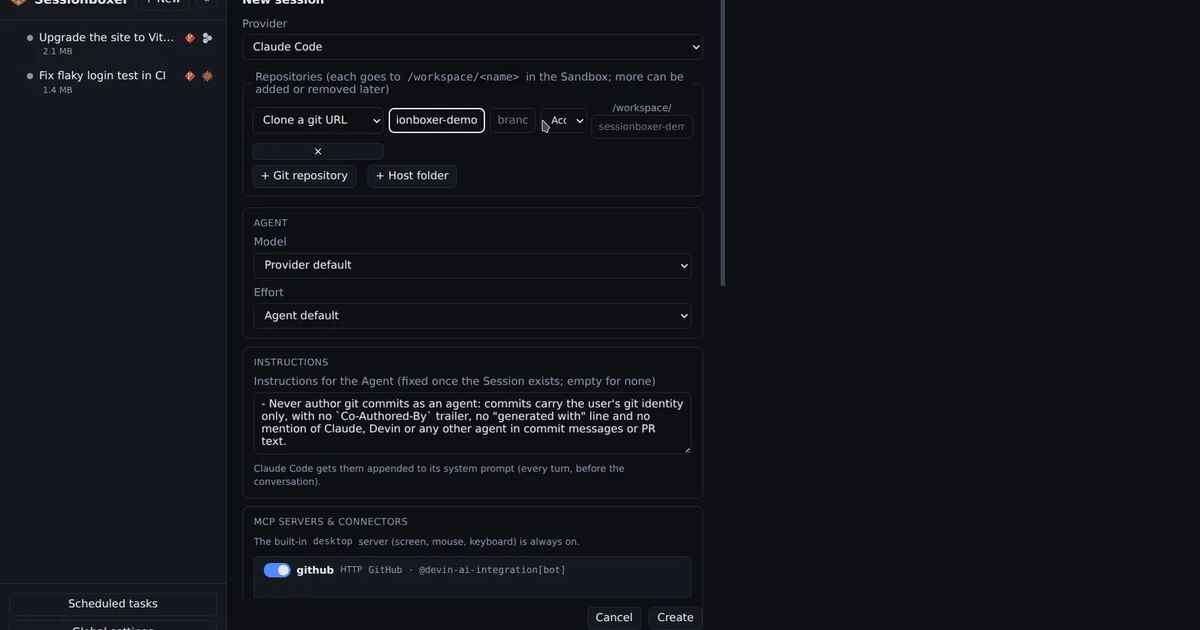
This is what Sessionboxer does by default: one box per session, cloned from your repositories, with its own Linux desktop, VS Code and terminals. It costs more disk and memory than a worktree, and starting a box takes longer than git worktree add. In return, "what else is running" stops being a question. CPU and memory limits are set per box, so one agent compiling Rust does not freeze the others.
The box also lets the agent do more than edit files. It can open Firefox and click through the app it just changed, because the desktop is its own. On a shared laptop, two agents clicking around your screen would be chaos.
Boundary three: a cloud VM per agent
Devin, Cursor Cloud Agents, Codex cloud and Claude Code on the web all run each task on a machine in their cloud. That buys you the strongest isolation plus compute that is not your laptop, and tasks keep going when you close the lid.
The trade-offs are the usual ones: the machine is theirs, the account is theirs, the billing is theirs, and your code is on their infrastructure. We compared them in another post. If you have a server of your own, a container per agent on that server gets you most of the way with none of the account changes.
Then the real problem: review
Isolation is the easy half. Cursor's research team ran hundreds of agents on one codebase for a week and wrote about what went wrong. The agents did not fail at coding. They failed at coordination: holding locks too long, avoiding hard tasks, churning for hours. Their fix was a hierarchy of planners and workers, and a judge at the end of each cycle.
You are probably running three agents, not three hundred, but the same thing happens in miniature. The limit on parallel agents is how many results you can review in a day. A few habits keep it under control.
Decide what "done" means before you start. Each task prompt should say what must be true at the end, which paths may change, and what command proves it. Agentastic's five-part prompt (outcome, scope, constraints, verification, handoff) is a good template.
Only run independent tasks together. If the UI depends on the API shape, do the API first. Four agents on four dependent tasks is slower than two agents on two independent ones, because the rework eats the gain.
Let the agent verify before you do. In Sessionboxer, each turn can end with a verification run: the agent plans a few end-to-end cases, clicks through them on its desktop and hands you a captioned video. Watching a two-minute video is faster than checking out a branch.
Queue instead of hovering. While agent A works, put your next two prompts in its queue and go look at agent B. The queue plays when the turn ends.
Name and group. Ten sessions called "fix bug" is a bad afternoon. Folders and pins in the sidebar, one folder per project or per customer, keep the list readable.
Stop what is waiting. A session you will not look at until tomorrow does not need CPU. Stop it; resume brings back the conversation, files and installed tools exactly where they were.
A workflow that holds up
- Break the work into tasks that can merge in any order. Put the dependent ones in a second wave.
- Start one session per task, each in its own box, with a prompt that says what done looks like.
- Queue the follow-ups you already know about.
- Review the verification video or the diff when a turn ends. Attach the PR to the session so comments and checks show up next to the chat.
- Fork a session when you want to try a second approach to the same task; delete the loser.
- Stop sessions you are not reading. Delete the ones you are finished with; the box, its files and snapshots go with it.
The number that matters is not how many agents you can start. It is how many finished pieces of work you can confidently merge before dinner. Give each agent a boundary, give yourself a review loop, and that number goes up.