
A USB device in the box
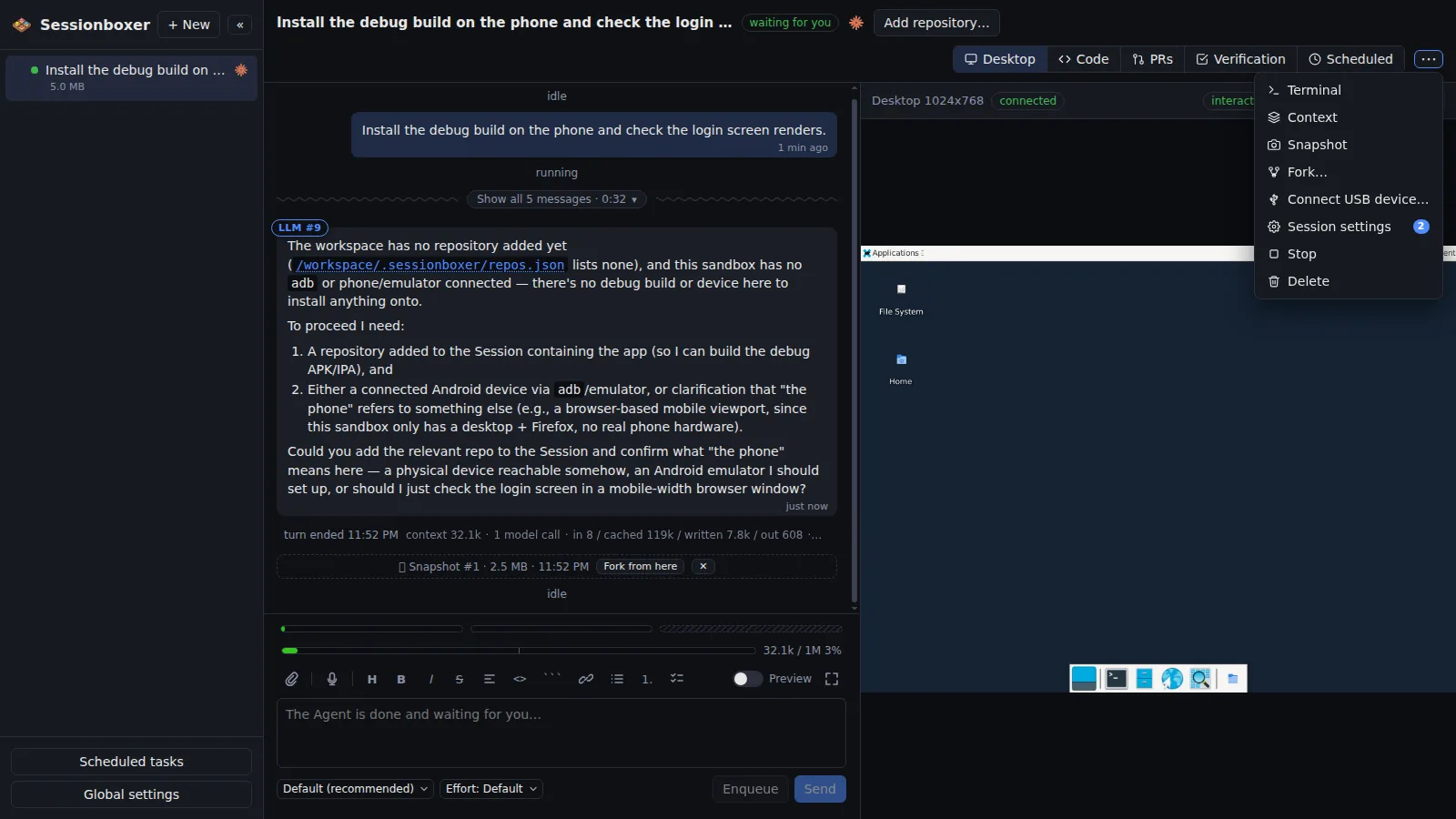
Plug the device into the machine that runs Sessionboxer, then in the session's ⋯ menu pick Connect USB device… and choose it. Its node appears in that box and nowhere else: a device belongs to one session at a time, and the agent is told the path and that it is the only USB device it can reach. When the device re-enumerates, unplugged and back, reset, Android's "Allow USB debugging" toggle, the box follows within seconds and the agent learns the new path. Stop and Resume keep it; Delete releases it.
Things you can do with it
Install the debug build on your phone
Connect the phone, then: "build the debug APK, install it on the phone and check the login screen renders." The agent installs adb, runs adb install, and can put scrcpy on its desktop to look at the phone.
Flash a board
An ESP32 or an Arduino shows up as its serial node; the agent installs the toolchain it needs in the box and flashes from there.
Two phones, two sessions
Each session holds one device. Connecting a phone to another session takes it from the first; the list says which session has what.
From Windows, through WSL2
With usbipd-win installed, the list shows Windows' devices too; Connect attaches the device to WSL2 for you and re-attaches it after resets.
How it works
The devices come from the Docker host's sysfs, and a session's device is a claim on the device's identity, not its number: a reconciler follows the kernel's numbering and replaces the /dev/bus/usb/BBB/DDD node in the box when it changes, without a restart. Nothing USB-specific is preinstalled: the agent runs sudo apt-get install -y adb and the phone's authorisation is answered once per box, since the adb key lives there. Works with Docker Engine on Linux and Docker Engine inside WSL2 (with usbipd-win); Docker Desktop, OrbStack and Colima have no USB passthrough, so use adb over Wi-Fi there. Sessions created before 1.4 need to be recreated or forked to see the bus.
Compared with other products
| Sessionboxer | Devin | Cursor Cloud Agents | Codex cloud | Claude Code on the web | OpenHands | T3 Code | |
|---|---|---|---|---|---|---|---|
| Runs on your machine or your server | ✓ | ✗ | ✗ | ✗ | ✗ | ✓ | ✓ |
| Isolated sandbox per session | Docker, or a Windows/macOS VM | VM | VM | container | VM | Docker | ✗ (your machine) |
| Desktop the agent drives with mouse and keyboard | ✓ | browser | ✓ | — | — | browser | ✗ |
A hosted agent has no way to reach a device on your desk. Of the local ones, OpenHands' container would need a manual --device flag and T3 Code uses whatever your machine sees. Sessionboxer scopes one device to one session from the UI and follows it through resets.
Based on each product's public documentation, September 2026; ✓ = offered, ✗ = not offered, — = not found in the docs. Corrections welcome as an issue.