
You asked for a small fix. Twenty minutes later the agent has rewritten the config loader, installed two packages, run a migration on your dev database and is now arguing with a test it broke. You want to go back to before you pressed Enter.
Every coding agent has some kind of undo, and each covers a different part of the mess. This post goes through what Claude Code, Cursor, Gemini CLI and Codex CLI restore, according to their docs as of 24 October 2026, what all of them leave behind, and how to get back a whole machine. We make Sessionboxer, which is the last part, and that section says what it does not do.
Three things to undo
When an agent goes wrong, three separate things have moved:
- The files it edited with its own edit tools.
- The conversation, which now holds its wrong idea and will keep steering it.
- Everything else it did through the shell: files a command generated or deleted, packages it installed, a database it migrated, a branch it pushed.
Roll back the files and keep the conversation, and the agent can make the same mistake again. Roll back the conversation and keep the files, and you have broken code and an agent that does not remember breaking it. Most tools do not touch the third group at all.
Claude Code: /rewind and /branch
Claude Code's checkpointing takes a checkpoint before each prompt that starts a turn and keeps the 100 most recent in a session. Run /rewind, or press Esc twice with an empty prompt, pick a prompt, then choose one of:
- Restore code and conversation
- Restore conversation, keeping the current files
- Restore code, keeping the conversation
Checkpoints are saved with the conversation, so /rewind still works after you resume a session, until the retention sweep deletes the file snapshots, by default about 30 days later.
The same page lists the limits. A file that only Bash commands changed "isn't tracked and stays as it is." Subagent edits are usually not restored, including those of a background forked skill. Symlinked and hard-linked files are skipped with a warning, which catches dotfile managers and pnpm. Changes from other sessions or from your own editor are not captured unless they touch files the session already edited.
To try another approach and keep the current one, /branch copies the conversation into a new session. It copies the conversation only; both sessions work on the same folder.
Cursor: checkpoints restore files
Cursor's checkpoints are snapshots of your codebase that the agent creates "before making significant changes, capturing the state of all modified files." You click a checkpoint in the chat to preview the files at that point and restore them, or use Restore Checkpoint on an earlier request.
The docs also say: "Restoring a checkpoint reverts files only; it does not remove messages from the conversation." The agent still remembers what it tried, so if the wrong idea came from the conversation, start a new chat. Checkpoints are stored locally and separately from Git.
Gemini CLI: /restore, once you turn it on
Gemini CLI's checkpointing is the most complete of the four on paper and the easiest to miss, because it is off by default. You turn it on in settings.json:
{
  "general": {
    "checkpointing": {
      "enabled": true
    }
  }
}
After that, every time you approve a tool that modifies files, such as write_file or replace, the CLI commits the project's state to a shadow Git repository in ~/.gemini/history/<project_hash> and saves the conversation and the pending tool call. /restore lists the checkpoints; /restore <checkpoint_file> puts back the files and the conversation and offers the tool call again. Your own Git history is not touched. Old instructions that use the --checkpointing flag are out of date: it was removed in 0.11.0.
The docs describe checkpoints for file-modifying tools. They do not say that a shell command triggers one.
Codex CLI: fork the chat, use Git for files
The Codex CLI command reference has codex fork, which copies a previous session into a new chat and keeps the original transcript, and a shortcut: press Escape twice with an empty composer "to edit the previous user message and fork the chat from that point." We did not find a command in that reference that restores files. For the files, Codex leaves you with Git. codex fork --worktree starts the fork in a managed Git worktree, which at least keeps the new attempt out of your working tree.
What none of them roll back
Put the four side by side and one gap is shared by all of them: whatever the agent did outside its own edit tools.
| Files from edit tools | Files changed by shell commands | Conversation | Installed packages, databases, services | |
|---|---|---|---|---|
Claude Code /rewind |
Yes | Only files it had already edited | Yes, or keep it | No |
| Cursor checkpoints | Yes | Not stated in the docs | No | No |
Gemini CLI /restore |
Yes, if enabled | Not stated in the docs | Yes | No |
| Codex CLI fork | No | No | Yes, as a new chat | No |
Agents run a lot of shell commands: a code generator, npm install, sed over twenty files, rm on a build folder, a migration. None of that is in a checkpoint, and going back in the chat does not undo it. Some of it is not on your disk at all, like a pushed branch or a row deleted in a shared database, and no local undo reaches those. Our post on the agent that deleted a production database is about that last group.
Git covers the files in your repository, if you commit before the agent starts; a throwaway branch before a large turn costs a few seconds. It does not cover node_modules, a global tool or the dev database. Our guide to reviewing a coding agent's changes before you commit has more on catching the shell's changes in the diff.
Undo the whole machine
The other way to get everything back is to take a copy of the whole machine before each turn. That only works when the agent has a machine of its own.
In Sessionboxer each session runs in its own Docker container. With automatic snapshots on, the box is saved with docker commit when the agent finishes a turn: the files, installed packages, browser state and the agent's own record of the conversation. Snapshot in the header takes one by hand. Two undos come from that, and they restore different things:
- Revert to here on a turn divider cuts the chat back to that point, in the same box. What followed is kept as a branch you can switch back to. Files are not touched: the revert and branches chapter says branches share the box, so a file changed on one branch stays changed on the others. Claude keeps the branch's memory exact; Devin is given a transcript up to that point.
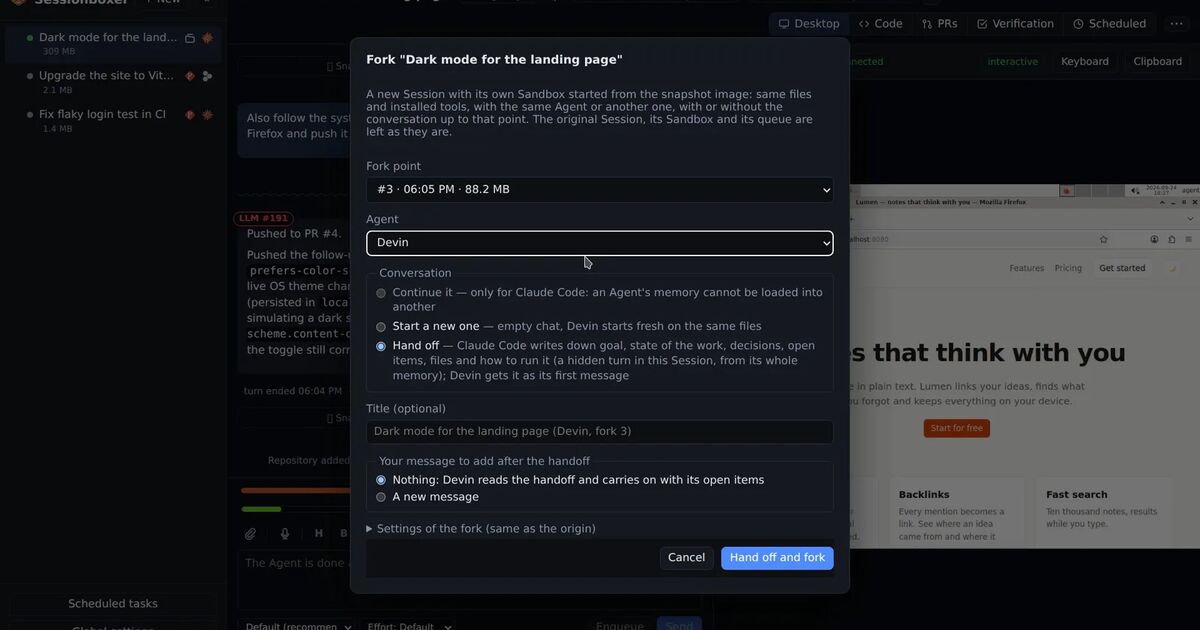
- Fork from here on a snapshot marker starts a new session with its own box created from that snapshot. Files, packages and anything else the commands left on the box's disk are as they were. You choose whether the fork continues the conversation, starts a new one on the same files, or gets a handoff written by the first agent. The original session is not changed, so you can compare the two.
So the full undo is a fork from the snapshot before the bad turn. The snapshots and forks chapter has the details, and our earlier post on snapshotting and forking a session covers handing the fork to a different agent. The chat folds each turn into one line with its divider, so finding the turn to go back to does not mean scrolling through 163 tool calls.
What Sessionboxer does not do here:
- Automatic snapshots are off on a fresh install. Turn them on in Global settings, or you will only have the snapshots you took by hand. Each session keeps 10 automatic ones by default; manual snapshots and snapshots a fork started from are kept.
- Windows and macOS sessions cannot take snapshots or fork yet, because the VM's disk is outside the box's image.
- A snapshot covers the box. A push, a pull request comment or a change on a remote database happened somewhere else and stays.
- Revert alone leaves the files as they are. If you want the files back, fork.
Which one to reach for
If the agent only edited files with its edit tools, its own undo is the fastest: /rewind in Claude Code, a checkpoint in Cursor, /restore in Gemini CLI once enabled. Reset the conversation too when the agent's plan was the problem.
If it ran commands, assume the checkpoint missed something and check git status before you trust it. Commit or stash before you hand it a large task.
If it installed things, changed a database or rebuilt half the environment, go back to a copy of the machine: a VM snapshot, a throwaway container, or a session with snapshots on.