
The agent writes "Done. All tests pass." You run git status and 23 files have changed, four of them new. You can commit on trust, or you can read every line and lose the hour the agent just saved you.
There is a middle way. You read the parts where mistakes hide, in an order that finds them early, and you check the agent's claims by running things yourself. Below is that order, the commands that help, and the places where "undo" covers less than you might expect. We make Sessionboxer, so the part about it is about our own product, including what it does not do.
Look at the shape of the change first
Before you read any code, look at which files moved and by how much:
git status
git diff --stat
You are looking for files you did not expect. A task about a login form should not touch the CI workflow, the lockfile, .gitignore or a migration. When one of those shows up, ask the agent why before you read anything else. Often the answer is fine ("the test runner needed a newer version"). Sometimes it is the whole problem.
Watch the new files. Agents create scripts, helper modules and scratch files, and git diff does not show untracked files at all. Either look at git status, or mark them with git add -N. The git-add documentation says --intent-to-add puts an empty entry in the index, which is useful for "showing the unstaged content of such files with git diff". The agents have their own diff views. Codex's /diff shows "the Git diff, including files Git isn't tracking yet." Claude Code's /diff shows "the edits Claude has made so far alongside anything else you haven't committed."
Read the tests before the code
"All tests pass" is a claim about the tests, so check them first. The quickest way an agent gets to green is to change the test. Look for assertions that got looser, expected values that were copied from the new output, tests marked skipped, and tests that were deleted. A deleted test file shows up in git diff --stat as a file with only minus signs.
Then check that the tests run at all. A new test file that the runner never picks up passes every time. If the agent added tests, break the code on purpose for a second and see whether one fails.
Stage what you have read
Large diffs are easier when you can mark your progress. Git already has a place for that: the staging area. git add -p walks through the changes hunk by hunk and asks whether to stage each one. Stage what you have read and agree with, and skip the rest. git diff then shows only what is left, and git diff --staged shows what you approved.
This works well with an agent that keeps going while you read. When it changes a file again, the new edits show up as unstaged, on top of the hunks you already approved. GitHub does something similar for pull requests: in its review docs, a file you mark as viewed is unmarked again if it changes after you viewed it.
Know what undo does not cover
Agents offer ways back, and it helps to know their edges before you need them. Claude Code's checkpointing captures your code before each prompt, and /rewind can restore code, conversation or both. The same page says checkpointing does not track files changed by Bash commands: an rm, mv or cp the agent ran "cannot be undone through rewind." The /diff docs say the same about its per-turn views, which come from Claude's file edits, so a change made through a shell command shows up only in the working-tree view.
Agents run a lot of shell commands. A code generator, a formatter run over the whole repository, a sed across twenty files: none of those are in a checkpoint. If a turn might do something large, commit first, or work on a branch you can throw away.
Run it yourself
Reading finds a lot. It does not tell you whether the button works. Run the tests yourself, in a shell you control, and start the app if the change has a UI. An agent's "all tests pass" can come from a run before its last edit. Ten seconds of npm test is cheaper than finding that out in CI.
If you do not want to run it every time, ask the agent to show you, with a recording of it clicking through the change. We wrote about that in letting the coding agent test its own work.
How Sessionboxer handles it
Sessionboxer runs each session in its own Docker container, and the review happens in that container.
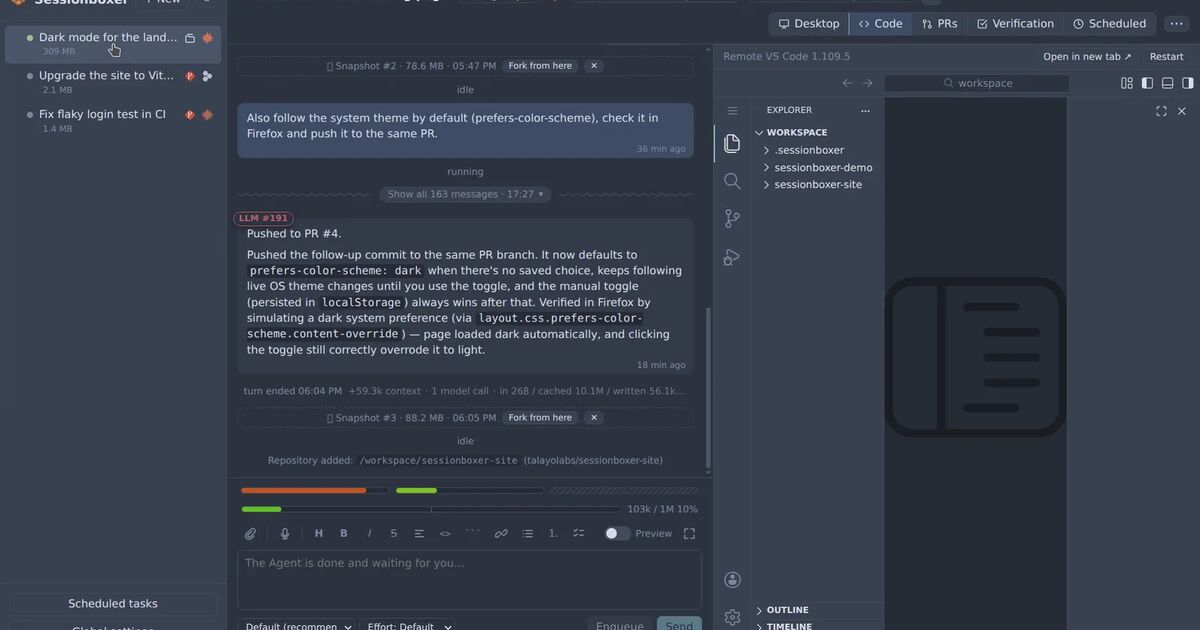
The Code tab opens VS Code inside the box, on the same files the agent edits. It is openvscode-server with search, the Git view and an integrated terminal, so the Git view's per-file diffs and per-hunk staging work as they do on your desktop. The agent's edits appear as you watch. File paths in the chat are links: src/App.tsx:42 in a reply opens that file at line 42 in the editor, and the Read and Edit tool rows link the files they touched. The Terminal tab opens as many shells in the project folder as you want, so you can run the tests yourself next to the agent. VS Code's own AI features are off in the box, so there is one agent per session, the one in the chat.
In the session header, each repository has a chip, and the chip shows a dot when it holds uncommitted or unpushed work. If you copied a folder from your machine instead of cloning, the agent's changes stay in the box until you pull them with Pull to folder… in the header. The dialog lists new, changed and deleted files before it writes anything, skips files that changed on both sides unless you tell it otherwise, and leaves your own edits alone. The Start a session chapter of the guide has the details.
For undo, Sessionboxer takes a snapshot of the whole box after every turn, with docker commit. That includes files changed by shell commands, installed packages and the agent's memory. You can fork a new session from any snapshot and continue from there, while the original stays as it was. More on that in snapshot and fork a coding agent session.
To check behaviour, Auto QA can follow every turn with a verification turn: the agent plans two to five test cases from your request, runs them on the box's desktop and replies with a video. It is off by default, and each verified turn costs a second turn of model time.
Once the work is a pull request, an automation with the Auto review action starts a session on the PR head and posts its review on GitHub or Bitbucket. Its strongest verdict is comment by default, so it does not approve or block unless you allow it.
What Sessionboxer does not do
- It does not review the diff for you in a normal session. The Code pane and the terminal are tools for your own review.
- Revert to here in the chat cuts the conversation back, but files stay as they are, because branches of a conversation share the box. The revert and branches chapter says so. To get the files back too, fork from a snapshot.
- Windows and macOS VM sessions do not have VS Code, snapshots or forks yet. You still have the terminal there.
- Snapshots are taken when a turn ends, or when you click Snapshot. There is no snapshot of the box halfway through a turn.
A short checklist
git statusandgit diff --stat. Ask about every file you did not expect.- Look at new files, or
git add -Nthem sogit diffshows them. - Read the test changes before the code. Look for skipped, deleted or loosened tests.
- Stage what you have read with
git add -p. - Run the tests and the app yourself.
- Before a large or risky turn, commit, or make sure you can fork from a snapshot.