
For a lot of people, talking to a coding agent is faster than typing to it. You explain the bug the way you would to a colleague, with the detours and the "oh, and also", and the agent sorts it out. Claude Code has had voice dictation for a while: run /voice, hold the space bar, speak.
Then you move Claude Code into a container, or onto a server you reach over SSH, and /voice stops working. Sometimes the command is not even there. This post explains why, using Anthropic's own voice dictation docs as of 23 October 2026, and gives three ways to keep talking to an agent that runs somewhere other than your laptop. We make Sessionboxer, which is one of them, so that part says what it does not do.
How /voice works
Claude Code records from the microphone of the machine it runs on and "streams your recorded audio to Anthropic's servers for transcription. Audio is not processed locally." The words appear in the prompt as you speak, and you can mix speech and typing in the same message.
Hold mode is push-to-talk on the space bar. Tap mode starts on one tap and sends the prompt on the next, as long as the transcript has at least three words. A recording stops by itself after 15 seconds of silence or two minutes in total. Transcription is tuned for coding words like regex, OAuth and localhost, and Claude Code adds your project name and git branch as hints. It does not use your Claude messages or tokens, and it does not count toward the limits in /usage.
The docs list 20 dictation languages. The setting is the same language that sets the language of Claude's replies, and an unsupported one falls back to English.
Why it stops in a container or over SSH
Three requirements on that page explain almost every failure.
It needs a microphone on the machine where Claude Code runs. The docs say plainly that dictation "does not work in cloud sessions or SSH sessions." Your laptop has the microphone; the server does not. A Docker container is the same case even on your own machine: it has no audio capture device unless you pass one in. In a container with SoX installed, Claude Code on Linux reports Voice mode requires a microphone, but SoX could not open an audio capture device. The VS Code extension has the same limit: no dictation in Remote sessions, which the docs say includes SSH, Dev Containers and Codespaces.
It needs a claude.ai login. The speech service is not available when Claude Code uses an Anthropic API key, Amazon Bedrock, Google Cloud's Agent Platform or Microsoft Foundry. The troubleshooting section adds a detail that catches people who run agents in containers: if ANTHROPIC_API_KEY, ANTHROPIC_AUTH_TOKEN or an apiKeyHelper setting is present, it "takes precedence over a claude.ai sign-in", and /voice answers Unknown command: /voice. A container that gets its login as ANTHROPIC_API_KEY loses the command this way.
It needs a network path to Anthropic's transcription service. Behind a proxy that inspects TLS, the VS Code docs describe a Dictation error: WebSocket error: with a certificate message, fixed by pointing NODE_EXTRA_CA_CERTS at your proxy's root certificate. Our post on Claude Code behind Zscaler or Cloudflare WARP covers that certificate problem in general.
An organization can also turn voice off by policy, in which case the message says so.
Claude Code assumes the agent, the terminal and the microphone are on one machine. Once you split them, which is the whole point of running Claude Code on a VPS or in a container, dictation has nowhere to record.
Option 1: your operating system's dictation
The simplest fix needs nothing on the server. Windows has Win+H, macOS has a dictation key, and phones have a microphone on the keyboard. They type text into whatever window has focus, so they work in a terminal running ssh or docker exec like anywhere else. Claude Code only sees keystrokes.
What you lose: Claude Code's coding vocabulary hints and its push-to-talk keys. Where the audio is processed depends on your system and its settings, so check them if that matters to you.
Option 2: transcribe on your laptop, paste the text
If you want speech recognition you control, run it yourself. whisper.cpp is a plain C/C++ implementation of OpenAI's Whisper speech recognition model, and it can run on the CPU alone. You record a clip, run it through whisper-cli with a downloaded model, and paste the text into the remote prompt. It works with any agent and any login, and no audio leaves your machine.
It is also clumsy by hand: a recorder, a command, a copy and a paste for every prompt. A small script bound to a hotkey makes it bearable.
Option 3: dictation in the page where you talk to the agent
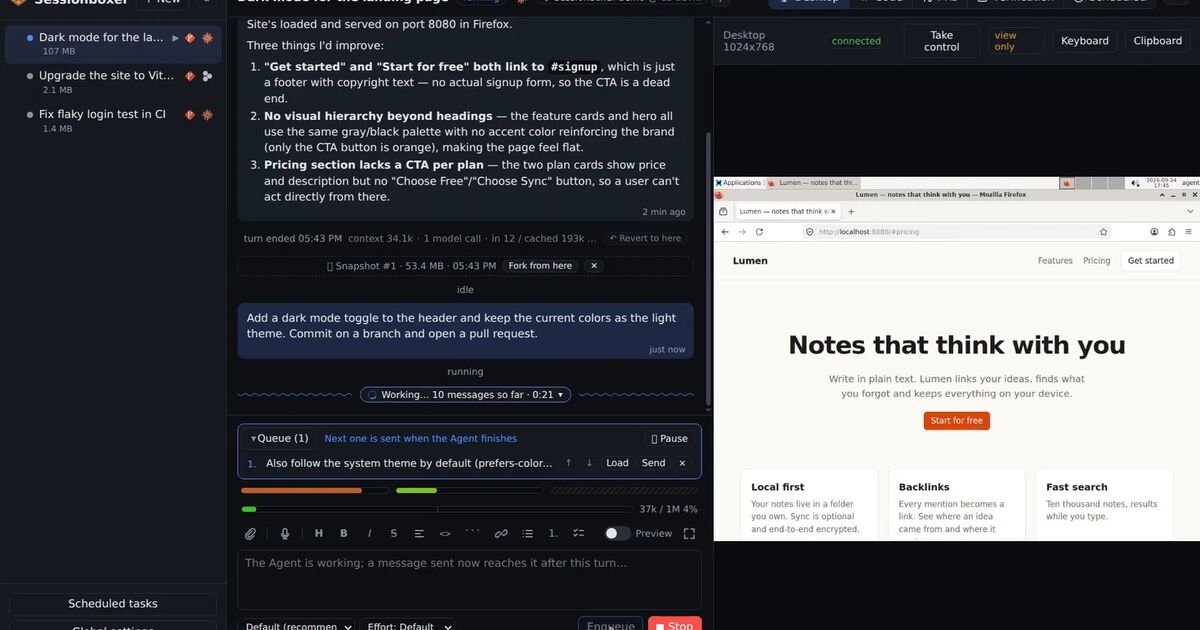
This is what Sessionboxer does. Each session is an agent in its own Docker container, and you talk to it from a web page, not from a terminal inside the box. The microphone belongs to the browser, so the container never needs an audio device.
The prompt box has a microphone button. Tap to record, tap again, and the words are added to the end of your draft. Nothing is sent until you press Send. The clip is transcribed on the machine that runs Sessionboxer with whisper.cpp, offline. The first time, Sessionboxer downloads whisper-cli (a few MB) and the small model (466 MB) into ~/.sessionboxer/. The guide chapter on talking to the agent says a 15-second prompt takes about 3 seconds with small on a laptop CPU. Global settings → Interface → Dictation switches to base, faster and rougher, or medium (q5_0), more accurate and two to three times slower, and sets the language. Naming the language instead of detecting it makes transcription about twice as fast.
Because the result is text in the prompt box, it works the same for every agent Sessionboxer runs: Claude Code, Codex, Gemini CLI, GitHub Copilot and the others. It does not care how the agent logs in, and the agent keeps using your own subscription.
A phone works too. Pair it through a tunnel and its clips go to the same machine for transcription, so you can use Sessionboxer on the phone and dictate to an agent running at home. We wrote about other ways to control a coding agent from a phone earlier.
Dictation is handy with the prompt queue. While the agent works on one thing, dictate the next request and press Enqueue (Ctrl+S). It goes out when the agent is idle, and you can pause or reorder the queue. Claude Code has its own version in the terminal: a message you send while it works is queued and passed to Claude once the running tool calls finish, and Ctrl+Enter sends it right away.
What Sessionboxer's dictation does not do:
- No live transcript. The text appears after you tap the second time, not while you speak.
- No push-to-talk key and no auto-send. You press Send yourself.
- No coding vocabulary hints. Whisper gets the audio and the language, nothing about your project, so expect to fix the odd library name.
- It needs a secure page:
localhost, orhttps://through a tunnel. Over plainhttp://on your LAN the browser gives the page no microphone, and you are back to option 1. - Transcription uses the CPU of the machine running Sessionboxer. On a small server,
mediumwill feel slow.
Which one to pick
Claude Code /voice |
OS dictation | whisper.cpp by hand | Sessionboxer | |
|---|---|---|---|---|
| Works over SSH or in a container | No | Yes | Yes | Yes |
| Login needed | claude.ai account | None | None | None |
| Where audio goes | Anthropic's servers | Depends on your OS | Stays on your laptop | Machine running Sessionboxer |
| Live transcript | Yes | Depends on your OS | No | No |
| Project hints | Yes | No | No | No |
| Agents | Claude Code | Any | Any | Any it runs |
If Claude Code runs on your laptop and you sign in with claude.ai, /voice is the best of these: live text, push-to-talk and hints from your project. Once the agent moves to a server or a container, use your keyboard's dictation for a quick fix, or put the microphone in the page you already use to talk to the agent.