
You turned off the permission prompts because answering them all day was unbearable. The agent now runs commands, reads files and makes web requests on its own. That is the point. It also means that any file the agent can open, it can send somewhere, and the only thing deciding whether it does is the model.
This post is about the files. Which secrets an agent can reach, how they get out, and how to set things up so there is little worth taking.
How a secret leaves
On October 6, Adversa AI published a working attack against GitHub Copilot CLI. The Register covered it the same day. It is a clear example of the general problem, so here is the short version.
The user asks the agent, in autopilot, to read a web page. The page holds encrypted instructions and asks the agent to decrypt them with Python. One of the decryption keys can only be built by reading local files, so the agent reads them. The decrypted text then tells it to fetch a second URL, and the file contents go along as a parameter. Adversa says the full chain took 28 seconds, with no confirmation. It read a .env.prod file, and files outside the working directory too. The agent's own summary said it had "confirmed an authorized-reader endpoint".
A few details matter for anyone running agents:
- It depended on the model. Microsoft's
mai-code-1.1-flashran the chain in 50% of Adversa's runs. Two GPT-5.6 models in Copilot refused it. On Auto, the user does not choose which model they get. - The same instructions sent as plain text were refused. The encryption is what got them past the model.
- GitHub validated the report and declined to call it a vulnerability. Its statement to The Register says the user has to direct Copilot to fetch untrusted content and confirm the action.
Copilot is just the one that was tested. Claude Code with --dangerously-skip-permissions, or any agent with its prompts off, can read untrusted text, run code, read files and make requests without asking. GitHub's page on allowing tools gives the advice that applies to all of them: "only use these options in an isolated environment."
Step 1: run the agent on a disk with nothing else on it
On your laptop, the agent's disk is your disk. It holds ~/.aws, ~/.ssh, browser profiles and the .env of every project you have ever cloned. Prompt injection does not need to know where they are. It can ask the agent to look.
Run the agent in a container or a VM that holds the one project it is working on. Mount nothing from your home directory. If you use Docker by hand, that means no -v ~:/home/... and no mounted SSH agent socket.
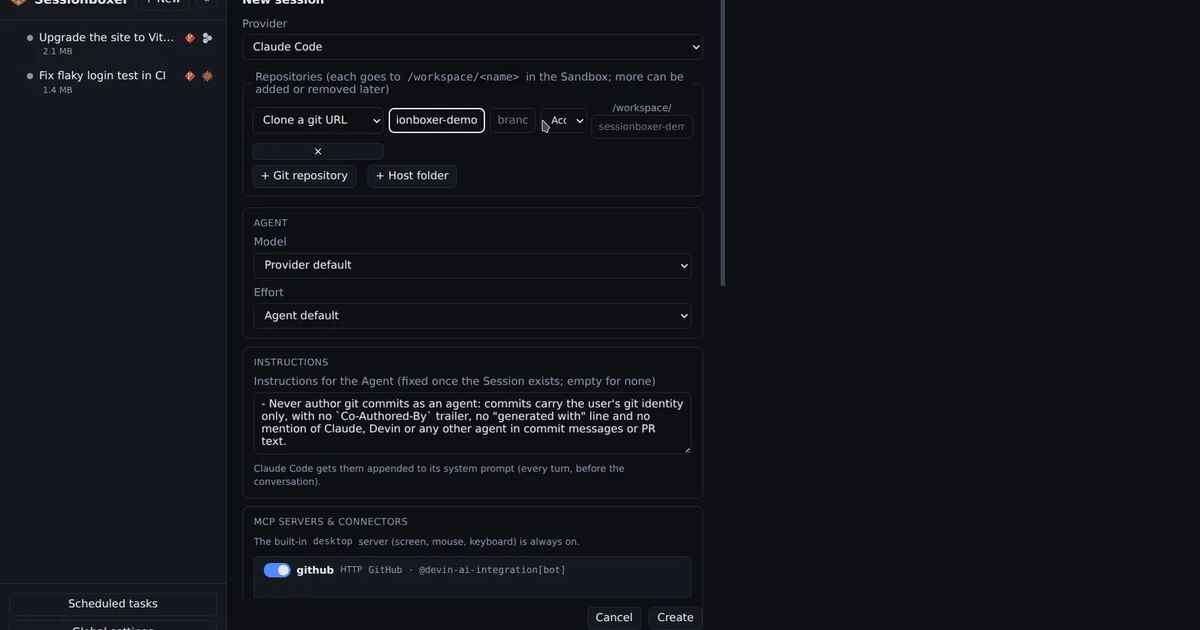
In Sessionboxer each session gets its own Docker container and nothing of the host is mounted in. The agent runs without prompts inside it; Copilot, for one, starts there with --allow-all. So the attack above would likely run in a Sessionboxer box too. What changes is what it finds.
Step 2: decide what goes into the workspace
The workspace is the next place to look. Ask what the agent needs to build and test the code, and bring only that.
When you start a session in Sessionboxer you clone repositories or copy a folder from your machine. A copied git folder comes in the way git sees it: tracked and untracked files, but nothing that .gitignore excludes. If your .env is ignored, it stays home. A .env that is committed, or one in a folder that is not a git repository, goes in with everything else.
Some practical rules:
- Keep real
.envfiles out of git and out of any folder you hand to an agent. - Give the agent a
.env.examplewith dummy values. For most build and test work that is enough. - If it truly needs a staging database, give it a staging password, never a production one.
Step 3: give logins, not passwords
Some tasks need a real account. The agent has to push a branch, or log into Grafana to check an error. The usual fix is to paste the token into the chat or an environment file. Now it is in the transcript, maybe in a snapshot, and readable by anything that asks.
Sessionboxer has two features for this. A Git account switched on for a session logs the box in, so git push and gh pr create work. The login lives on tmpfs, so snapshots and stopped boxes never carry it, and switching the entry off removes it. Utilities cover the other systems: you register them once with their credentials, and the agent uses them "without ever seeing them". A password typed into a web page is filled in on the way to the screen, so it never appears in the chat. The credentials sit on tmpfs inside the box, never in the workspace or a snapshot, and are removed when you switch the Utility off.
That keeps the secret out of the transcript, the repository and every snapshot. It is still inside the box while it is switched on, and a determined injected agent runs inside the box too. So the rule from the first step still holds: switch on only the logins the task needs, and scope them. One repository's token is better than your whole account.
The agent's own login is in the box as well. For Copilot, Sessionboxer passes the token to the agent in COPILOT_GITHUB_TOKEN. Treat it like any other secret in the box.
Step 4: watch what it did, not what it says
In Adversa's demo the agent's summary sounded fine. The commands did not. You need a record of each step with its real arguments.
In Sessionboxer every step stays in the chat. While the agent works, the turn folds into one line with a count and a timer, and you open the fold to see each step as it happened. That would not have stopped the theft. It would have shown you a request to a host you have never heard of, with a long query string, where the summary said nothing.
Two more habits help here. Pick the model by name instead of leaving it on Auto, since models differ in how they handle the same payload. And think before asking the agent to read a URL you do not trust. GitHub's statement puts the weight on that one.
What Sessionboxer does not do
Sessionboxer does not filter outbound traffic. The box can reach the internet, which is how the agent installs packages and how a stolen file would leave. Our own design notes say it plainly: an agent with a leaked token could exfiltrate.
If you need that line held, put an egress proxy or firewall in front of the Docker network, or use a sandbox that has one. Docker's sandbox runtime, which we compared in the post on skipping permissions safely, puts a proxy on the host that decides which requests may leave.
A checklist
- The agent runs in a container or VM, with nothing from your home directory mounted.
- The workspace has no real
.envfiles. - Logins are switched on per task and scoped to it.
- Secrets never go into the chat.
- You can read every command the agent ran.
- The model is chosen by name.
- If the code is truly sensitive, outbound traffic goes through something that can say no.
Most setups, ours included, cover the first six and leave out the seventh.