
Every Claude Code user meets the same wall a few minutes in. The agent wants to run npm test. May it? Yes. It wants to edit a file. Yes. It wants to git commit. Yes, please, that is why you asked for it. After the twentieth prompt most people look up the flag that makes the questions stop, and they find --dangerously-skip-permissions.
The word "dangerously" is there for a reason. This post is about how to use the flag without the danger.
What the flag actually does
claude --dangerously-skip-permissions (the same as --permission-mode bypassPermissions) switches off the approval prompts. Tool calls run as soon as the model asks for them, including writes to paths that no other mode approves on its own.
A few things survive the flag. Anthropic's documentation lists them, and a careful write-up on AI Coding Guide collects them in one table:
- Tools that match a deny rule in your settings are still blocked.
rmandrmdiraimed at a critical path still prompt.- Tools explicitly marked "ask" still prompt.
- On Linux and macOS, Claude Code refuses to start in this mode as root.
And one thing the flag does not do: it does not protect you from prompt injection. If the agent reads a web page or an issue comment that tells it to do something stupid, nothing in bypass mode stops it from trying.
The condition in the docs
Anthropic's own guidance is short. Use bypass mode in a container, a VM or another sandbox where Claude Code cannot damage your host. Do not leave it on for everyday work on your development machine.
That is the whole trick. The flag is not unsafe by itself. It is unsafe on a machine that holds your SSH keys, your browser sessions, your ~/.aws folder and the only copy of your thesis.
So the real question is: where do you get such a container, and how do you work in it without it feeling like a punishment?
Three ways to get a box
Docker Sandboxes. Docker now ships a sandbox runtime for coding agents. Claude Code runs inside a microVM, and a proxy on your host decides which outbound requests the sandbox may make. It is a solid foundation, and it is a command-line tool: you get a shell in a box, and the rest is up to you.
A dev container or your own Dockerfile. Anthropic publishes a reference devcontainer with a firewall script. It works well if you already live in VS Code and your project has a container definition. You maintain the image, the mounts and the network rules yourself.
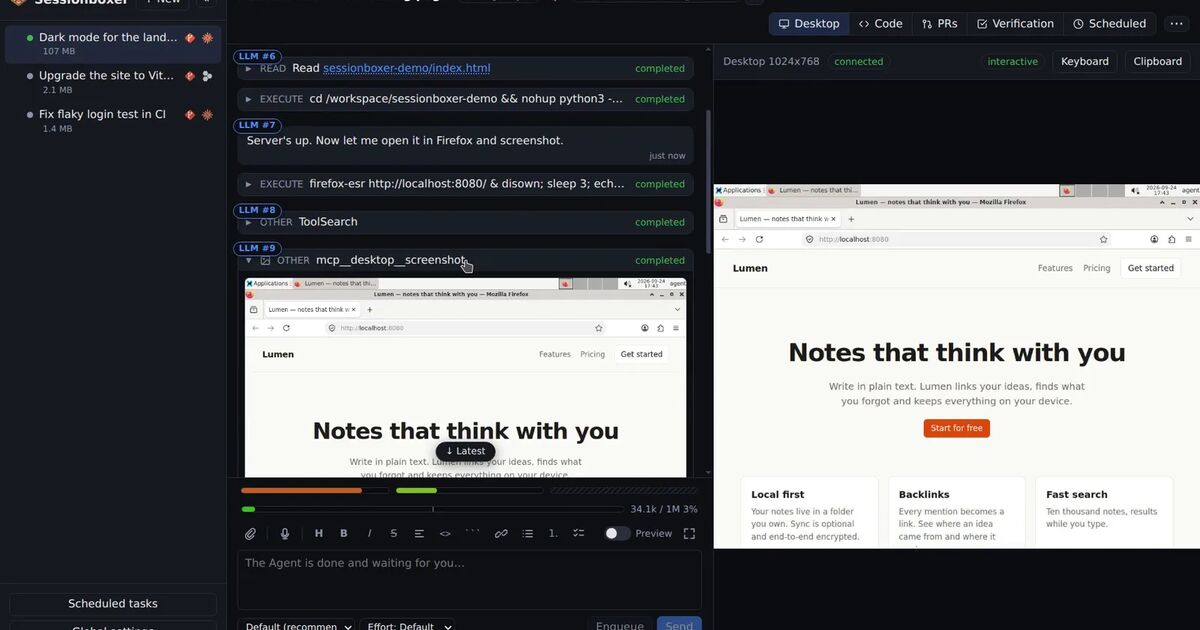
Sessionboxer. This is the one we build, so take the enthusiasm with a grain of salt. Each session gets its own Docker container with a clone of your repositories, a Linux desktop, VS Code and terminals. Claude Code runs inside with all permissions granted, so it never stops to ask, and the container is the boundary. The box publishes no ports on your machine; your browser reaches it through the Control Plane on 127.0.0.1:4000. Your Claude token is handed only to the containers that need it, lives on tmpfs, and is never stored in a snapshot.
All three put the flag where the docs want it. The difference is in how much you get to see and undo.
What "safe" should include
Isolation keeps the agent away from your laptop. It does not keep the agent from making a mess inside the box, and a mess inside the box still costs you time. Three habits help.
Watch, without babysitting. The agent's messages for a turn fold into one line with a counter and a timer. You can open the fold when something looks off. The desktop is live in the same page, so when the agent opens Firefox to test the app you see the same screen.
Keep an undo button. Sessionboxer can take a snapshot of the whole box after each turn (a docker commit: files, installed packages, browser state, the agent's memory). If turn 14 went sideways, fork a new session from the snapshot after turn 13 and try again. With plain Docker you can do the same by hand; the point is to do it every time, which is why it is a switch and not a chore.
Keep secrets out of the box. A good sandbox has nothing worth stealing. Do not mount your home directory. Do not pass cloud credentials "just for this task". If the agent needs to log into a staging dashboard, Utilities store the credential outside the box and fill it in on the way to the screen, so the agent uses the password without ever reading it.
A short checklist
Before you turn the prompts off, check that:
- The agent runs in a container or VM, not on your host.
- Nothing in the box can reach production. The box only has the repositories and tokens the task needs.
- You can see what the agent is doing while it does it.
- You can go back to a known-good state in one click.
- Your Claude token is not sitting in a file inside the image.
If all five are true, --dangerously-skip-permissions is just "permissions". Sessionboxer sets them up for you on the first screen; the start a session chapter walks through it. If you would rather build your own, the Docker and devcontainer routes above are good, and the checklist is the same.
The prompts were never the safety feature. The box is.