
The agent worked for two hours while you were in meetings. It says it is done. Now you want to know how it got there: which commands it ran, why it changed the database schema, and what it said about the failing test around the middle. Or it is three weeks later, and you want that conversation back because a bug came back.
Both questions start with the same one: where does Claude Code keep the conversation, and for how long? This post answers that from Anthropic's documentation, read on November 3, 2026, then covers how to read a long session without scrolling through hundreds of tool calls. Codex gets a short section too. We make Sessionboxer, which shows agent sessions as a chat in the browser; that part comes last, with what it does not keep.
Where Claude Code stores conversations
Claude Code writes each session to disk as it goes. The sessions page gives the path:
~/.claude/projects/<project>/<session-id>.jsonl
<project> is your working directory with every character that is not a letter or a digit replaced by -. So a session started in /home/ana/work/shop lives under ~/.claude/projects/-home-ana-work-shop/. Each line of the file is one JSON object: a message, a tool call or its result, a record of a request sent to the model, or metadata. Subagents get their own transcripts in <session-id>/subagents/, in the same format.
The same page warns that this format is internal and "changes between versions", so a script that parses the files directly can break on any release. For a person, /export is the supported way out. For a script, claude -p with --output-format json is.
There is a second file people mix up with this one. ~/.claude/history.jsonl holds only the prompts you typed, with a timestamp and the project path. It feeds the up arrow and Ctrl+R search. It is not the conversation.
How long it stays
By default, 30 days. The .claude directory page says Claude Code deletes transcripts older than cleanupPeriodDays, and that the minimum is 1. Setting it to 0 is a validation error. To keep sessions for longer, raise it in ~/.claude/settings.json:
{
  "cleanupPeriodDays": 180
}
Subagent transcripts go when their parent goes. history.jsonl is not swept: it stays until you delete it.
Before you set this to a year, read the paragraph under Plaintext storage. Transcripts are not encrypted, and file permissions are the only protection. If a tool reads a .env file or a command prints a token, that value is now in the .jsonl. A longer retention keeps your secrets around for longer too. claude purge deletes a project's transcripts and related state when you want them gone sooner.
Getting an old session back
Resuming is the easiest way to read an old conversation, because it loads the whole thing back into Claude Code:
| Command | What it opens |
|---|---|
claude --continue |
The most recent session in the current directory |
claude --resume |
A picker of past sessions |
claude --resume <name> |
A session you named |
claude --resume <path>.jsonl |
The session in that transcript file |
/resume |
Switches to another session from inside one |
Two things catch people out. Sessions started with claude -p or the Agent SDK are left out of the picker and out of --continue. You can still open one with claude --resume <session-id>. And the picker starts with the current worktree only. If the session you want is not there, Ctrl+W widens it to every worktree of the repository and Ctrl+A to every project on the machine.
If the long conversation was big, resuming it after a break can show a "Resume this conversation?" dialog with an estimate of how much of your 5-hour limit the saved conversation would use. That cost comes with your first message after Resume. We wrote about why in idle compaction.
Reading a long session without scrolling for an hour
Inside Claude Code, Ctrl+O opens the transcript viewer. It shows each tool call in detail, with a timestamp and the model on every assistant message, and it expands lines that are folded in the normal view, such as a run of MCP calls shown as one line. With fullscreen rendering on, { and } jump between your prompts, [ writes the whole conversation to your terminal's scrollback so Cmd+F or tmux can search it, and v opens it in your editor.
For a file you can keep, attach to a ticket or send to a colleague, run /export. It copies the conversation to the clipboard or saves it as plain text, with tool outputs rendered as readable text.
It also helps to read in order: your prompts first, then the agent's last message after each one, and open the tool calls only where the answer surprises you. Most of a long run is reading files and running tests. The decisions are in a few places. When you want to check the code itself and not the story, reviewing the diff before you commit is the faster path.
One more limit. If the session was compacted, the transcript has everything, but the agent does not. After a compaction it only remembers the summary. If you resume a long session and ask "why did you change the schema?", the answer may come from that summary and miss details it dropped.
Codex: codex resume
Codex keeps local sessions too. The CLI features page describes codex resume as reopening a recent chat from the current repository, or searching across local chats for older work. The command reference adds that codex resume --last is scoped to the current directory unless you pass --all, and that codex fork starts a new session from a saved one.
A flag and a setting decide whether anything is saved at all. The --ephemeral flag runs Codex "without persisting session rollout files to disk", and in the config reference, history.persistence = "none" stops Codex from saving transcripts to history.jsonl. If an old Codex chat is missing, check those first.
When the agent runs somewhere else
All of the above assumes the agent ran on your laptop. If it ran in a container, on a server, or in a VM, its ~/.claude/projects/ is there and not on your machine. claude --resume on your laptop will not list it, and the container's files go when the container goes.
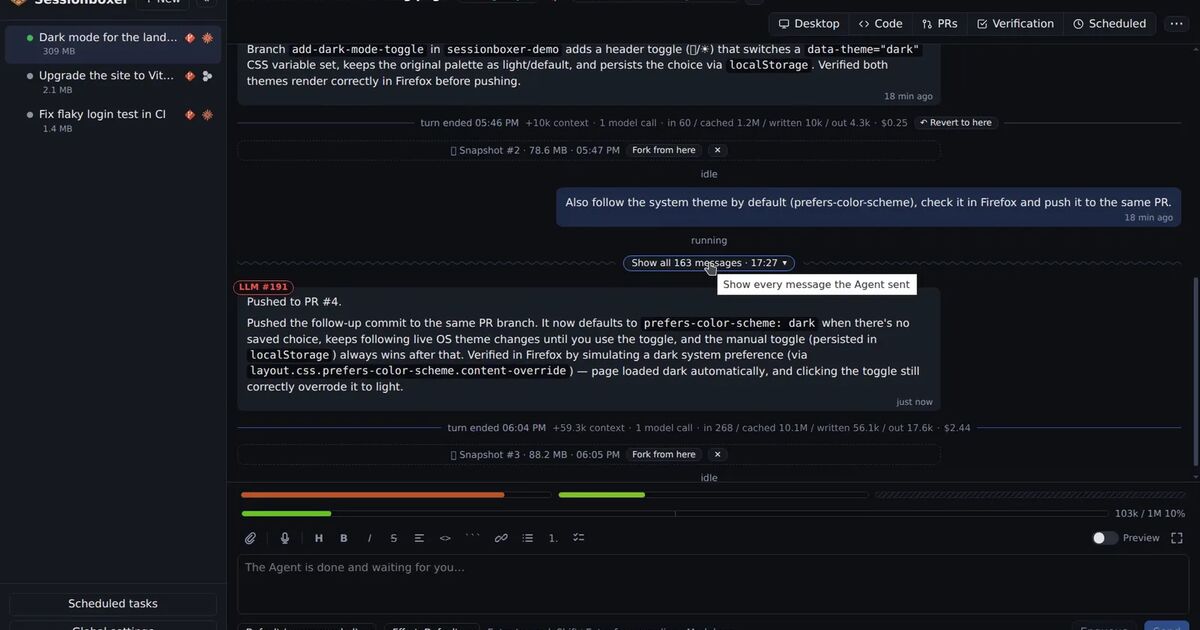
Sessionboxer runs agents that way. Each session runs its agent in its own container on your machine or server, and the chat you see in the browser is kept by Sessionboxer in ~/.sessionboxer/db.sqlite on the host (where things live). How the chat reads is described on a chat that stays readable:
- While the agent works, the turn's messages fold behind one line with a count and a timer. When the turn ends, only the agent's last message stays, with Show all n messages in the fold.
- Every message has its time. Hover it for the exact date.
- Each turn ends with a divider that says what it did to the context window, how many model calls it made, what it cost, and offers Revert to here.
- A compaction marker opens a dialog with the messages that were compacted away next to the summary they became, so you can see what the agent still remembers (context you can see).
To keep a conversation outside Sessionboxer, the session's ⋯ menu has Copy session…. It copies or downloads the conversation as Markdown, JSON or JSONL, with the parts you tick: your messages, the agent's (all of them or only each turn's last one), its thinking, the tool calls with or without what they returned, and timestamps. The Talk to the agent chapter covers the rest of the chat.
What it does not do: there is no retention setting to raise, because Sessionboxer does not age the chat out, and Stop keeps the conversation and the box as they were. Delete removes the session, its container and its snapshots for good, and the conversation with them. Copy the session first if you might want it later. The compaction dialog reads the agent's own records in the box, so it needs the box running, and it cannot read Codex's records yet; it says so.
For going back to an earlier point in the conversation, not only reading it, see how to undo a coding agent's changes.