
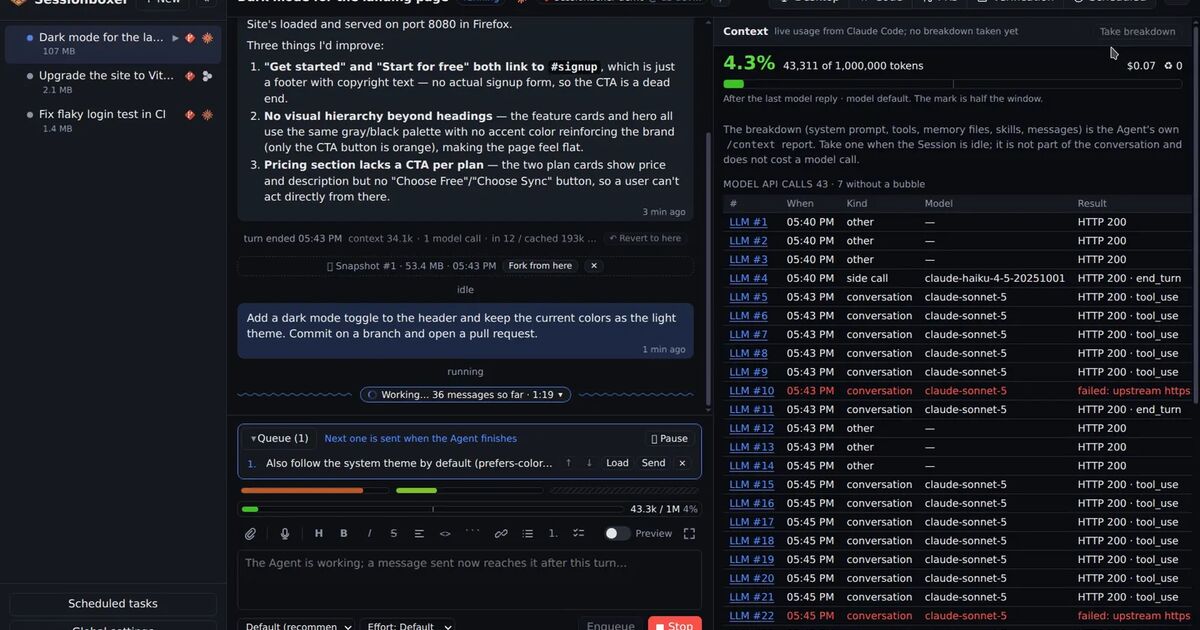
You type "rename this function". The agent thinks for a moment and does it. Somewhere in between, a request of forty thousand tokens went to a model, and your message was about ten of them.
Most people never see that request. They see the agent's reply, and sometimes a surprise on the usage page. This post is about the other 39,990 tokens: what they are, why they matter, and how to look at them.
What a turn is made of
A Claude Code request to the model is, roughly, in order:
- The system prompt. Claude Code's own instructions: how to behave, how to use tools, what the safety rules are. Several thousand tokens before you say a word.
- The tool schemas. Every tool the agent could call, described in JSON: read file, edit, run command, search, the desktop tools, and every tool of every MCP server you have switched on. Each MCP server adds its tools to this block, whether the turn uses them or not.
- Memory files.
CLAUDE.mdandAGENTS.mdfrom your project and your home directory, and any skills. - The conversation. Every earlier message, every tool call and every tool result, back to the last compaction. The result of
cat big-file.jsonfrom twenty turns ago is still here. - Your message.
Items 1 to 3 are the same on every turn, which is why providers cache them. Item 4 is what grows, and what the agent "forgets" when the window fills and the history is compacted into a summary.
Why you should care
Two reasons, and they are not the obvious one.
Quality. Every agent works worse as its window fills. Instructions from the start get diluted. The thing you said in turn 3 is a summary of a summary by turn 30. When the agent starts to go in circles, the window is often the reason, and a fresh conversation on the same files (a fork with a new chat) fixes it faster than a sharper prompt.
Cost, in a form you can act on. If your plan has a weekly window, the tokens you spend on tool schemas you never use are tokens you do not have on Friday. An MCP server with sixty tools is a tax on every turn of every session it is on. You cannot trim what you cannot see.
Seeing the window
Claude Code has /context and /cost for this, and Codex has /status. They show a snapshot in the terminal when you ask. Sessionboxer keeps the same numbers on screen for every turn.
A gauge above the prompt box shows how full the window is and how often it was compacted. Each turn's divider in the chat shows its tokens and cost. The Context pane breaks the window down: system prompt, built-in tools, each MCP server's tools as its own slice, memory files, skills, messages, free space. For Claude Code these come from /context asked while the agent is idle; for Devin they are estimated from the system prompt, tools and messages; for other agents they follow what each one reports.
The useful moment is when you open the pane and see that one MCP server you switched on for one task is a fifth of the window. MCP servers are per session in Sessionboxer for exactly that reason: switch it off here, keep it on in the session that uses it.
Seeing the bytes
The gauge tells you how much. For Claude Code sessions, Inspect LLM tells you what.
A small recorder inside the box sits between Claude Code and the Anthropic API (or your company's proxy, if you have set one). It keeps each request and response, byte for byte, in memory: the last forty calls, each cut at 4 MB, gone when the box stops. Headers are never recorded, so your token is not either.
Every reply in the chat gets an LLM #n label. Click it and you get four tabs: the raw request, the raw response, a parsed tree of both, and a diff against the previous call. The diff is the one I use most. It shows exactly what this turn added: your message, the tool results, and sometimes a surprise, like a mod or a hook that quietly rewrote the prompt (see the post on Claude Code mods).
Nobody else shows this. The hosted agents cannot, because the request would expose their system prompts. Claude Code on your laptop can write a debug log if asked. In a box you own, the request passes through a recorder on its way out, and showing it is just a matter of saving it.
Usage windows, not just tokens
Tokens are the model's unit. Your subscription's unit is a window: Claude's 5-hour session and weekly limits, Codex's 5-hour and weekly limits. Three small bars above the gauge show how much of each is used; hover for the reset time. When the agent refuses a turn for lack of credit, a no-entry bar counts down to the reset, Continue resends the prompt and Auto-continue does it for you the moment credit is back. For Claude Code the figures come with the model calls themselves, which is why Inspect LLM needs to be on for them.
Devin and Cursor do not report their usage to anyone else, so their bars are hatched. That is a fair limitation of running someone else's agent; we would rather show a hatched bar than a guess.
A short routine
- Once a week, open the Context pane on a typical session. If tools are more than a third of the window, cut MCP servers or trim a bloated
CLAUDE.md. - When an agent starts repeating itself, check the gauge before you rewrite the prompt. If it is past 70%, fork with a new conversation.
- When a reply surprises you, click
LLM #nand read the diff. The answer is usually in there. - Keep the usage bars visible. The weekly limit is much friendlier at 60% on Wednesday than at 100% on Friday.
The model is not a black box. The box around the agent just needs a window in it. The context window and Inspect LLM chapters show where to click.