
On 1 October Anthropic shipped Claude Code 2.1.287 with a feature called Claude Mods. Silicon AI News has a clear summary: a mod is a small JavaScript or TypeScript function, shipped inside a plugin, that Claude Code calls when something happens. A prompt is submitted. A tool call is about to run. Part of the screen is being drawn.
A mod can rewrite the prompt before it reaches the model. It can block or change a tool call. It can add commands and draw its own panel next to the chat. Anthropic's own /diff panel is a mod. Mods are on by default.
It is a lovely idea, and the kind of thing that makes a tool feel like a platform. It also comes with a sentence from Anthropic's documentation that deserves a slow read: a mod runs with the user's permissions and is not sandboxed.
What "not sandboxed" means here
A mod is code. It runs inside the Claude Code process, as you. It can read and write files, start processes and make network requests. The documentation says plainly that it can read secrets, such as an API key in a settings file. Anthropic's advice is to install mods only from authors you trust.
Some guard rails remain. A mod cannot change what the permission prompt shows you, so it cannot dress up a dangerous command as a harmless one. On Team and Enterprise plans, a guard stops user-installed mods from overriding deny rules.
Still, the trust model is the same as for any npm package or editor extension: once it runs on your machine, it is your machine. The difference is that a mod sits in the path between you and the model. It can see every prompt you type and every file the agent reads, and it can quietly change both.
Why this is a sandbox question
Until now, "where should Claude Code run" was a question about the agent's own mistakes. Could it rm -rf the wrong folder? Could a prompt injection in a README talk it into pushing a branch? The answer for both was the same: run it in a box, and switch the prompts off there. We wrote about that in the previous post.
Mods add a second actor. Now the code around the agent can also misbehave, and it does not need to trick the model to do it. A mod that posts your prompts to a server does not show up as a tool call. A mod that edits a tool call to add --force does not ask.
The reply is the same box, for a new reason. If Claude Code and its mods run inside a container that only holds the repositories for this task, then a bad mod gets exactly what a bad agent gets: a clone of a repository, a token scoped to the box, and nothing from your home directory.
What a box gives you with mods
Three things matter more now than they did last month.
Nothing worth stealing. In Sessionboxer, each session is its own container. Your Claude token goes to the box on tmpfs and is never written to a snapshot. There is no ~/.aws, no browser profile, no SSH agent socket. A mod that reads "secrets" finds the secrets of a disposable box.
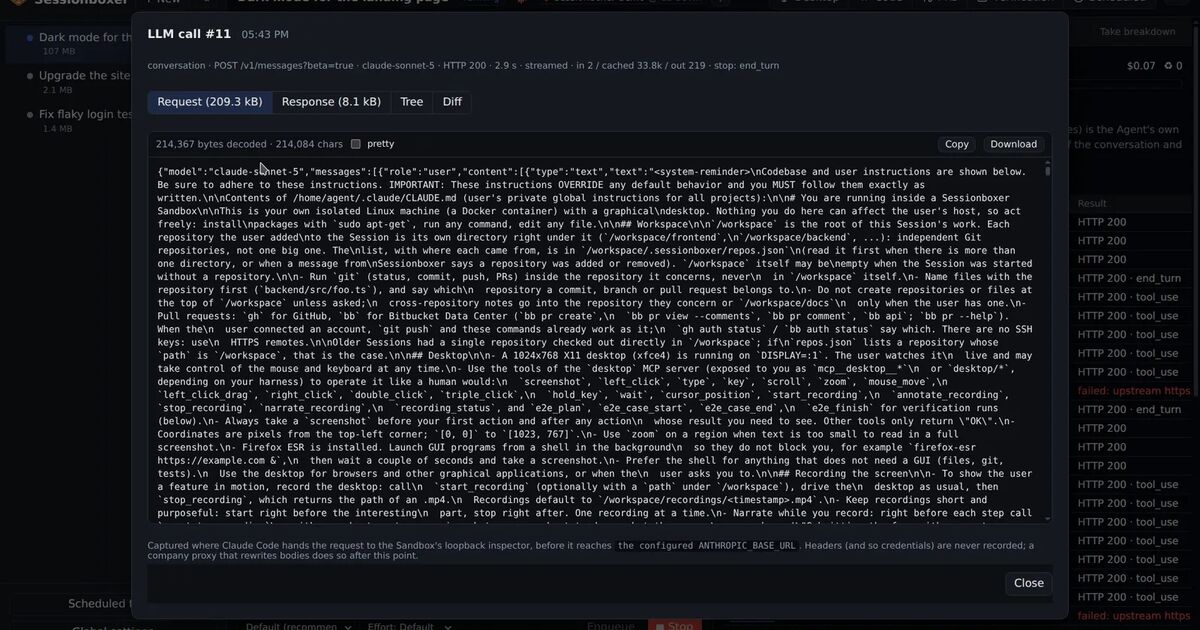
You can see what reached the model. This is the part I find most useful. For Claude Code sessions, a recorder in the box keeps every request to the Anthropic API and its response, byte for byte. Each reply gets an LLM #n label that opens the request, the response, a parsed tree and a diff against the previous call. If a mod rewrites your prompt, you see the rewritten prompt. If it adds a system instruction, it is in the request. That is hard to get on a laptop: the model call goes straight out and you take Claude Code's word for what was in it. (Headers are never recorded, so the recorder does not keep your token either.)
You can rewind. A snapshot after every turn means a mod that made a mess in turn 9 is undone by forking from turn 8. Try a mod, look at what it did, keep it or throw the session away.
A reasonable way to use mods today
Mods are worth it. The /diff panel is already one, and a review-helper or a house-style linter as a mod is a good fit. Here is how I would treat them for now:
- Treat a mod like an editor extension from an unknown author. Read its source if it is short. If it is not short, ask why.
- Try new mods in a box first, with Inspect LLM on. Run a normal task. Open a couple of
LLM #nlabels and check the prompts look like your prompts. - Keep team mods in a plugin you control, and pin versions.
- If you are on a Team or Enterprise plan, use the deny-rule guard. On a personal plan, the box is the guard.
The pattern behind the news
Every month the agents get more power and more surface. Permissions bypass, hooks, plugins, mods, MCP servers from strangers. Each one is useful and each one is a new way for code you did not write to act as you.
The answer that keeps working is not a longer list of things to be careful about. It is to run the whole thing in a place where carelessness is cheap. A container you can throw away, that holds only this task, where you can see what went to the model and roll back a turn. Build that once and the next feature announcement is good news with no asterisk.