
You want coding agents that run on hardware you control. Someone on the platform team says "we already have Coder", and they have a point: Coder runs self-hosted development workspaces, and it now has several ways to run agents in them. The hard part is working out which of those ways matches what you had in mind, and whether a smaller tool would do.
We build Sessionboxer, so this is a comparison from the maker of one of them. Everything about Coder below comes from its documentation and pricing page, read on November 16, 2026. Coder ships often, so check the linked page before you rely on a detail.
Four ways Coder runs agents
The AI coder overview lists four paths, and they are quite different from each other.
Coder Agents is Coder's own agent. Its page calls it "a standalone agent written in Go" and adds that it "is not a wrapper around third-party agent tools like Claude Code or Codex." You talk to it in a chat in the Coder dashboard or through an API.
Agent Relay connects a cloud agent's sessions to Coder workspaces. Today that means Claude Code's self-hosted environments and Cursor's self-hosted machines. The Agent Relay page says it is in beta and needs a Premium license. The orchestration and the model calls stay with Anthropic or Cursor; only the tool calls run in your workspace. We covered the Anthropic side in Claude Code self-hosted environments vs Sessionboxer.
Agents in the IDE are the ones built into Cursor, Zed or an editor extension, used inside a Coder workspace like on any other machine.
Agents in workspace templates are CLIs such as Claude Code or Codex, installed into a workspace by a Terraform module. The Claude Code module installs the CLI and sets up its login (an API key, a claude setup-token OAuth token, Bedrock, Vertex, or Coder's AI Gateway). Starting Claude is left to you. The module's notes say version 5 "drops support for Coder Tasks and Boundary."
That last point matters if you read an older blog post. Coder Tasks, the earlier way to run Claude Code in the background in a workspace, was deprecated in v2.34 and has been removed. Coder Agents is what Coder points to now.
How Coder Agents works
The agent loop runs in the Coder control plane, not in the workspace. The control plane sends your prompt to the model, gets back tool calls, and runs them in a workspace over the same connection Coder uses for web terminals and port forwarding. The docs say the workspace "has no knowledge of AI": no API keys and no agent software in it.
The docs name what this buys you. A process in the workspace cannot steal a model key that is not there. There is no Claude Code or Codex binary to keep up to date on every workspace. And because the workspace does not need to reach a model provider, you can lock its network down hard.
The agent also picks a workspace for you. It reads the descriptions of the templates you are allowed to use, chooses one, and creates a workspace. For questions that need no files it may not create one at all. The getting started page says the agent "does not read Terraform", so the template description is what steers it. Chat history lives in Coder's database, so it survives when a workspace is stopped or rebuilt. There are sub-agents, a message queue and file attachments.
Some things to know before you start:
- You need an API key for a model provider (Anthropic, OpenAI, Google, Azure OpenAI, Bedrock, an OpenAI-compatible endpoint, OpenRouter or Vercel AI Gateway). The docs ask you to plan for LLM costs, because every turn sends tokens to that provider. A Claude Pro or ChatGPT Plus subscription is not on the list.
- Community and Premium licenses run up to five agents at once, with more queued. AI Premium removes that cap.
- Agent workspaces get the same network access as any workspace made from that template. The docs warn that if the template does not restrict egress, the agent has full internet access.
- All configuration is for admins. Providers, models, system prompts and tool permissions are set in the control plane, as Platform controls puts it, and "are not user preferences."
How Sessionboxer works
Sessionboxer has no agent of its own. It starts the vendors' agents: Claude Code, Codex, Cursor, OpenCode, Devin, pi, fx, Kimi CLI, GitHub Copilot, Mistral Vibe, Grok Build, Gemini CLI and Qwen Code. Each runs on the login you already have, so a Claude Max plan or a ChatGPT plan works as it is.
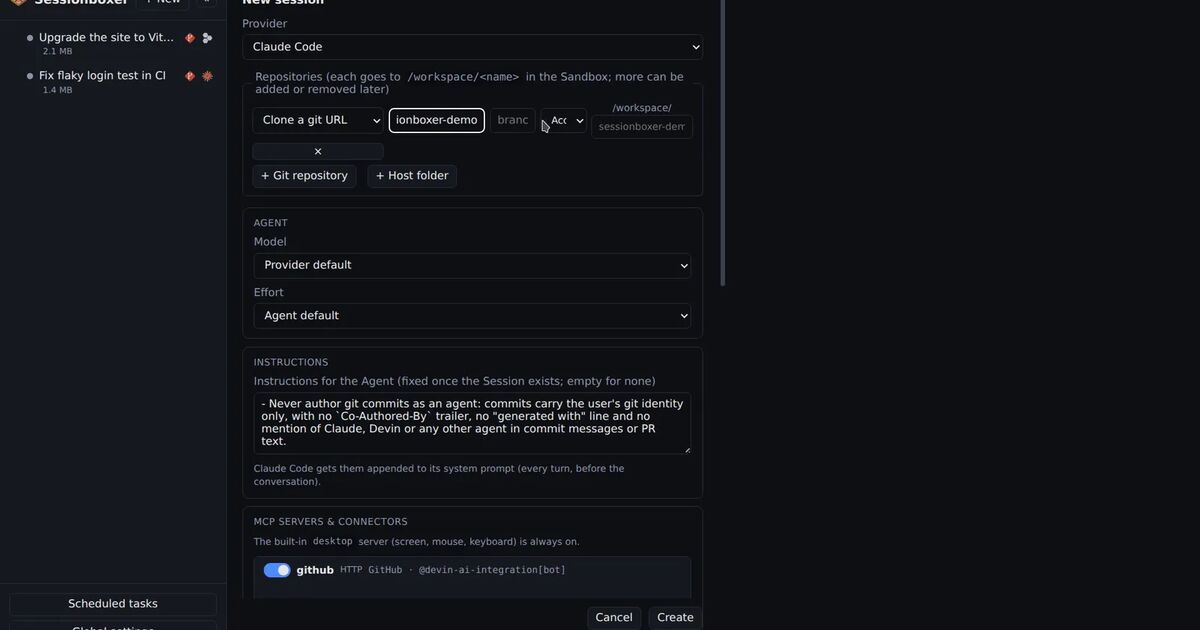
Each session gets its own Docker container, with the repositories cloned into it and no folders from your machine mounted in. The agent runs inside that box with all permissions, and the box is the limit of what it can touch. The box also has a Linux desktop with Firefox that the agent drives with mouse and keyboard, and you watch it live. You can snapshot the whole machine and fork it, or hand a session to a different agent. The Start a session chapter walks through the form.
Where Sessionboxer differs most from Coder Agents is the credential. The agent runs in the box, so the box holds the agent's login: for Claude Code, the token from claude setup-token. Coder Agents keeps the model key out of the workspace entirely; Sessionboxer does not. What Sessionboxer keeps out of the agent's sight are the other systems' passwords. Utilities let the agent log in to Grafana or a staging app without the password ever appearing in the transcript, and those credentials sit in memory in the box, never in a snapshot. Our post on keeping secrets away from a coding agent goes into why this matters. Sessionboxer also does not filter the box's outbound traffic.
Setting it up is a one-line install on Linux with Docker, or on macOS with OrbStack or Docker Desktop, plus Node.js 22. It listens on localhost. To reach it from your phone or another machine, you pair the device through a tunnel or a private Tailscale network, as the Remote access chapter explains. There is one access token per installation and a list of logged-in devices; the guide has no user roles or single sign-on. It is MIT licensed, and there is no Sessionboxer account.
Side by side
| Coder Agents | Sessionboxer | |
|---|---|---|
| The agent | Coder's own agent, written in Go | The vendors' CLIs (13 agents) |
| How the model is paid | API key of a model provider | Your existing subscription or key per agent |
| Where the agent loop runs | Coder control plane | Inside the session's container |
| Model credential in the workspace | No | Yes, the session's agent login |
| What the agent works in | A Coder workspace from a Terraform template | One Docker container per session, or a Windows or macOS VM |
| Desktop the agent drives | Not in the pages linked here | Linux desktop with Firefox, watched live |
| Users | Coder users; multi-org RBAC and OIDC sync on Premium | One access token, paired devices |
| Concurrent agents | 5 on Community and Premium, no cap on AI Premium | No cap in the guide |
| What you operate | A Coder deployment: database, DNS, TLS, templates | One process and Docker |
| Licence | AGPL-3.0, paid Premium tiers | MIT |
Which one to pick
Pick Coder Agents if you run a platform team for many developers, you already have Coder, and the rule is that model keys never sit where code runs. Its design answers a security review well: the agent acts as the user who prompted it, every action is tied to that user, and the workspace can have no internet access at all. The price is that you use Coder's agent, not Claude Code or Codex, and you pay per token.
Pick Coder with the Claude Code module, or Agent Relay, if your developers want Claude Code itself inside Coder workspaces. Read the module's auth options and Agent Relay's plan requirements first.
Pick Sessionboxer if you are one developer or a small team that wants the agents you already pay for to run in a box, on a laptop, a home server or a VPS, with a desktop to test on and snapshots to go back to. It does not give you multi-user governance, spend budgets or an egress firewall, and it does not keep the agent's own login out of the box.
If you are still choosing between self-hosted options, our OpenHands comparison and what a self-hosted Devin alternative needs cover the other common candidates.