
You want a coding agent that runs on your own machine or server, in a browser tab, with your code staying home. OpenHands is the name most people find first. It is open source and MIT licensed. Then the docs show a client, several backends, a Cloud and an Enterprise edition, and it is hard to tell which part does what you want.
We build Sessionboxer, so this is a comparison from the maker of one of them. Everything about OpenHands below comes from its documentation, read on November 7, 2026. Agent Canvas, its open-source app, ships fast: v1.37.0 came out on November 6, the third release that week. Check the linked page before you rely on a detail.
What OpenHands is today
The Agent Canvas overview describes it as "an open-source control surface for agentic work". A browser client talks to one or more backends. A backend is the Agent Server that runs conversations and tools, plus an Automation Server for schedules and events. The backend can run on your machine, in Docker, on a VM, in Kubernetes, on Modal, on DigitalOcean or in OpenHands Cloud.
OpenHands is no longer only its own agent. The ACP agents page lists Claude Code, Codex, Gemini CLI, Pi and OpenCode next to the built-in OpenHands agent. When the backend runs on the same machine where you signed in to that CLI, it reuses the subscription login and you need no API key. The OpenHands agent itself takes a provider key, an OpenHands LLM key, or a local model through Ollama, LM Studio, vLLM or LiteLLM.
Sessionboxer is narrower. It has no agent of its own. It drives the vendors' agents over the same protocol, ACP: Claude Code, Codex, Cursor, OpenCode, Devin, pi, fx, Kimi CLI, GitHub Copilot, Mistral Vibe, Grok Build, Gemini CLI and Qwen Code, each on the login you already have. Sessionboxer's guide has no section on local models.
Where the agent runs
In OpenHands the answer depends on how you install it.
The default npm install -g @openhands/agent-canvas runs the backend on your host. The overview's table says so: it "Runs directly on your machine. The agent server can operate on the local filesystem." The FAQ adds that a local process backend "can access the host with the permissions of the user running Agent Server". The Enterprise vs. Open Source page marks isolated sandboxes as not available for the local backend and "On Roadmap" for the VM backend.
There are two Docker options. The official image puts the whole stack in one container, and the agent sees the projects you mount under /projects. Or you set OH_CONVERSATION_RUNTIME=docker and each conversation gets its own container. The container runs as your UID, drops all Linux capabilities and sets no-new-privileges, with default limits of 4 GB of memory and 2 CPUs. The workspace is a bind mount of a host folder, and the page notes that "Conversations that share a host workspace share the same files."
Sessionboxer has one mode. Every session is its own Docker container, and the code is cloned or copied into it, so nothing is bind-mounted from your machine. The agent runs inside with all permissions, on a private Docker network that publishes no host ports. Two sessions on the same repository have two copies of it. On a Linux host with KVM, a session can be a Windows or macOS VM with the agent running inside the guest. OpenHands' setup page covers Windows and macOS as hosts for Canvas, and we found nothing about Windows or macOS sandboxes.
| OpenHands Agent Canvas | Sessionboxer | |
|---|---|---|
| Default install | Backend on your host | Container per session |
| Container per conversation | Optional, OH_CONVERSATION_RUNTIME=docker |
Always |
| Workspace | Host folder, bind-mounted | Clone or copy inside the box |
| Windows or macOS sandbox | Not found in the docs | QEMU VM on a Linux host with KVM |
| Agents | OpenHands, Claude Code, Codex, Gemini CLI, Pi, OpenCode | 13 vendor agents, no agent of its own |
| Local models | Documented for the OpenHands agent | Not covered in the guide |
| License | MIT, plus commercial Cloud and Enterprise | MIT |
Going back and trying again
OpenHands has Branch from here on any message. It makes a new conversation with the history up to that point, and the original stays in the sidebar. With a bind-mounted workspace, the files on disk are whatever the last run left there.
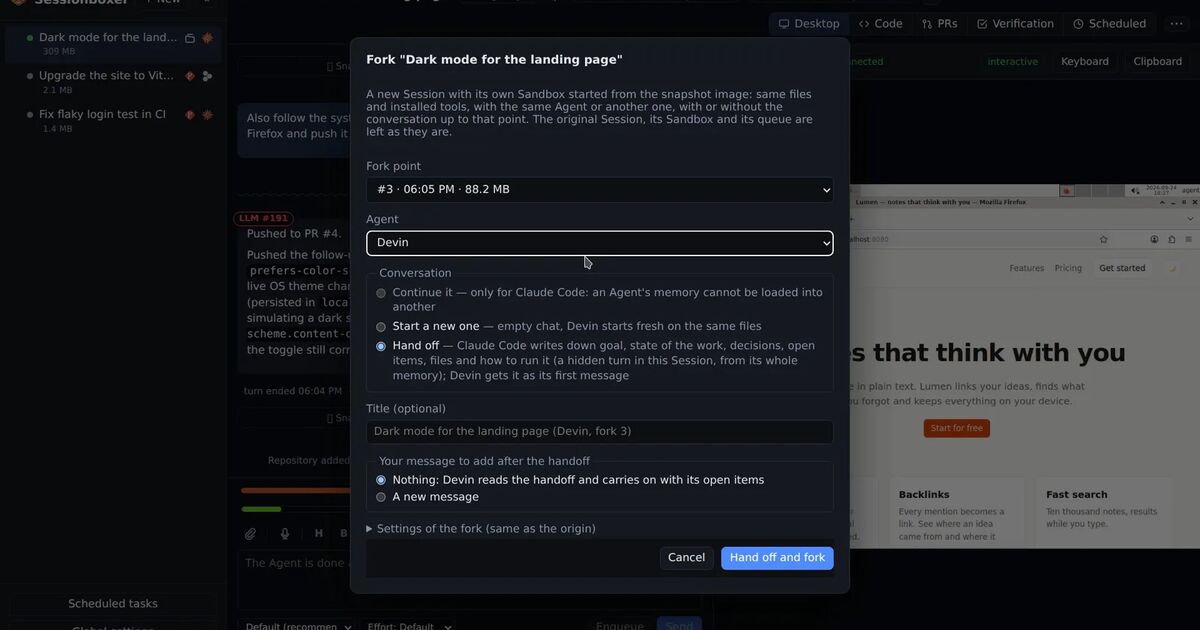
Sessionboxer can snapshot the whole box after a turn: files, installed packages, browser state and the agent's own memory. A fork is a new container started from that snapshot. You choose whether the fork continues the chat, starts a new one on the same files, or hands off, where the first agent writes a handoff note and a different agent picks up from it. The Snapshots and forks chapter covers the details. Stop a session and the container is kept as it is, packages included, until you resume it. Windows and macOS sessions cannot be snapshotted yet.
Seeing what the agent does
OpenHands gives its agent a browser tool, and Canvas shows files, terminals and the git state of the workspace. Its critic is an extra pass that scores how likely the task is to have succeeded and can make the agent refine its work after a low score. Sessionboxer has nothing like the critic.
Every Sessionboxer box has a Linux desktop with Firefox. The agent drives it with screenshots, mouse and keyboard, so it can test any GUI app, and you watch the same screen live and take control when it is idle. By default the agent also checks its own work after each turn on that desktop and hands you a captioned recording. Our post on letting the coding agent test its own work shows what that looks like.
Teams, integrations and the phone
OpenHands goes further for teams. The open-source Canvas can be used from Slack, GitHub and GitLab, and its automations run on a schedule or by polling. Event-driven automations need a backend that the outside world can reach, such as a VM. The docs include templates for daily PR reviews, dependency scans and Slack summaries. The paid Cloud and Enterprise editions add authentication, role-based access, multi-user organizations, SAML, budgets and observability. The FAQ is clear about the open-source install: it "is meant to be run by a single user on their local workstation" and has "no built-in authentication, isolation, or scalability."
Sessionboxer is also a tool for one person. It has one access token per server, no user accounts and no roles. Its automations run on a cron schedule, on pull request events from GitHub or Bitbucket Data Center, or on MCP server events, and can prompt a session, start one, post an automatic review or record a QA video on a PR. There is no Slack or Jira integration. For the phone, OpenHands' docs suggest Tailscale or ngrok. Sessionboxer installs as a web app with push notifications, and the Remote access chapter covers tunnels and your own address.
What Sessionboxer asks of you
Docker is required. You need Docker Engine on Linux, or OrbStack or Docker Desktop on macOS. Each box carries a full Linux desktop, and the first session of each agent downloads an image of 1.2 to 1.4 GB compressed. Windows and macOS sessions need a Linux host with KVM.
Which one to pick
Pick OpenHands if you want an open agent you can point at any model, including one on your own GPU, or the Software Agent SDK to build on. It also fits if you need Slack and webhook triggers, or a path to a paid edition with logins and roles for a team. If the agent runs without prompts on code you did not write, use the per-conversation Docker mode, since the default runs on your host.
Pick Sessionboxer if you already pay for Claude Code, Codex, Cursor or another vendor agent and want each session in a container of its own, with a desktop the agent can use, snapshots of the whole machine, or a Windows or macOS VM. The Start a session chapter walks through the first one. If you are also weighing control surfaces that run agents directly on your machine, our T3 Code comparison covers that trade-off.