
You want Claude Code to look at last night's CI run before you wake up, or to update dependencies every Monday and open a pull request. Writing the cron expression is the easy part. The harder questions are where the run happens, what it can reach, and what happens when the machine it needs is asleep.
Anthropic's docs describe four ways to schedule Claude Code: /loop, Desktop scheduled tasks, cloud Routines and GitHub Actions. Plain cron with claude -p is a fifth, and Sessionboxer, which we build, is a sixth.
The options side by side
| Runs on | Needs your computer on | A run missed while it was off | |
|---|---|---|---|
/loop |
your machine, inside an open session | yes, and the session open | not caught up |
| Desktop scheduled task | your machine | yes, app open and awake | one catch-up run for the latest missed time |
| Routine | Anthropic's cloud, or your org's self-hosted environment | no | n/a |
| GitHub Actions | GitHub's runners | no | n/a |
cron + claude -p |
wherever cron runs | that machine | skipped by plain cron |
| Sessionboxer automation | your machine or your server, in a container | that machine, with the Control Plane up | skipped, or one catch-up run, your choice |
The rows for Anthropic's options come from their scheduling comparison and the pages it links.
/loop: while you are at the keyboard
/loop 5m check if the deployment finished runs a prompt on an interval inside the session you have open. Leave out the interval and Claude picks a delay between one minute and one hour after each run.
The scheduled tasks page is clear about the limits. Tasks fire only while Claude Code is running and idle, and wait for a running turn to end. Recurring tasks expire seven days after creation. They also get jitter: an hourly job set for :00 can fire as late as :30. If timing matters, pick an odd minute, such as 3 9 * * *.
Use it for babysitting a build or a pull request during the day. It is the wrong tool for anything that should still run next week.
Desktop scheduled tasks: local files, local machine
The Claude Desktop app has a Routines page where you can create a local task with a name, instructions, a working folder, a schedule and a permission mode. The Desktop scheduled tasks page says each run starts a fresh session, with access to your files and tools.
Three details are easy to miss:
- Runs happen only while the app is open and the computer is awake. If the computer sleeps through a run, it is skipped. When it wakes, Desktop starts one catch-up run for the most recent missed time and drops older ones. The docs warn that a 9am task might run at 11pm.
- By default a run works on the folder as it is, uncommitted changes included. There is a worktree toggle to give each run its own Git worktree.
- A task in Manual permission mode stalls on the first tool it has no permission for, until you come back and answer.
It fits a morning briefing on the laptop you use every day. The agent works on your real disk, with whatever access its permission mode allows.
Routines: in Anthropic's cloud
A routine is a saved prompt, one or more repositories and a set of connectors, run on Anthropic-managed machines, or on your organization's self-hosted environment when it is routed there. It can run on a schedule, on an API call or on a GitHub event, with your laptop closed.
According to the docs, routines are in research preview, on Pro, Max, Team and Enterprise plans. Each run starts from a fresh clone, so no local files. The minimum interval is one hour. Runs draw on your subscription like interactive sessions. Anything a routine does on GitHub appears as you, and by default it pushes to branches prefixed with claude/. The default environment allows only a list of package registries and common development domains, so a routine that needs your own services needs its network access edited first.
If your code may live on Anthropic's machines and hourly is often enough, this is the least work.
GitHub Actions and plain cron
The Claude Code GitHub Action runs a prompt on a schedule trigger like any workflow. Claude gets no shell or GitHub API access until you grant the tools with --allowedTools or a permission rule. GitHub runs scheduled workflows only from the default branch, and in public repositories it disables the schedule after 60 days without activity. You can authenticate with an API key or with a CLAUDE_CODE_OAUTH_TOKEN from claude setup-token, which uses your subscription instead of API billing.
Plain cron works too. The headless docs show the flags for a run nobody watches:
claude -p "Update the dependency pins and run the tests" --permission-mode auto --permission-prompts none
--permission-prompts none needs Claude Code 2.1.259 or later. It denies anything that would have asked a person, so the run does not hang. Where cron runs is still up to you. On your laptop, the agent sees your laptop. Our post on keeping secrets away from a coding agent covers what that exposes.
The same job in Sessionboxer
Sessionboxer runs coding agents on your machine or your server, each session in its own Docker container, with the subscription you already have. Its Automations are a trigger, an action and limits.
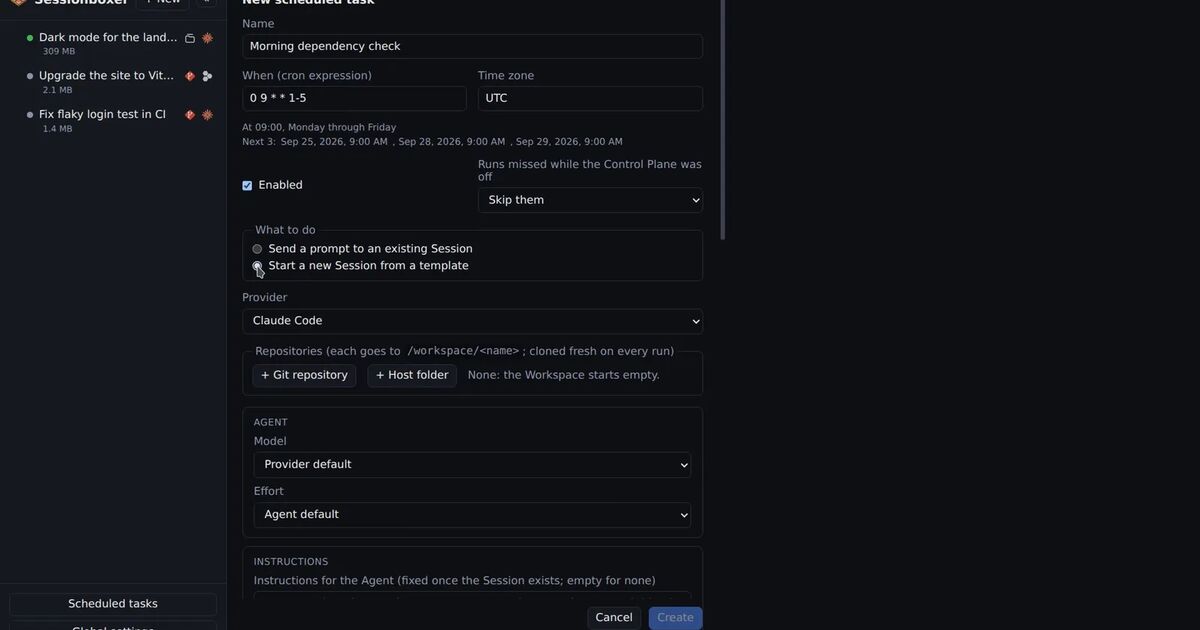
On a schedule, you give a cron expression and a time zone. The form spells the expression out in words and lists the next three runs. You choose what happens to runs missed while the Control Plane was off: skip them, or run once when it is back. Then pick the action:
- Prompt an existing session. The prompt is sent at once if the session is idle, queued behind the running turn if it is busy, and a stopped session is resumed first.
- Start a new session from a template: agent, repositories, model, instructions, MCP servers. By default the session stops when the turn ends, so boxes do not pile up. The transcript and snapshots stay, so you can open it later and continue.
Inside the box the agent runs without permission prompts, so a scheduled run does not stall waiting for you. The template is not tied to Claude Code; it has the same provider choice as the New Session form.
Each automation has limits with defaults: two sessions at once, 20 runs a day, six hours per run. A run past a cap is recorded as skipped, with the reason. The history lists each run with its trigger, status, duration, what it did and a link to the session. A failed run marks the automation and sends a push notification if you have them on. The Automations chapter of the guide has every field, including the pull request triggers that can post a review or an Auto QA video, which we described in the post on agents testing their own work.
What Sessionboxer does not do
The scheduler lives in the Control Plane, and it runs only while the Control Plane is up. On a laptop that sleeps, that is the same problem Desktop tasks have. Put Sessionboxer on a server or a machine that stays on if the 7:00 run has to happen at 7:00.
It is not a cloud service. If you want runs to continue with every machine you own switched off, a routine or a GitHub Action does that and Sessionboxer does not. The box can also reach the internet: Sessionboxer does not filter outbound traffic.
Write the prompt for a run nobody reads live
Nobody is there to answer a question, and the run may start late. Write the prompt so that a late or empty run is harmless:
Look at the CI runs on main from the last 24 hours.
If none failed, reply "CI green" and stop.
If one failed, find the cause, fix it on a new branch and open a pull request.
Do not push to main. Do not change CI configuration.
If you are unsure of the cause, open an issue with what you found instead.
Give it a time window instead of "today", because "today" means something else at 23:00. Say what to do when there is nothing to do. Name the branch rules, and back them with branch protection on the repository, since a sentence in a prompt does not stop a push. Then read the first few runs in full before you trust the schedule with more.