
The most common sentence in an agent's final message is some version of "I have implemented the feature and all tests pass." The second most common experience is clicking the button and watching nothing happen.
Unit tests pass because the agent wrote them to pass. What they do not tell you is whether the dropdown opens, whether the form submits, whether the page still renders on the second visit. Checking that yourself means pulling the branch, starting the app and clicking around. For one PR it is fine. For six agents running in parallel it is the whole day.
This year the big vendors agreed on the fix: give the agent a screen and make it click.
What Devin and Cursor shipped
Devin 2.2 (February) gave Devin a full Linux desktop. After creating a PR, Devin offers to test it there; approve and it runs through the app and sends back screen recordings.
Cursor Cloud Agents (also February) run in a VM with a desktop, test their changes and produce videos, screenshots and logs. Cursor's post is worth reading for the examples: an agent that clicked every component in a plugin page to check the links, one that reproduced a clipboard exfiltration bug end to end and recorded the attack, one that spent 45 minutes walking the docs site. They say more than 30% of the PRs they merge are now written by agents in cloud sandboxes, and the artifacts are why they trust them.
Both are good. Both run in the vendor's cloud, on request, after the PR.
The same loop, on your machine, after every turn
Sessionboxer gives each session a Linux desktop with Firefox, driven by a computer-use MCP server: screenshot, click, type, scroll, drag, record. That is the raw material. Verification is the loop built on it.
When you turn it on, every finished turn is followed by a hidden verification turn. The agent:
- Looks at what changed (
git statusin each repository, what it did this turn). - Plans two to five end-to-end cases from your prompt. Not unit tests: "open the settings page, change the theme, reload, the theme is still dark."
- Starts a desktop recording.
- Runs the cases one by one with mouse, keyboard and browser, captioning the video as it goes.
- If a case fails, fixes the code and runs it again.
- Replies with the video, which plays inline in the chat.
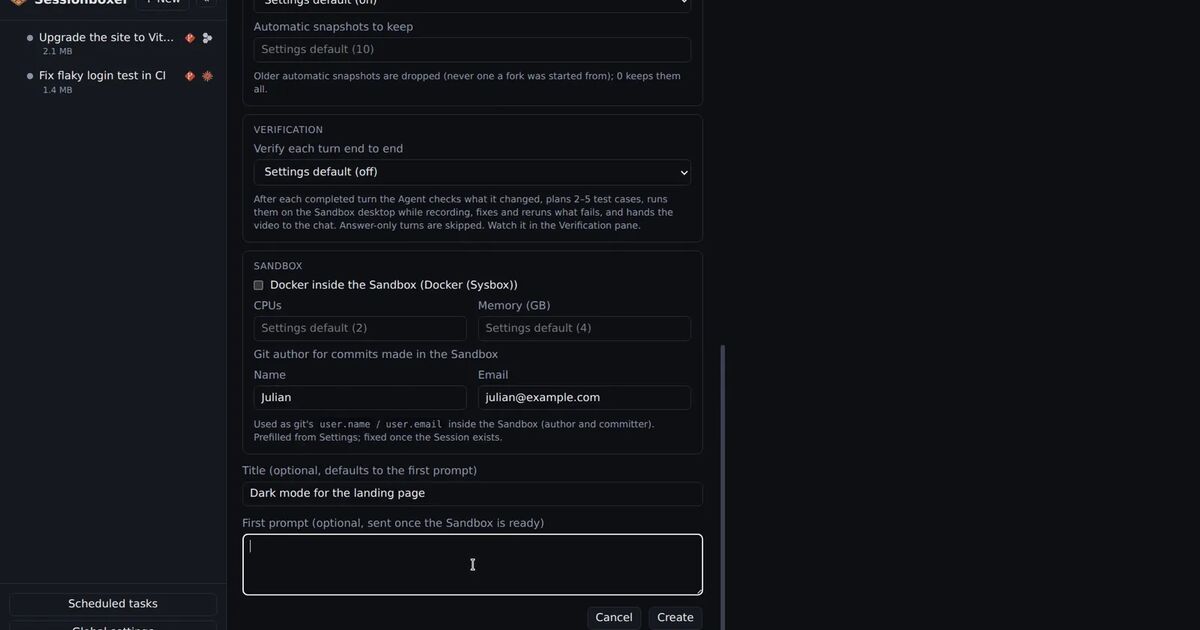
The Verification pane opens when the first case starts. You see each case, its state, the cycle it is on, a note and a screenshot; click one for the steps and the expected result. A marker in the chat, Verified: 4/4 passed · 2:13 · video, opens the pane on that run later. Messages you queued wait until the run is over.
Run now starts a run whenever you want, with the agent's own plan or with a brief you write. The agent can also start one itself through the built-in sessionboxer MCP server when it thinks a change deserves it.
It is a switch, per session or globally. It is off on a fresh install, because every run costs tokens and a few minutes, and not every task is a UI task. For UI work, turn it on and leave it.
Why "after every turn" matters
Testing after the PR catches the bug once. Testing after every turn catches it while the agent still remembers what it changed, which is when the fix is cheap. It also changes what you review: instead of reading a diff cold, you watch a two-minute video of the feature working, then skim the diff for how. Reviewing becomes a thing you can do on your phone while the next turn runs.
And because the run records itself, you get a demo for free. Ask for a recording explicitly and the agent produces a captioned .mp4 with optional offline narration, good enough to paste into a PR description.
What the agent sees is what you see
The desktop is live in the session page. While the agent works, the view is read-only, so you do not fight over the mouse. When it is idle, Take control gives it to you. If a verification case fails in a way the agent does not understand, you can click through the same app in the same browser and tell it what you saw.
The cursor glides to its target instead of jumping, which sounds like decoration but is not: hover menus, drag-and-drop and tooltips behave as they do for a person, so the test is testing the thing a person would hit.
Where it does not help
Be fair about the limits. Verification tests the app the agent can reach from the box. If your app needs a staging backend, give the session a Utility for it; if it needs a real phone, a USB device in the box covers Android over adb. Desktop-only software on Windows or macOS needs a Windows or macOS session, where the desktop in the pane is the VM's.
Verification also does not replace a test suite. It is the layer above it: the part a person would do by hand before saying "ship it", done by the agent, on video, every time.
Try it in five minutes
Start a session on a web project, turn on Auto QA in the session's settings, and ask for a small visible change: a new button, a renamed menu item. When the turn ends, the Verification pane will open and the agent will go click on the button. The verification chapter has the settings; the desktop chapter explains the screen.