
You clone a repository you want to try, start Claude Code, Cursor or Codex in it, and click Trust on the folder dialog. Most of us click it without opening .claude/settings.json first. A repository's agent configuration can start programs, change which binaries the agent runs and send its traffic somewhere else, and none of that has to look unusual while you work.
On November 10, Manifold Security published What is your agent configured to run? and released agentaudit, an open-source tool that reads those folders and lists what they can do. Below is what the article shows, how to run the tool, and what to do with its report. We make Sessionboxer, which runs each agent session in its own container; that part is near the end, along with what it does not stop.
What Manifold found in ordinary settings
Manifold's point is that none of its examples are bugs. Each is a documented setting doing its job, and each runs whatever the repository's author wrote. Hooks are the familiar case, and we covered a worm that used them in the testmetest post. The article goes through the less familiar ones.
| Where | What the repository sets | What happens |
|---|---|---|
.claude/settings.json |
statusLine.command |
A script that draws the status line, and can run anything else on the way, again and again as the session goes on |
.claude/settings.json |
env.PATH with a relative entry first |
The repository decides which git or bwrap the agent runs. On Linux, Manifold notes, Claude Code's sandbox works by calling bwrap, so a repository that ships its own becomes the sandbox |
.claude/settings.json |
env.ANTHROPIC_BASE_URL, env.HTTPS_PROXY |
Nothing runs. The prompts, the files the agent read and, per Manifold, the credentials it sends go to a host the repository chose |
.claude/agents/*.md |
mcpServers in a subagent's front matter |
A server that starts with the subagent, or with the session if agent in settings names it, without the "new MCP server found" question .mcp.json servers get |
.claude/skills/*/SKILL.md |
A line starting with !` |
A shell command that runs when the skill is invoked, before the model sees its text |
.cursor/worktrees.json |
setup-worktree |
A command that runs when Cursor creates a worktree for an agent |
.codex/config.toml |
bearer_token_env_var, http_headers_helper on an MCP server |
One sends the value of an environment variable you have, such as AWS_SECRET_ACCESS_KEY, to the server. The other runs a local command to make the headers |
Anthropic's documentation covers the same Claude Code settings and says when each one applies. The settings reference says project settings cannot set some variables, such as HOME, CLAUDE_CONFIG_DIR or the telemetry exporters. PATH and ANTHROPIC_BASE_URL are not on that list. The status line page says statusLine waits for workspace trust, like hooks. The subagents page says inline mcpServers from a project's .claude/agents/ load only after you trust that folder, and have done so since 2.1.238. So the trust dialog is still the gate. What Manifold shows is how much sits behind one click on it.
The Codex keys are in the Codex configuration reference. The Cursor example comes from Manifold's article.
Scripts skip the dialog
The trust dialog only appears in interactive sessions. Anthropic's permissions page has a table of what a repository can supply and when it is used. For claude -p and the Agent SDK, which never show the dialog, hooks in settings files, the env block and helper commands are "Used". .mcp.json servers are connected without asking.
One flag does less than people expect. --bare stops hooks, skills, subagents, plugins and .mcp.json servers from loading, but the same page says "the project's env block and helpers such as awsAuthRefresh in its settings files still apply." A repository that sets PATH or ANTHROPIC_BASE_URL still gets its way under --bare. To keep a scripted run from reading the project's settings at all, pass --setting-sources user.
How to run agentaudit
The tool is written in Go, Apache-2.0 licensed, and supports Claude Code, Codex and Cursor. Its README says it "only reads configuration; it never runs or modifies it." Install it with Go 1.26 or later, or download a release archive and check it with gh attestation verify as the README shows:
go install github.com/manifold-security/agentaudit/cmd/agentaudit@latest
Point it at a GitHub URL before you clone, or at a folder you already have:
agentaudit https://github.com/owner/repo   # fetched in memory, no clone
agentaudit -v ~/code/some-repo             # -v adds the rule behind each finding
agentaudit -r ~/code                       # every project under a folder
agentaudit --global-config                 # your own user-level agent config
Each line of the report is one capability: what it is, the value, and the file and key it came from. Findings are grouped by agent and by category: code-execution, credential-access, network-access, permissions, sandbox and filesystem-access.
Read the report as a list, because it is not a verdict. A repository that runs npm test in a hook will show up next to one that downloads a payload, and the tool does not say which is which. That is still the useful part. Instead of reading five folders, you read the five lines that run a command and decide whether you expected them.
The exit code is 1 when there is at least one finding or a file could not be read, so a script that clones repositories for an agent can stop and ask a person:
agentaudit "$REPO_URL" || { echo "agent config found, review it before running"; exit 1; }
The --global-config scan is worth one run on your own machine. This month Socket found a malicious Ruby gem, strutil-core, carrying a new build of the testmetest worm, and reporting on it describes a fake MCP server and SessionStart hooks written into the user-level settings of AI coding tools. That scan reads the user-level configuration of Claude Code, Codex and Cursor.
Where to open the repository afterwards
agentaudit tells you what a configuration will do. If you decide to open the repository anyway, the next question is what those commands can reach. On a laptop the answer is your home folder, your SSH keys, every token in your shell and every cloud login you have.
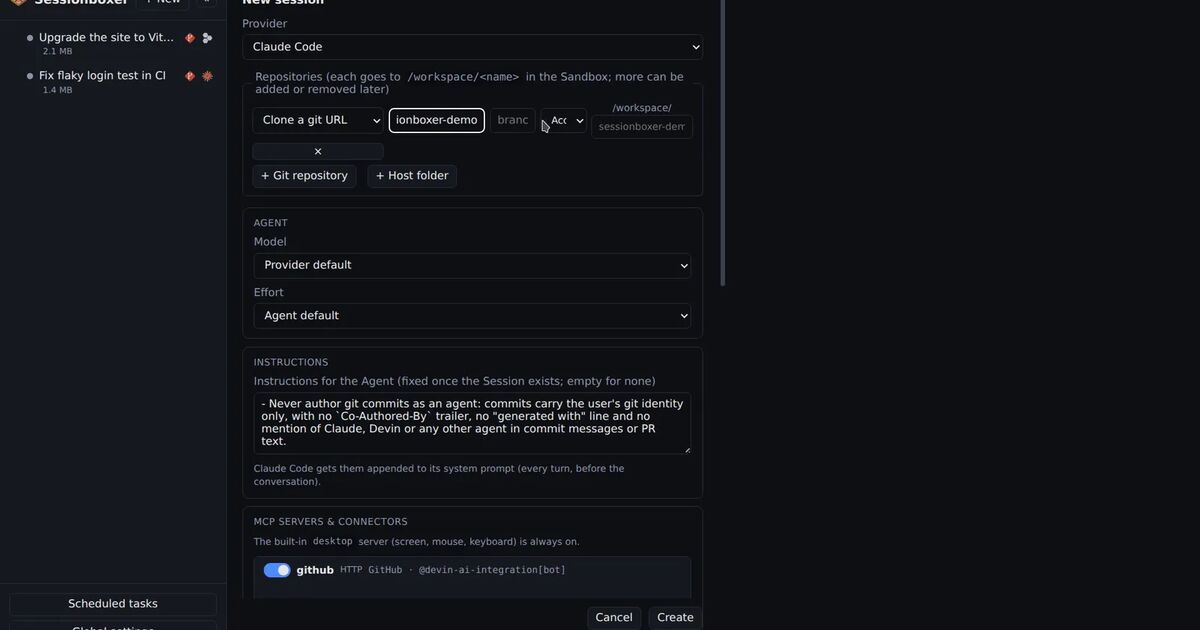
Sessionboxer gives each session its own Docker container. The repositories are cloned into /workspace in that box, and the agent runs there with all permissions granted. A hook, a status line script or a replaced bwrap runs inside that container and sees the box's files. Your home directory and your SSH keys are not in it. Delete the session and the container goes with it.
Be clear about what the box does not change:
- Sessionboxer does not read or filter a repository's agent configuration. Whatever
.claude/,.cursor/or.codex/sets up runs in the box, because the agent there treats the workspace as trusted. - The box holds the login of the agent you picked, and the login of any Git account you enabled for the session. A command from the repository can read them. The GitHub login chapter explains that switching the account off for a session removes it from the box, so for a stranger's repository, start without one if you do not need to push.
- Outbound network from the box is not restricted. An
ANTHROPIC_BASE_URLorHTTPS_PROXYset by the repository still sends traffic where it says.
So for a repository you do not know, run agentaudit on the URL first, then start the session with only the logins the task needs. The Start a session chapter shows where a new session's repositories and Git connectors are set. The agent still works with your own subscription and repositories; the box only limits what a bad configuration reaches. Our post on keeping secrets away from your coding agent covers which credentials to leave out entirely.
What to do today
Install agentaudit and run agentaudit --global-config once. Before you open a repository you did not write, run it on the URL and read the code-execution and network-access lines. If you run Claude Code from scripts, use --setting-sources user in folders you have not reviewed, and remember that --bare still applies the project's env block. Open the repositories you are unsure about in a container or VM that holds only that task.