
You gave Claude Code a long refactor and went to lunch. When you come back, the terminal says You've hit your session limit · resets 3:45pm. The task stopped halfway. Nothing is broken, but nothing happened for an hour either, and now you have to remember what you asked for and type it again.
Below: what the limits on a Claude or ChatGPT plan are, what you can do when you hit one, and how to have the agent pick the turn up by itself after the reset.
What the limits are
A Claude Pro or Max plan meters usage in windows. Anthropic's article on using Claude Code with a Pro or Max plan says both plans have a five-hour session limit and a weekly limit, and Max plans also have a separate weekly limit for Fable. The limits are shared across Claude and Claude Code, so an afternoon of chatting in the Claude app uses the allowance your agent needs in the evening.
Claude Code's error reference lists the messages you see when a window runs out:
You've hit your session limit · resets 3:45pm
You've hit your weekly limit · resets Mon 12:00am
You've hit your Opus limit · resets 3:45pm
You've hit your Sonnet limit · resets 3:45pm
The session and weekly limits apply to all models, so switching models does not help with them. The Opus and Sonnet limits apply to one model family only, and switching to a model outside that family with /model keeps you working. The same page warns that usage counts against the session and weekly allowances at the same time, so a single burst of heavy work, "such as a large workflow fanout", can use up the week before the five-hour window resets.
Codex works much the same way on a ChatGPT plan. OpenAI's help article tells you to check Settings or the usage dashboard, or to type /status in an active Codex CLI session. One difference: if you reach a limit during an active turn, "Codex can continue working on that turn, subject to fair-use limits." The limit stops the next turn instead.
Your options when the limit hits
For Claude Code, Anthropic lists four: wait for the reset, turn on usage credits to keep going at pay-as-you-go prices (/usage-credits opens the settings), upgrade the plan, or switch to a Claude Console account with API credits. If the message names Opus or Sonnet, there is a fifth: change the model. The docs note that each model has its own prompt cache, so the first request after the switch re-reads the whole conversation without cache hits.
For Codex, the limit notice shows what your account can do: add credits, apply a reset if you have one, upgrade, or wait.
Waiting is free, and for most people it is the answer. It usually means watching a clock.
Claude Code can wait for you, in a terminal
Since v2.1.234, Claude Code can wait for a usage limit to reset and continue on its own. It is on by default in interactive sessions signed in with a claude.ai subscription. While it waits, the bottom of the screen shows Continuing automatically at 3:45pm · esc to cancel. At the reset, Claude Code asks Claude to pick the task up where it stopped. It does not resend your last message.
The docs list the cases where it does not do this, and they are worth reading before you rely on it:
- You have to keep the session open. If you exit Claude Code, the wait does not restart when you resume.
- It does not start a wait on its own when the reset is more than 24 hours away, which is often the case for a weekly limit.
- Background sessions and
-pruns do not get the wait at all. - The continued turn still asks for permissions as usual, so it can stop again on a prompt while you are away.
- If it hits the limit again, it re-arms at most twice in a row, then stops.
The Claude Desktop app has its own checkbox, Auto-continue when limits reset, on the session-limit card only, not on the weekly one. You can switch the CLI behaviour off with the autoContinueAtUsageLimit setting.
If you work in one terminal and keep it open, this covers you. It covers less when the agent runs on a timer or in several sessions at once.
See the wall before you hit it
Claude Code can warn you as you get close, with a line like You've used 85% of your session limit, and /usage shows plan usage bars and when each window resets. On a paid plan the costs page says /usage also breaks down what counts against your limits.
Anthropic's article on how usage limits work adds that longer conversations which trigger automatic context management use more of your limit, and suggests starting a new conversation when you are close. For an agent that means a fresh session for a new task, instead of one session that has been compacted three times. Our post on what your coding agent sends to the model shows why: every turn sends the whole history again.
Parallel sessions are the other usual cause. Five agents on one subscription draw from one allowance, five times as fast. If you run several at once, as in running coding agents in parallel, plan the big jobs for right after a reset.
How Sessionboxer handles it
We build Sessionboxer, so this section is about our own product. It runs Claude Code, Codex and other agents, each session in its own Docker container, on your own subscription. In the box, Claude Code runs through an ACP adapter rather than its terminal interface, and Sessionboxer has its own wait for limits.
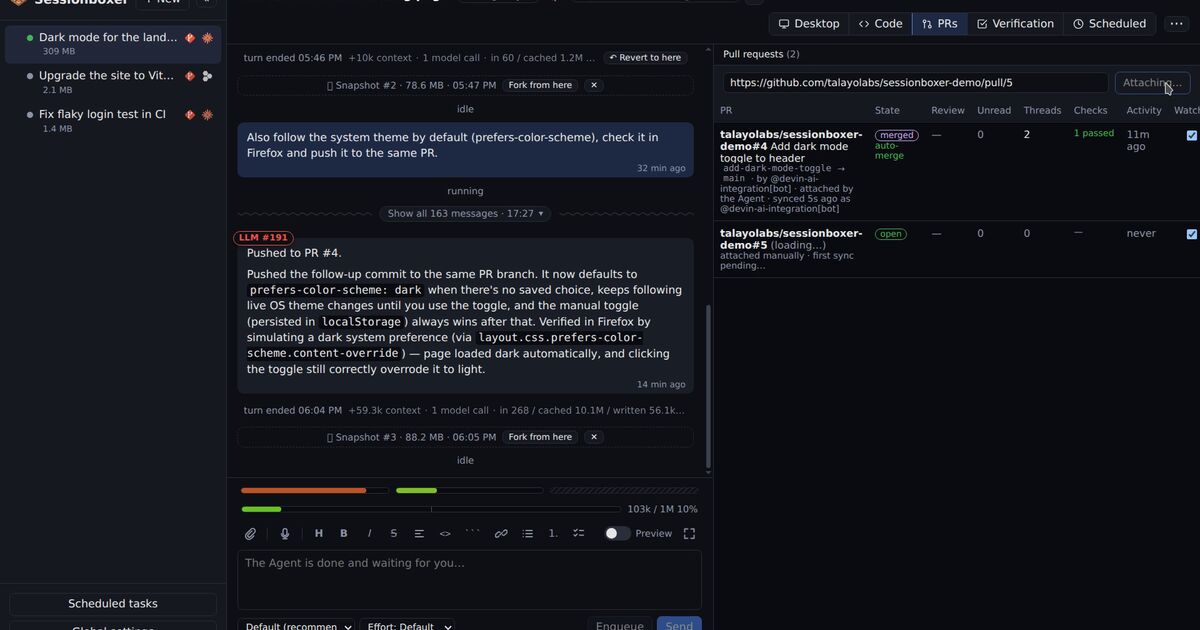
Above the prompt box there are three small usage bars for the plan's windows: Claude's session and weekly windows, plus a third for a model with its own weekly window, or Codex's 5-hour and weekly limits. They go from green to red as a window fills. Hover one for the figure and the reset time, for example Session usage: 11% used · resets in 3 h 48 min. For Claude Code the figures come with the model calls the agent makes, so Inspect LLM must be on (it is by default), and they refresh with the first call of each turn. For Codex they are read after each turn. They sit next to the context gauge from the context window chapter, so both kinds of "full" are in one place.
When the agent refuses a turn because a window is used up, the session is not marked as an error. A red bar with a no-entry sign appears, counts down to the reset, and shows what the agent said when you hover it. The session list shows the same sign, so the sidebar tells you which sessions are waiting for credit.
The refused prompt is kept. Continue sends it again, or, if the agent had already started working, asks it to continue where it left off. Tick Auto-continue and Sessionboxer does that for you: once the announced reset is due, it asks the agent a one-line question every 10 seconds, and the moment the agent answers, it continues the interrupted turn. The wait pauses while the box is stopped and carries on when you resume it.
Messages you put in the queue wait while the limit stands and play on after the continued turn. So you can queue the next three tasks, tick Auto-continue and go to bed. The usage limits chapter of the guide has the details.
A scheduled run that hits a limit is marked failed with a note that the usage limit was hit, and the session offers Continue and Auto-continue. If you run automations, the run history says so instead of showing a generic agent error.
What it does not do:
- It does not give you more usage. Every session on the same login draws from the same windows, and ten sessions use them up faster than one.
- It does not buy usage credits or upgrade your plan. Do that on claude.ai or chatgpt.com.
- Not every agent reports its usage. Cursor and Devin do not report it to Sessionboxer, so their bars are hatched and say why on hover. Their limit messages are still recognised, with Continue and Auto-continue.
A short checklist
- Run
/usage(Claude Code) or/status(Codex) before a long task, and start it after a reset if the window is nearly full. - If the limit names Opus or Sonnet, switch to a model outside that family.
- In a terminal, keep the session open and let Claude Code's automatic continue do the wait. Remember the 24-hour limit and the permission prompts.
- Start a fresh session for a new task, and save big parallel runs for right after a reset.