
Your agents write pull requests faster than your team can review them. The slow part is now the review comments, the red checks and finding someone to click Approve. On November 23 Anthropic announced a product for that queue, and one part of it can approve pull requests on its own.
Introducing Claude Ship describes three agents for GitHub pull requests and a new /ship command in Claude Code. Below is what each part does according to Anthropic's docs, which settings decide whether a change can merge with nobody looking, and what to set first. We make Sessionboxer, which also follows pull requests from an agent's session; that part is at the end, with what it does not do.
What Claude Ship is
The Claude Ship docs list three agents:
| Agent | What it does | Status |
|---|---|---|
| Code Review | Reads the change with the surrounding code and posts inline findings ranked by severity | Generally available |
| PR Steward | Works on failing checks, merge conflicts and review comments, and pushes commits with fixes | Beta |
| Claude Approvals | A check that follows a policy file in your repository and reports who still has to approve | Beta |
It is for Claude Team and Enterprise organizations on GitHub, and not available with Zero Data Retention, the HIPAA configuration or customer-managed encryption keys. Each agent is billed on tokens through usage credits, separately from the plan's included usage.
PR Steward is "designed not to approve or merge pull requests". When it runs in Anthropic's cloud, the PR Steward access page says Anthropic's service refuses its requests to approve a pull request, change branch protection, write check runs, delete a branch or push tags. Merging, turning on auto-merge and force-pushing are not refused by the service. They are left to your GitHub branch rules, after a permission rule and auto mode's check look at the command. The docs add that "a command that's written another way can pass both."
Approving is left to the third agent, and only where your policy allows it.
The policy file decides who approves
Claude Approvals reads .claude/approvals.yml from the default branch. The Approvals docs start with this example:
# .claude/approvals.yml
version: 1
mode: observe
rules:
  - purpose: "A change takes two people, and Claude doesn't approve."
    paths: ["**"]
    verdict: { claude: comments, seats: 2 }
    advisory: [claude/code_review]
seats is how many people must approve changes to those paths. claude: comments means Claude only comments; claude: approves lets it post an approving review. mode: observe makes the check report what the policy would decide without enforcing it. A rule can also have a condition that reads facts about the pull request or the answer of a classifier, a model asked a question such as "how risky is this change?".
Two side effects are easy to miss. A policy file can stop automatic Code Reviews on the files it covers, unless a rule lists claude/code_review, as the example does under advisory. And a condition cannot read CI results, so CI has to stay its own required check in GitHub.
How a change merges with nobody looking
The page Claude Approvals and your GitHub rules has a section called "Merges without human review". It is the part to read before anything else. A pull request can merge with only its author looking, or with no person at all if a bot wrote it, when:
- GitHub does not require the Claude Approvals check, or the policy is in observe mode
- the rule has
seats: 0, orseats: 1, which the author can fill - a
fromlist admits bots, or a machine user (an account a script or agent drives) counts as a person - files match no rule, and GitHub treats the neutral result as passing
- a rule's condition reads a classifier's answer, which the pull request's own text can steer
- a
reusekeeps seats after a new push
Add auto-merge or a merge queue on top and the docs say plainly that "a change can merge without anyone acting." A direct push to the default branch gets no check at all.
The policy is a file, so whoever can merge into the default branch can change it. A pull request that changes the policy can require a person with write access, and that person can be its author.
What to set before you turn it on
Most of this comes from the setup pages, and it is worth doing for any agent that pushes to your pull requests.
- Require pull requests on the default branch, with at least one approval, and dismiss stale approvals when new commits are pushed. The PR Steward setup page asks for this before you start.
- Keep the Claude GitHub App off every ruleset's bypass list, and protect the other branches you do not want it to push to.
- Start PR Steward on Manual (
@claude steward) and set its monthly limit. The docs warn it "has no spend limit of its own until you set one." - Start Approvals in observe mode. Before you enforce it, add the rule from the docs that asks for one person who is not an author on every path,
seats: [{ count: 1, from: [humans, "!pr/authors"] }], and list your machine users with!so they cannot fill that seat. - Keep Claude off approving on paths where a mistake is costly, and do not let a classifier lower what billing or auth code needs.
Item 4 matters if your agents push from their own GitHub account: a machine user counts as a person to Approvals. We covered agent accounts in who pushed your agent's commits.
/ship runs on your own computer
PR Steward runs as the Claude GitHub App in a cloud session. /ship is different. The /ship and /steward page says it needs Claude Code 2.1.330 or later and runs in your terminal session. It can commit your uncommitted changes, push and open the pull request as you, with no confirmation prompt; before the commit and before the push, a line ending Esc to cancel gives you a few seconds to stop it. Then a "watch" starts: Claude keeps pushing fixes for failing checks, conflicts and comments with your gh and git logins. You merge it yourself, unless GitHub auto-merge is on.
Its secret check only looks at file names such as .env, so look inside the files yourself.
The warning to take seriously is this one: "Run a watch only where you trust everyone who can merge to the base branch or push to your branch. Any of them can run programs on your computer with your credentials." During a watch Claude merges the base branch into yours, merges other people's pushes, runs your tests and runs your hooks. That code runs with whatever your laptop can reach, and the watch edits the same checkout you are working in.
So run a watch somewhere with only the credentials the pull request needs, on a clone you are not editing: a container or VM with its own clone and GitHub login.
Where Sessionboxer fits
Sessionboxer runs each agent session in its own Docker container on your machine, with its own clones under /workspace and the GitHub login you chose for that session. The box has no SSH keys. The GitHub login chapter shows how to bind a session to one account, or to a fine-grained token for a few repositories.
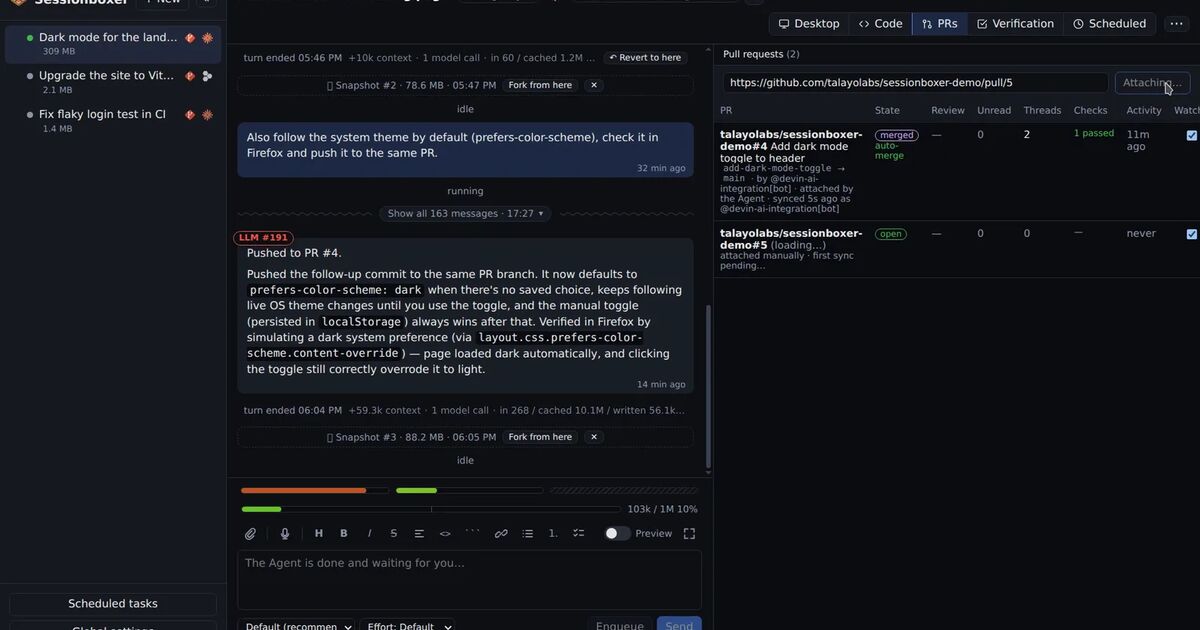
When the agent opens a pull request, it is attached to the session. The PRs tab shows review threads and the checks on the head commit. Each item has To prompt, Address and Address & reply, and a failed check has Fix and Fix & push. The Address prompts tell the agent that reviewer text is feedback to evaluate, not instructions from you. An automation can send a prompt to the session when a check fails, with limits per day and per pull request. The pull requests chapter has the details, and letting an agent fix failing CI and review comments walks through a full loop.
What it does not do, so you can compare fairly:
- Sessionboxer has no policy file like
approvals.yml. Its Auto review automation posts a GitHub review capped by Strongest verdict, which is comment by default, so it approves only if you raise that. - Its Auto-merge switch is off by default, is GitHub-only, and is an ordinary GitHub merge with the head commit pinned. It waits for every check and for the reviews branch protection asks for. If your rules ask for no review, it will merge without one.
- A box limits what a pull request's code can reach, but the box still holds the session's GitHub login, and that login can push.
- We have not tested
/shipinside a Sessionboxer box, so we make no claim about it there.