
A commit lands on main with your name on it. Did you write it, or did the agent you left running over lunch? GitHub could not tell you. The name and email on a commit are whatever the machine that made it wrote there. An agent runs git commit with your user.name and user.email, pushes with your token, and the result looks exactly like your own work.
On October 12 GitHub announced push attribution as a limited public preview. This post covers what it adds, why it does not separate your commits from your agent's on its own, and what to set up so that it can.
What GitHub changed
A git commit carries two identities, the author and the committer. GitHub's announcement is blunt about them: they "are just strings that the pushing client supplies, so anyone with write access to a repository can set them to any name and email they choose." GitHub has always authenticated the push itself, but it did not keep that account next to each commit.
With the preview it does:
- Every pushed commit gets a durable pusher identity: the account that authenticated the push, whatever the author and committer fields say. It shows in the UI and in the API next to those two fields.
- A new repository rule condition,
Committer must match pusher, blocks a push when the committer email does not match any verified email address of the account that pushed.
The preview is for GitHub Enterprise customers, who join by asking their account team. On a personal account or another plan you will not see it yet.
GitHub's reason is spoofing. Its example is an attacker who compromises a low-privilege account and forges commits that look like they came from a trusted maintainer, to get past review policies and muddle the audit trail. An agent that reads a poisoned issue and then pushes is a close cousin of that case, which is why the change is worth a look even if you never planned to forge anything.
What it means when an agent pushes
The pusher field names the GitHub account that authenticated. It knows nothing about which program typed git push. If the agent pushes with your login, the pusher is you.
That is the case in most setups people run today. An agent in your own terminal uses your git config and your credential helper, so author, committer and pusher are all you. An agent in a container where you ran gh auth login with your own account gives the same answer.
Claude Code adds a Co-Authored-By trailer to its commits by default, and you can change or hide it with the attribution setting (settings reference). It helps a reader, but the trailer is part of the commit message, so it is also a string the client writes. Anyone can add it or delete it.
So for most people the new field will confirm what they already assumed: you pushed it. It only starts to say something new when the agent pushes as a different account.
The new rule has a sharp edge here. Say you set the agent's git email to agent@example.com so its commits are easy to spot, while it still pushes with your token. The committer email does not match any verified email on your account, so a repository with Committer must match pusher refuses the push. The identity written in the commit and the login used to push it have to belong to the same account.
Give the agent an account of its own
For the pusher field to say "the agent did this", the agent needs its own GitHub account. GitHub's page on types of accounts calls this a machine user: "User accounts are intended for humans, but you can create accounts to automate activity on GitHub."
- Create the machine user and add a verified email address to it.
- Give it write access only to the repositories the agent works on. A fine-grained personal access token limited to those repositories narrows it further. On a paid organization, check whether the account takes a seat.
- Set the agent's git
user.nameanduser.emailto that account's name and verified email, so author, committer and pusher agree. - Keep branch protection or a ruleset that requires a pull request and a human review before
main. Rulesets can also require signed commits and block force pushes.
Now a commit on main has a trail you can follow later: the machine user pushed it to a branch and opened the pull request, and a person approved and merged it. The pusher record and the review record answer different questions. GitHub suggests using the pusher to "spot-check suspicious activity or speed up security investigations". Whether the change is correct is still a question for the review.
Where the identity lives in Sessionboxer
We make Sessionboxer, so this section is about our own product. Each session runs in its own container, and two settings decide what a commit from that box says.
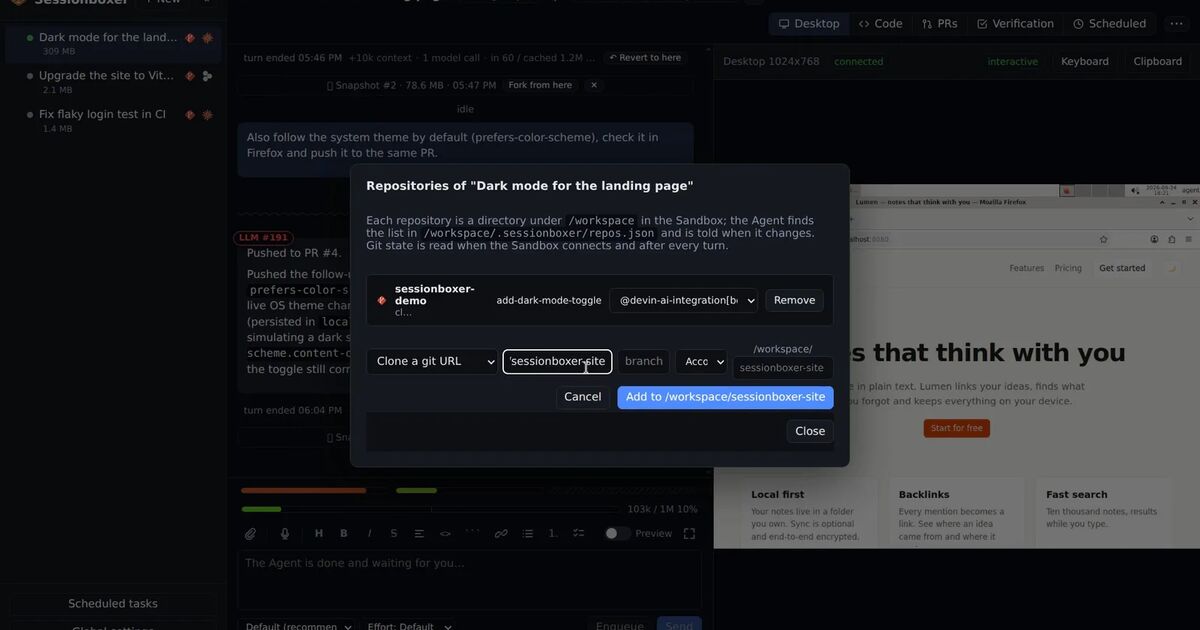
The first is the git author. When you start a session, Git author for commits made in the Sandbox shows the name and email the agent's commits will carry, as both author and committer. It is prefilled from Global settings, or from your machine's own git config when that is blank, and you can change it for one session. It is fixed once the session exists and travels with forks. The Start a session chapter has the details.
The second is the GitHub login. You connect GitHub in Settings → Git accounts, through the GitHub CLI's login, Sessionboxer's OAuth App or a personal access token. You can add the entry more than once under different names to connect different accounts, and each repository in a session is bound to one of them. Inside that repository's directory, git push and gh act as the bound account. The GitHub login chapter and Your repositories, your subscription explain the binding. The login lives on tmpfs in the box, so snapshots and stopped boxes never carry it.
To give the agent its own identity, connect the machine user as a second entry (its fine-grained token works), bind the repository to it, and set the session's git author to the machine user's name and verified email. The pushes and the pull requests the agent opens are then the machine user's. Pull requests attached to a session are followed with that account too. Auto-merge also uses that account, and it waits until the checks are green and the reviews branch protection asks for are in. Leave it off if you want a person to press the merge button.
Two limits are worth knowing. Sessionboxer's default instructions ask the agent to keep its name out of git: no Co-Authored-By trailer, no "generated with" line, and Claude Code's own byline is switched off in the box. That suits people who want commits to read as theirs, and it means that with the defaults nothing in the commit says an agent wrote it. If you want that marker, the separate account is the one to rely on, because a trailer would be one more string the client writes. Also, Sessionboxer does not set up commit signing in the box, so a ruleset that requires signed commits will refuse the agent's pushes unless you add a key yourself.
What to check this week
- If you are on GitHub Enterprise and join the preview, look at the pusher on a few recent agent commits. You will most likely see your own account.
- Before you turn on
Committer must match pusher, list everything that pushes to the repository: CI bots, agents, release scripts that set their own git email. Any of them whose committer email does not match the account it pushes with will start failing. - If you want to tell agent work from yours later, give the agent a machine user now, with access to only the repositories it needs. That only helps if the agent cannot also read your personal token, so pair it with the steps in keep secrets away from your coding agent.
- If you run several agents in parallel, one machine user can serve all of them. The pull request and the session it came from tell you which run made the change.