
Not every folder is a repository. Maybe it is a pile of shell scripts on a server, a static site someone sent you as a zip, a folder of data notebooks, or the config directory of a tool you run at home. You want a coding agent to clean it up. You do not want to start a git history for it, and you certainly do not want an agent with no permission prompts editing the only copy.
This post covers what agents do when there is no git, what their undo can and cannot bring back, two ways to work on a copy and compare it afterwards, and how Sessionboxer does it with a host folder and a Pull button. We build Sessionboxer, so that part is about our own product.
What the agents say about git
Claude Code runs in any directory. Its undo is checkpointing: /rewind restores files Claude edited with its file tools. The checkpointing docs list the limits plainly. A file that only Bash commands changed "isn't tracked and stays as it is." Changes you make outside Claude Code are normally not captured. Symlinked and hard-linked files are skipped on restore. Each time, the docs point to version control, such as Git, for the rest.
So in a folder without git, a sed -i over twenty files, a mv or an rm run through the shell has no undo at all.
Codex is stricter. The non-interactive mode docs say Codex "requires commands to run inside a Git repository to prevent destructive changes." You can override that with codex exec --skip-git-repo-check, which the CLI reference describes as "useful for one-off directories". The flag turns the check off and adds no undo of its own.
The agents agree on the advice: have a copy you can compare against. You can keep that copy in git, or you can keep the original out of the agent's reach.
Option 1: a throwaway git repository in a copy
The cheapest baseline is git itself, used only for this job and never pushed anywhere. Copy the folder, start a repository in the copy and commit everything as it is:
cp -a ~/client-scripts ~/client-scripts-agent
cd ~/client-scripts-agent
git init -q
git add -A
git commit -qm baseline
Run the agent in the copy. Afterwards, git status lists every file it added, changed or deleted, whatever tool it used, and git diff shows each change. git checkout -- <file> throws one away. When you are happy, copy the files you want back to the original folder and delete the copy, .git included.
Two catches. Anything the agent does outside that folder is not in the diff: a package installed globally, a file written to your home folder. And the agent still runs on your machine, with your SSH keys and your other projects one cd away. The copy protects that one folder and nothing else on the machine.
Option 2: a container, with the original read only
If the agent already runs in Docker, keep the original folder out of its write path. A bind mount is the usual way to get files into a container, and the Docker docs on bind mounts warn that "bind mounts have write access to files on the host by default." They also give the fix: the readonly (or ro) option.
Mount the original read only, and have the agent copy it to a working directory inside the container:
docker run -it --name tidy \
  --mount type=bind,src="$HOME/client-scripts",dst=/original,readonly \
  my-agent-image bash -c 'cp -a /original /work && cd /work && exec bash'
When it is done, copy the result out with docker cp, which works on a running or a stopped container, and compare it with the original on your side:
docker cp tidy:/work ./client-scripts-agent
git diff --no-index ~/client-scripts ./client-scripts-agent
git diff --no-index compares any two paths on disk, no repository needed. To see only which files would change, rsync -rcni ./client-scripts-agent/ ~/client-scripts/ does a dry run (-n) and prints a line per file (-i), comparing by checksum (-c). The rsync manual has the flags. Add --delete to that dry run if you also want to see the files the agent removed.
This works, but the comparison has only two sides and no memory of where you started. If you edited a file in the original while the agent worked, the diff cannot tell your change from the agent's, and copying the result back would undo yours.
How Sessionboxer does it
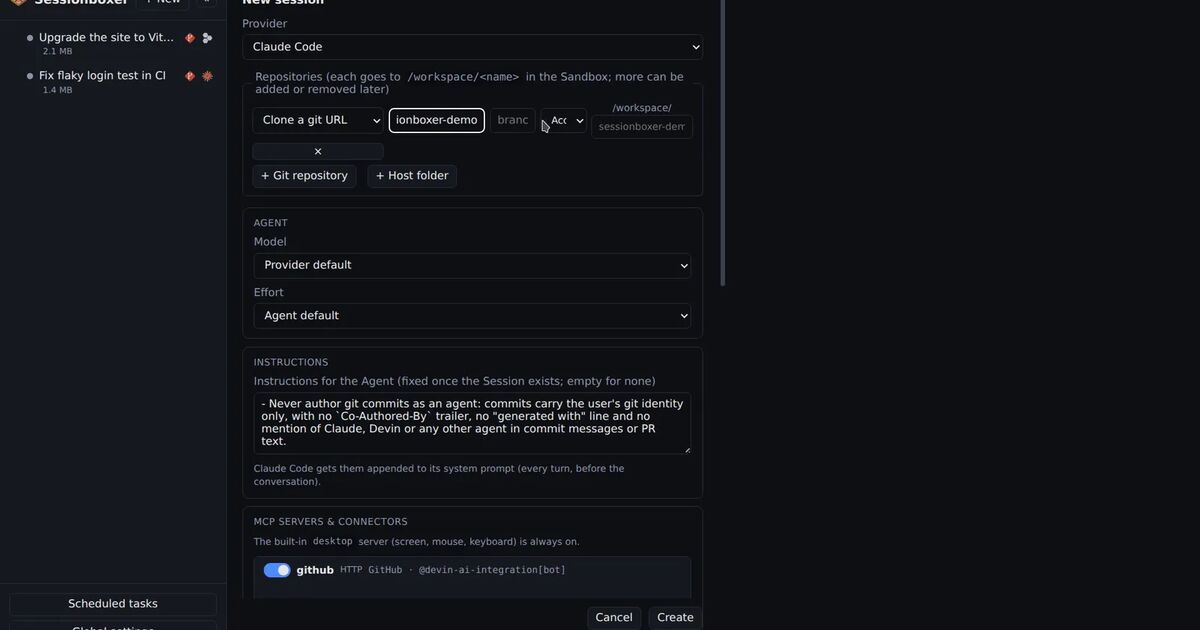
Each Sessionboxer session runs in its own Docker container, and the agent works there without permission prompts. When you start a session, the repositories list takes a git URL or, with + Host folder, a folder on your machine.
A host folder is copied into the box. Nothing is mounted. If the folder is a git repository, it is copied the way git sees it: tracked and untracked files plus .git, without what .gitignore excludes. Any other folder is copied whole. Each one lands in /workspace/<name>. Your folder is never written to while the agent works.
To see the changes as they happen, open the Code tab. That is VS Code inside the box, on the same files the agent edits.
To bring the work home, click Pull to folder… in the session header. The dialog compares the box with your folder and lists what would change before it writes anything: + for new files, ~ for changed ones, − for files the agent deleted. Pull changes applies them.
The difference from Option 2 is the baseline. After the first copy, Sessionboxer records the state of every file. A pull compares three things: that record, the box and your folder. A file only the agent changed is applied. A file only you changed is left alone. A file both of you changed is a conflict. It is skipped and marked kept yours, unless you tick Also overwrite… and confirm. Each pull records a new baseline, so the next pull only shows what changed since. The Start a session chapter of the guide describes the dialog.
A few more details from our design notes. Files git ignores, .git itself, node_modules, .venv and __pycache__ stay in the box. A symlink in the box that points outside your folder is never written, even with overwrite on, so an ln -s to a system file cannot reach your disk.
For undo inside the box, Sessionboxer takes a snapshot of the whole box after every turn. A snapshot keeps files changed by shell commands too, which is the gap the Claude Code docs describe. You can fork a new session from any snapshot, as the snapshots and forks chapter explains.
What it does not do
- Pull goes one way, from the box to your folder. Edits you make in your folder after the session starts are not copied into the box.
- There is no per-file pick in the dialog. You pull everything the plan lists, minus conflicts. Throw away what you do not want in the box first, or in your folder after.
- There is no merge for a file both sides changed. You keep yours or take the box's.
- Pull is refused while the agent's turn is running, and the box has to be running.
- A session forked from a host-folder session cannot pull to the folder. The fork started from a snapshot, not from the folder.
- A non-git folder is copied whole, secrets included. A
.envin the folder is in the box, where the agent can read it. Move it out before you start, or read how to keep secrets away from a coding agent. - Sessionboxer does not review the changes for you. The pull plan tells you which files changed; reading them is still your job. Our post on reviewing a coding agent's changes has an order for that.
A short checklist
- Before an agent touches a folder without git, make sure a copy exists that the agent cannot write to.
- Do not count on
/rewindthere. It skips anything changed through the shell. - For a quick job,
git inita copy and usegit statusas your list of changes. - In Docker, mount the original with
readonlyand compare withgit diff --no-indexbefore copying anything back. - If you keep editing the original while the agent works, use a tool that remembers the starting point, or you will overwrite your own changes.