
The agent opened the pull request an hour ago. Since then the lint job failed, an end-to-end test timed out, and a reviewer left six comments. None of it is hard, yet you are copying log links into a prompt by hand.
Most coding agents can now take that loop over. They differ in where the fix runs, what wakes them up, whose name goes on the replies, and whether they merge at the end. Below are the documented options, then what to set up before any of them pushes on its own. We make Sessionboxer, so the part about it is about our own product, including what it does not do.
What the agents document today
GitHub Copilot CLI has a /pr command that works on the pull request of your current branch. /pr fix feedback reads the review threads, makes the changes, pushes, replies in each thread and resolves it. Threads that need your input get an answer but stay open. /pr fix ci reads the failing jobs' logs, pushes a fix, and repeats until the checks pass or it decides it cannot get further. Failures unrelated to your branch are reported as such. /pr auto loops through feedback, conflicts and CI until the PR is green, and stops there. /pr automerge does the same, then turns on GitHub's auto-merge, so GitHub does the merging once the required approvals and checks are in. It runs in your terminal, and the subcommands that push ask for permission first unless you have pre-allowed those tools.
Claude Code has auto-fix for pull requests. It runs in a cloud session and needs the Claude GitHub App installed on the repository. You turn it on per PR: from the CI status bar of a cloud session, with /autofix-pr in your terminal, or by pasting a PR URL into a session and asking. Claude then gets the PR's GitHub events. When a fix is clear, it pushes. When a comment is ambiguous or touches the architecture, it asks you first. The docs point out one gap: GitHub sends no event when the base branch moves and causes a conflict, so you have to ask for the rebase yourself. Separately, the Claude Code GitHub Action responds to @claude mentions in PR comments and runs in your own Actions workflows.
Codex works from comments. In OpenAI's code review use case, you comment @codex fix it after a review finding, and that starts a new cloud task that updates the pull request.
Devin has a /devin command in PR comments, for example /devin fix the failing lint check and push a commit, described in its GitHub integration docs. With Auto-Fix on, its SDLC guide says Devin responds to review comments and iterates on CI failures by itself.
| Where the fix runs | What starts it | Merges at the end | |
|---|---|---|---|
Copilot CLI /pr |
your machine | you run the command; /pr auto keeps looping |
/pr automerge turns on GitHub auto-merge |
| Claude Code auto-fix | Anthropic's cloud, or your self-hosted environment | GitHub events on the PR | not in the docs |
| Codex | OpenAI's cloud | an @codex comment |
not in the docs |
| Devin | Devin's cloud machine | a /devin comment, or Auto-Fix |
not in the docs |
The table reflects each vendor's docs on October 15, 2026. "Not in the docs" means we did not find it, not that the product cannot do it.
Three things to settle before the agent pushes by itself
Review comments and CI logs are input from other people. On a public repository, anyone can comment on a pull request. A test can print anything into a log. An agent that treats a comment as an instruction from you can be talked into doing something you never asked for. Prefer tools that tell the model the quoted text is feedback to weigh, and keep the agent's box free of credentials it does not need. We wrote more about that in keeping secrets away from your coding agent.
Replies go out under some account. Claude Code's docs say its replies are posted with your GitHub account and labeled as coming from Claude Code. The docs also warn that a reply can trigger comment-driven automation such as Atlantis, Terraform Cloud or Actions on issue_comment, and suggest turning auto-fix off where a PR comment can deploy infrastructure. If the agent pushes as you, GitHub records you as the pusher too, as covered in who pushed your agent's commits. A separate account for the agent makes both easier to read later.
The merge rules belong to the repository. GitHub's own auto-merge merges "after all required reviews and status checks pass", has to be allowed in the repository settings, and switches itself off if someone without write access pushes to the branch. Keep at least one required approval and the required checks on the target branch. Then the agent can fix and push all it likes, and nothing merges that nobody looked at.
How Sessionboxer handles it
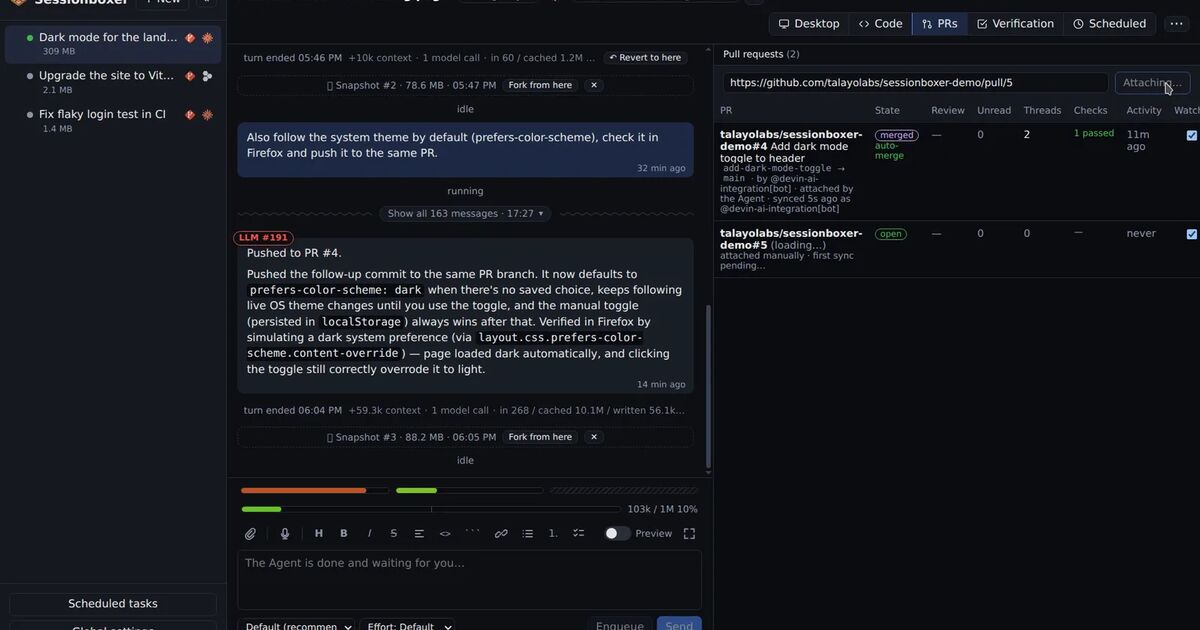
Sessionboxer runs each session in its own container on your machine, with Claude Code, Codex, Copilot or another agent signed in with your own subscription. When the agent opens a pull request with gh pr create, or you paste a PR URL into the prompt, the PR is attached to the session.
The PRs tab then lists the PR's comments by thread and the checks on its head commit, and it polls about every minute while the agent is idle. A failed check shows up as unread and sends a notification once per commit.
Each failed check has three actions. To prompt puts the check's name, conclusion, log link and summary in the prompt box for you to edit. Fix sends it to the agent, which reads the log (gh run view --log-failed for Actions), reproduces the failure in the box, fixes it, verifies and commits. Fix & push also pushes, so the checks run again. Review comments get the same three actions as To prompt, Address and Address & reply. The last one also has the agent reply in each thread and resolve it. Comments and red checks can go together in one prompt. The prompts tell the agent that reviewer text is feedback to evaluate and that CI output is diagnostic material, not instructions from you.
Auto-merge when checks pass is a per-PR switch, off by default, and it asks you to confirm. About every 10 seconds the Control Plane asks GitHub whether the PR may merge, and merges with the head commit pinned when the answer is yes. It waits for every check, required or not, plus the reviews branch protection wants. It is an ordinary GitHub merge, so branch protection still applies, and a push that lands in between makes GitHub refuse.
To make the fixing itself hands-off, add an automation. Use the trigger "when a followed pull request changes" with the event "check failed", and the action "Prompt a Session" aimed at the session the PR is attached to. The prompt can use {pr.url}, {pr.headSha} and {event}:
A check failed on {pr.url} at {pr.headSha} ({event}).
Read the failing log, reproduce it in the workspace, fix the cause and push.
If the failure is not caused by this branch, say so and do not push.
If the agent is busy, the prompt waits in the session's queue. If the session is stopped, it is resumed first. Limits cap runs per day and per PR, so a flaky test cannot keep the agent busy all night. One default to know about: PR automations skip your own pull requests, so if the agent opens PRs with your login, change the author filter. The automations chapter lists every trigger and filter, and the pull requests chapter covers the PRs tab in full.
What Sessionboxer does not do
- Auto-merge is GitHub-only. Bitbucket Data Center PRs get the checks and the Fix buttons, but HTTP access tokens cannot merge there. The Bitbucket post has the details.
- A check that is not required but fails forever keeps auto-merge waiting forever. You fix the check or turn the switch off.
- Watching and automations run in the Control Plane on your machine. If that machine is off, nothing reacts until it is back.
- Only GitHub and Bitbucket Data Center pull requests can be attached. GitLab merge requests are not covered.
A setup to start with
- Protect the target branch: one required approval and the checks you care about marked required.
- Give the agent its own GitHub account or token, scoped to the repositories it works on.
- Try one tool on a single PR with a red check before you turn on anything that runs by itself.
- Read what it pushed. The first few fixes show you which failures it handles well and which ones it papers over.