
You pay for ChatGPT and you use Codex. On your laptop it works well, but the laptop has to stay open while it works, and you would like to start a task from your phone and look at it later. Codex Cloud does that. So does running Codex on a machine of your own. This post compares the two on setup, trust and usage, so you can pick the one that fits your work.
We build Sessionboxer, so this is a comparison from the maker of one of them. Everything about Codex Cloud below comes from OpenAI's documentation, read on November 17, 2026. OpenAI moved Codex Cloud to a new setup recently and the pages still change, so check the linked page before you rely on a detail.
What Codex Cloud is now
The Codex Cloud overview says it plainly: give Codex a task, and it works in the cloud while your computer is asleep. You start it on the web or in the desktop app with Work in > Cloud, or open Codex on mobile. Each task runs in its own workspace, in a VM on OpenAI's side: 2 vCPUs and 8 GiB of memory on Plus, 4 vCPUs and 16 GiB on Pro, Business and Enterprise.
The part that changed is the environment. In the cloud environments guide you pick repositories and Codex does the setup itself: it inspects them, installs dependencies and tools, and tests the workflow. It records what worked as an Install script and a Start skill, asks you for anything it cannot guess, and you publish the result. Publishing "captures the prepared filesystem for new tasks." You don't write a setup script unless you want to.
A few details are worth knowing before you start:
- Each task keeps its own files, including uncommitted changes and installed tools. By default, saved VM state can be recovered for up to seven days after you last start a turn or resume the task. After that, what you did not commit is gone, and the docs say so: "Saved state doesn't replace source control."
- Network access is set per environment: all public internet, a package manager preset, or a list of extra domains. VPN access to a private network and OIDC connections for cloud credentials are separate settings.
- Secrets work differently from plain environment variables. A network secret reaches programs as a placeholder, and the proxy swaps in the real value only for the domains you allowed, over HTTPS on port 443. The raw token never sits in a file or a process the agent can read.
- In an Enterprise workspace you can share a published environment with colleagues. Each of them gets their own tasks, and each can supply personal values from a Personal vault.
- The older experience lives on as Codex Cloud (Legacy). Code Review and the Linear and GitHub integrations still run there, and the guide says OpenAI plans to deprecate it.
On cost, the pricing page lists Codex on the web from the Plus plan up. Local messages and cloud chats share your plan's allowance, and cloud tasks "may use more of your allowance than local messages."
How Sessionboxer runs Codex
Sessionboxer is a program you install on a machine you own: a laptop, a home server or a VPS with Docker. It starts the vendors' own CLIs, and Codex is one of thirteen. You sign in once with your ChatGPT account (the Connect your agent chapter shows the one-time code flow), and Codex runs on the subscription you already have. There is no Sessionboxer account.
Each session gets its own Docker container. The repositories are cloned into it and no folder from your machine is mounted in. Codex runs inside with all permissions, because the box is the limit of what it can touch. We wrote up how that works for Codex by hand in Run Codex CLI in Docker; Sessionboxer does those steps for you.
What you get on top of the plain CLI:
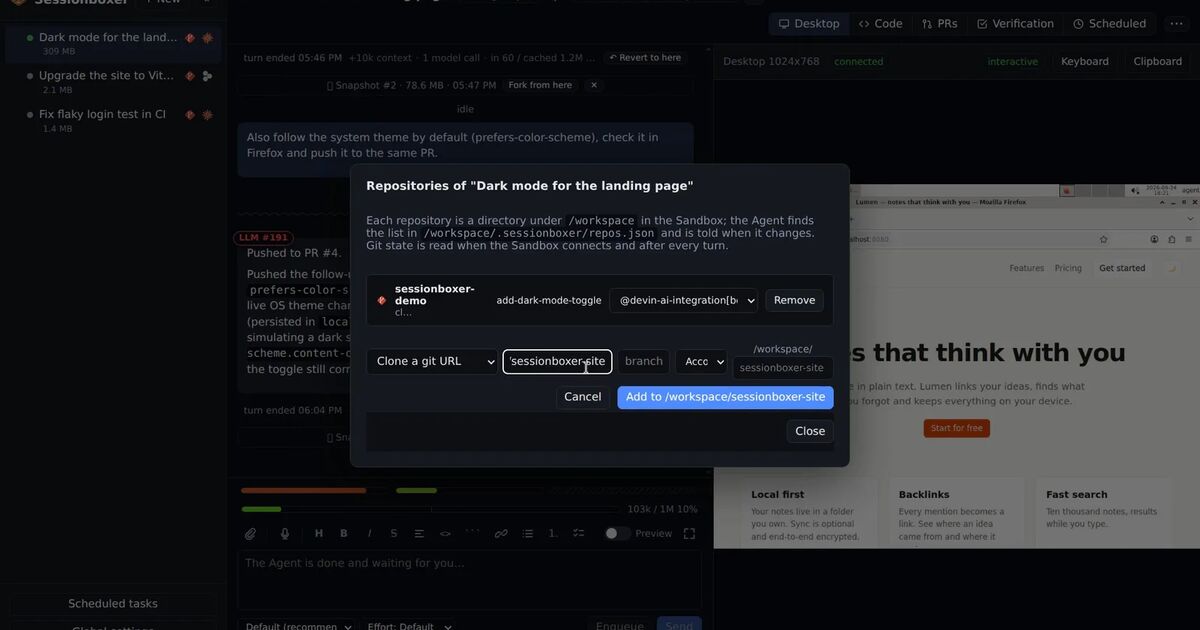
- A Linux desktop with Firefox in the box. The agent drives it with mouse and keyboard to test what it built, and you can watch it or take over.
- Snapshots and forks of the whole machine after each turn. You can fork from any snapshot, or hand the session to Claude Code or another agent with a written brief.
- Stop and resume. A stopped box uses no CPU or memory and resumes with the conversation, files and installed tools where they were. Nothing expires while it is stopped.
- Pull requests followed from the session: comments, reviews and checks in a table, buttons to have Codex address them, and auto-merge when checks pass.
- Usage bars for Codex's 5-hour and weekly windows. When a window runs out, the session waits with a countdown, and Auto-continue picks the turn up again after the reset.
To reach it from your phone, you pair the device through a tunnel or a private Tailscale network, as the Remote access chapter explains. The phone is then a browser pointed at your own machine.
Where each one falls short
Codex Cloud needs no machine of yours, and that is most of its appeal. The price is that the machine is OpenAI's. Your code is checked out there, the agent is Codex only, and how long a task's state lasts is OpenAI's decision. The pages we read describe the agent running commands and tests, not a desktop it drives with a mouse. If you want to see an app open in a browser before you merge, you test it yourself after pulling the branch.
Sessionboxer needs a machine that stays on, with Docker on it, and you are the one who keeps it running. These are the gaps on the Sessionboxer side:
- It does not filter the box's outbound traffic. Codex Cloud lets you turn internet off or allow a list of domains; Sessionboxer has no such switch.
- The agent's own login sits in the box. For Codex that is the
auth.jsonfrom your ChatGPT sign-in. Sessionboxer keeps other passwords out of the transcript with Utilities, held in memory and never in a snapshot, but it has no placeholder trick like Codex Cloud's network secrets. - There is one access token per installation and a list of paired devices. No user roles, no workspace sharing, no Personal vault.
- Your machine is the limit. Ten busy sessions need the CPU and memory of ten busy sessions.
Side by side
| Codex Cloud | Sessionboxer | |
|---|---|---|
| Where the work runs | VMs on OpenAI's side | Docker containers (or a Windows or macOS VM) on your machine |
| Agents | Codex | Codex and 12 others, including Claude Code, Cursor and Gemini CLI |
| How it is paid | ChatGPT plan; cloud tasks share and may use more of the allowance | Your ChatGPT plan, used like the local CLI |
| Environment setup | Codex inspects the repos and writes the install script | You pick repositories; the agent installs what it needs in its box |
| How long work lasts | Saved VM state up to 7 days after the last turn | Until you delete the session |
| Desktop the agent drives | Not in the pages linked here | Linux desktop with Firefox, watched live |
| Snapshot and fork the machine | Not in the pages linked here | After each turn |
| Outbound network control | Off, preset or domain list per environment | Not filtered |
| Secrets | Network secrets substituted by a proxy | Utilities in memory; the agent login is in the box |
| Teams | Shared environments in Enterprise | One access token, paired devices |
| Phone | Codex mobile app | A browser on your own machine, with a phone layout |
| Source | Closed | MIT |
Which one to pick
Pick Codex Cloud if you want tasks to run with nothing of yours switched on, you only use Codex, and the work is the kind you check with tests and a diff. It is also the better choice for a company on ChatGPT Enterprise that wants shared environments, network policy and secrets the agent never sees.
Pick Sessionboxer if you have a machine that can stay on and want Codex to work there with a desktop to test on, sessions that last until you delete them, and the option to switch to another agent halfway. It suits one developer or a small team. It does not give you an egress firewall or team permissions.
Both can live together. Codex Cloud is fine for the quick task you send from the bus. A long job that needs a browser, a snapshot to go back to, or Claude Code for the second half is where a box on your own machine pays off. If you are weighing other hosted agents too, our comparison of Devin, Cursor, Codex Cloud, Claude Code on the web and OpenHands puts them in one table, and the Coder Agents comparison covers the self-hosted platform route.