
You use Cursor every day. While its agent works on a long task, your laptop stays open and the fan stays on. Cursor Cloud Agents fix that by moving the work to a machine in Cursor's cloud. Some teams cannot put their code there, and some people would rather use a machine they already pay for. This post compares Cloud Agents with running Cursor's agent in a box on your own machine, so you can tell which one fits.
We build Sessionboxer, so this is a comparison from the maker of one of them. Everything about Cloud Agents below comes from Cursor's documentation, read on November 20, 2026. The pages change often, so check the linked page before you rely on a detail.
What Cursor Cloud Agents are
The Cloud Agents overview describes them as the same agent you use in the editor, running in an isolated VM in the cloud instead of on your computer. You can run many in parallel, and your computer does not need to be online while they work. You start one from the desktop app, the web, the iOS app, Slack, Linear, an @cursor comment on GitHub, or the API.
Each agent gets a full development environment: your repositories cloned, dependencies installed, secrets, start commands and network access. You can let the agent set that up, start from a saved snapshot, or point .cursor/environment.json at a Dockerfile. The agent pushes its work to a branch. A Cursor admin first connects GitHub, GitLab, Bitbucket Cloud or Azure DevOps.
The agent can build and run what it changed, drive the VM's desktop and browser, and attach screenshots, videos and logs to the pull request. You can take control of that desktop and hand it back.
A few details matter before you move work there:
- The security page says your code runs in isolated VMs on Cursor's AWS infrastructure, and the agent runs every terminal command without asking.
- The agent has internet access by default. Three modes change that: allow all, default domains plus an allowlist, or allowlist only. You can set them per user, team or saved environment.
- Secrets come in three types. Runtime Secrets are still environment variables, but their values are replaced with
[REDACTED]in tool results, the transcript and commits. Build Secrets reach only the Docker build. - Environment snapshots are deleted after 30 days without use. Each start or resume extends that by 30 days. Conversations are kept until you delete them.
- Cloud Agents use a curated set of models and bill against your Cursor plan at each model's rate. You are asked to set a spend limit the first time.
The self-hosted option inside Cursor
If "the code cannot leave our network" is the problem, Cursor has an answer of its own. Self-Hosted Machines move tool execution to a machine you manage. You install the Cursor CLI on it and run agent worker start. That opens an outbound HTTPS connection to Cursor, and Cursor sends the agent's tool calls down it. No inbound port is needed.
Read what stays where. The checkout, build cache and local credentials stay on your machine. The agent loop, the planning and the model calls stay in Cursor's cloud. During a run the worker sends Cursor what the agent needs: file contents, terminal output, diffs, screenshots and MCP results. Artifacts are uploaded to Cursor's storage.
The guide to choosing a runtime splits this into two setups. My Machines is for one person: the worker belongs to the user who started it, targets the repository it was started in, and must stay online while sessions run. You also clean it up between runs. Team Pools are for Enterprise teams that run a fleet, with service accounts, labels and autoscaling. On a My Machine, only the repository list from the environment settings applies, and no dashboard secrets reach it.
It is still Cursor's agent, models and dashboard, with your hardware running the commands. On a team, an admin must turn on Allow Personal Machines, the same switch as Cursor Remote Control.
How Sessionboxer runs Cursor
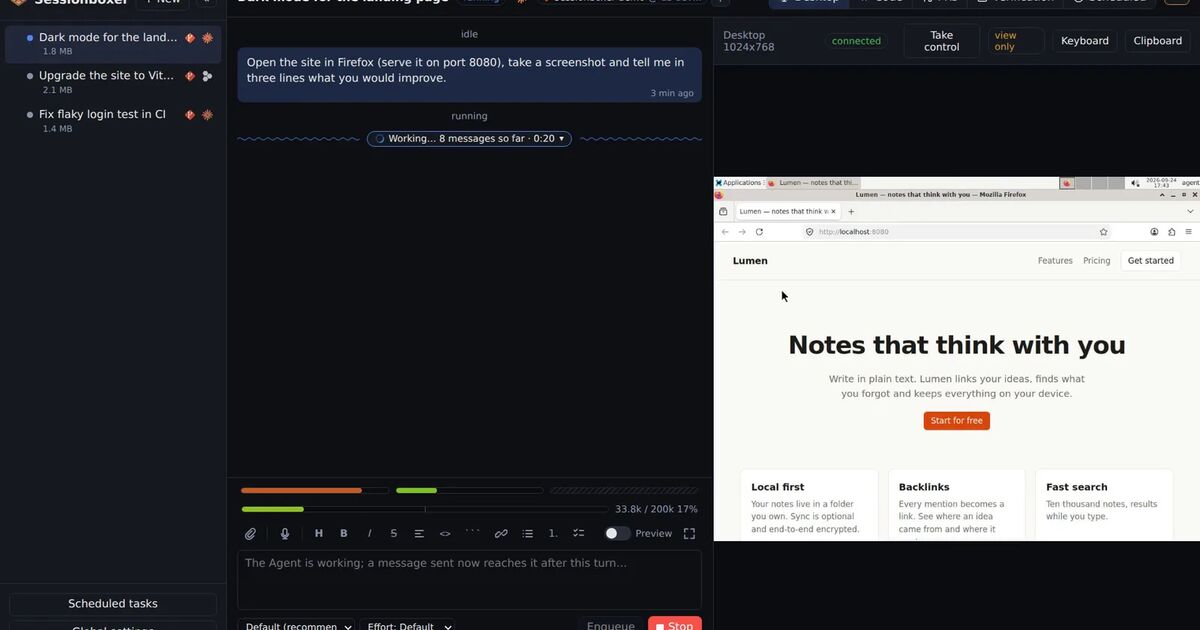
Sessionboxer is a program you install on a machine you own: a laptop, a home server or a VPS with Docker. It starts the vendors' own command-line agents, and Cursor's CLI is one of thirteen. You sign in with your Cursor account or paste an API key, as the Connect your agent chapter shows, and the agent runs on the plan you already have. There is no Sessionboxer account.
Each session gets its own Docker container, or a Windows or macOS VM. The repositories are cloned into it. Cursor runs inside with --force and does not stop to ask; the box is the limit of what it can touch. Our post on running Cursor CLI in Docker shows how to build that by hand; Sessionboxer does those steps for you.
The difference from Self-Hosted Machines is where the agent itself runs. In Sessionboxer the whole CLI runs in the box, and the model calls go from the box to Cursor as they do from your laptop. Sessionboxer adds no service of its own in between.
What you get around the CLI:
- A Linux desktop with Firefox in each box. The agent drives it with mouse and keyboard to test what it built, you watch it live, and you can take over.
- Snapshots of the whole machine, automatic after each turn if you turn them on, or by hand. You can fork a new session from any of them, or hand the session to Claude Code or Codex with a written brief. The snapshots chapter has the details.
- Stop and resume. A stopped box resumes with the conversation, files and installed tools where they were. Nothing expires while it waits.
- MCP servers registered once and switched on per session.
- Pull requests followed from the session, and auto-merge when checks pass.
- When Cursor reports a usage limit, the session waits instead of failing, and Auto-continue can pick the turn up again later.
From a phone you reach it through a tunnel or a private Tailscale network, as the Remote access chapter explains. The phone is a browser pointed at your machine, installable as an app with push notifications.
What each one does not do
Cloud Agents need no machine of yours and come with network rules and redacted secrets. But the VMs are Cursor's, the agent is Cursor only, and an environment snapshot unused for a month is gone. Self-Hosted Machines keep the checkout at home, but file contents and terminal output still travel to Cursor during a run.
Sessionboxer needs a machine that stays on, with Docker, and you keep it running. These are its gaps:
- It does not filter the box's outbound traffic.
- The agent's Cursor login sits in the box, on tmpfs, where the agent could read it.
- A container shares your host's kernel, so it is a weaker wall than a VM.
- There is one access token per installation and a list of paired devices. No roles, no team dashboard, no read-only sharing of a run.
- Your machine is the limit. Ten busy sessions need the CPU and memory of ten busy sessions.
- No Slack, Linear or
@cursortriggers. Automations run on a schedule or when a followed pull request changes.
Side by side
| Cursor Cloud Agents | Self-Hosted Machines (My Machines) | Sessionboxer | |
|---|---|---|---|
| Where tools run | VMs on Cursor's AWS | Your machine | A container or VM on your machine |
| Where the agent loop runs | Cursor's cloud | Cursor's cloud | In the box |
| Agents | Cursor | Cursor | Cursor and 12 others, including Claude Code and Codex |
| Desktop the agent drives | Yes, with remote control | Computer use on macOS and Linux workers | Linux desktop with Firefox, watched live |
| Outbound network control | Allow all, default + allowlist, allowlist only | Your machine's network | Not filtered |
| Secrets | Environment, Runtime (redacted) and Build secrets | The machine's own credentials | Kept out of the transcript by Utilities; the agent login is in the box |
| How long state lasts | Snapshots deleted after 30 days unused | Your disk; you clean it | Until you delete the session |
| Snapshot and fork the machine | Environment snapshots for setup | Not in the pages linked here | Any snapshot, into a new session or another agent |
| Teams | Team visibility, follow-ups, Team Pools on Enterprise | One user per worker | One access token, paired devices |
| Source | Closed | Closed | MIT |
Which one to pick
Pick Cursor Cloud Agents if you want tasks to run with nothing of yours switched on, your code can live in Cursor's cloud, and you want network rules and redacted secrets without building them. If your company already pays for Cursor Enterprise and the rule is that the checkout stays inside, try Self-Hosted Machines next.
Pick Sessionboxer if you have a machine that stays on and want the whole agent to run there, with a desktop to test on, sessions that last until you delete them, and the choice of a different agent halfway through. It suits one developer or a small team. It does not give you an egress firewall or team permissions.
You can use both. The quick fix you send from Slack fits a Cloud Agent. A long job that needs a browser, a snapshot to go back to, or Codex for the second half fits a box on your own machine. If you are also weighing Devin, Codex Cloud or Claude Code on the web, our comparison of hosted coding agents puts them in one table, and Codex Cloud vs Sessionboxer goes through the OpenAI side the same way.