
You run three Claude Code or Codex agents at once in Conductor, each on its own branch, and it works. Then a teammate on Linux wants the same setup, and Conductor only ships for the Mac. Or you want the agents to run without prompts, and you read that they run as you, with no sandbox. That is usually when people start looking for a Conductor alternative.
We build Sessionboxer, so this is a comparison from the maker of one of the two. Everything about Conductor below comes from its docs and pricing page, read on November 1, 2026. Conductor ships often, so check the linked page before you rely on a detail.
What Conductor is
Conductor is a Mac app for running several coding agents in parallel on one codebase. Its harness overview lists Claude Code, Codex, Cursor and OpenCode. Claude Code, Codex and OpenCode come bundled; Cursor goes through the Cursor API with a Cursor API key. The local app is free, and Conductor does not resell model usage: it uses the logins already on your machine, or an API key you give it.
Each task gets a workspace, and each workspace is a git worktree with its own branch, usually under ~/conductor/workspaces/<repo>/<city>. You get a diff view, setup and run scripts, checkpoints and a pull request flow around that worktree. The install page says it is "not available for Windows or Linux yet".
There are now two places a Conductor workspace can run, and they answer the safety question differently.
Local workspaces: fast, and on your user account
A local workspace is a folder on your Mac. The agent runs there as you. Conductor's FAQ is direct about it: "Agents run directly on your system without sandboxing." The worktree page adds that "Workspace isolation is development isolation, not a security boundary."
That is fine for code you trust with approvals on. It matters when you turn approvals off. Conductor's Big Terminal Mode starts Claude with --dangerously-skip-permissions and Codex with --sandbox danger-full-access when tool approvals are off, and at that point a bad command, a hostile install script or a poisoned repository hook can reach everything your user can. The FAQ's own advice for extra safety is to "run Conductor on a separate machine or VM dedicated to development work."
Conductor Cloud: a sandbox per workspace, in their cloud
Conductor Cloud runs each workspace in an isolated Linux sandbox. The Cloud FAQ gives the details: a Vercel sandbox in us-east-1 with 8 vCPUs, 16 GB of RAM and 32 GB of ephemeral storage on Amazon Linux 2023. Agents keep working after you close the app. Cloud needs a Pro plan ($50 a month) or a team plan, supports GitHub repositories only for now, and you still bring your own subscription or API key.
Read the privacy line before you move work there: "chat messages from cloud workspaces are stored on Conductor's servers." Local sessions talk straight to your model provider. A cloud workspace also goes to sleep after 20 minutes without agent or terminal activity, and every sandbox stops at 23 hours and 50 minutes even if it is busy. Files and chat history survive that; running processes do not.
You cannot point Cloud at your own machines yet. The FAQ says Conductor is building a self-hosted offering and asks interested Enterprise customers to get in touch. Today the choice is your Mac with no sandbox, or a sandbox in Conductor's cloud.
Sessionboxer: a container per session, on a machine you own
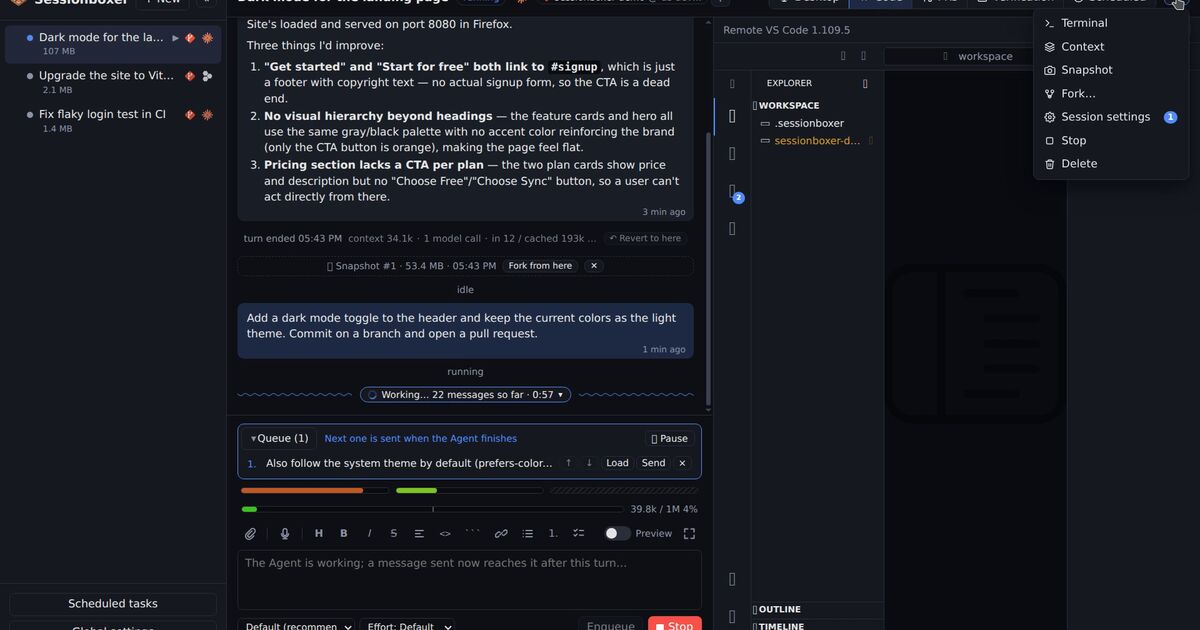
Sessionboxer puts each session in its own Docker container on your laptop or your server. The code is cloned into the box, the agent runs inside it, and the container is the boundary. Inside, the agent runs without permission prompts, because a bad command can only damage that box. Delete the session and its container and snapshots go with it.
The agent uses the login you already have for Claude Code, Codex, Cursor, OpenCode, Gemini CLI, GitHub Copilot and the other supported agents. There is no Sessionboxer account. Sessions and chat history live in ~/.sessionboxer/db.sqlite on the machine that runs it. Sessionboxer is MIT licensed.
A few things follow from the box:
- Stop a session and resume it a week later with the conversation, files and installed packages where they were. A stopped box uses no CPU or memory.
- The box has a Linux desktop with Firefox that the agent drives with mouse and keyboard, and that you watch and take over.
- You can snapshot the whole machine and fork it into a new session, or hand it to a different agent.
- Agents can run Docker inside their own box, and a Linux host with KVM can run Windows or macOS sessions.
| Conductor local | Conductor Cloud | Sessionboxer | |
|---|---|---|---|
| Where the agent runs | Your Mac, as your user | Vercel sandbox, us-east-1 | A container on your machine or server |
| Sandbox | None | Linux microVM | Docker container, or a Windows/macOS VM |
| Host you need | A Mac | The Mac app or the iOS app | Linux, or macOS with OrbStack or Docker Desktop |
| Where chats are stored | Your Mac | Conductor's servers | The machine running Sessionboxer |
| Runs after you close the laptop | No | Until it sleeps or hits 23h50m | Yes, if it runs on a server |
| Price | Free | Pro, $50/month | Free, MIT |
What Conductor does that Sessionboxer does not
Conductor is a polished native Mac app, and worktrees are light. A new workspace appears in seconds with no image to pull and no container using memory. Your own SDKs, simulators and keychain are right there.
It also has features we do not:
- Multiplayer in Cloud: teammates open the same workspace, watch the same chat live, follow it and reassign it. A Sessionboxer Control Plane has one access token and a list of your logged-in devices. Its guide describes no shared team workspaces.
- An iOS app with Remote control of the Mac's local workspaces, end-to-end encrypted through Conductor's relay. Sessionboxer's phone client is its web UI installed as an app, reached on your Wi-Fi or through a tunnel.
- Spotlight testing, which syncs a workspace back to the repository root so you can test it with the one Docker stack or database you already run there.
Going back to an earlier turn also works differently. Conductor's checkpoints revert the code and "permanently delete" the later messages. Sessionboxer's Revert to here keeps the old path as a branch of the conversation, but leaves the files alone; to roll files back you fork a snapshot.
What Sessionboxer asks of you
You need Docker, and each session is a container with a desktop, so it uses more memory and disk than a worktree. The Install chapter covers Docker Engine on Linux, and OrbStack or Docker Desktop on a Mac. The tools on your laptop are not in the box until you or the agent install them. Windows and macOS sessions need a Linux host with KVM, so they do not run on a Mac with Docker Desktop. If your work is a native Mac or iOS app that needs Xcode on your own machine, Conductor's local workspaces fit it better.
If you run Sessionboxer on a laptop, sessions stop when the laptop sleeps, same as Conductor local. To keep them going, install it on a server and reach it from the laptop and the phone as the Remote access chapter describes.
Which one to pick
Pick Conductor if you work on a Mac, the agents work on your own code with approvals on, and you want a fast native app. Pick Conductor Cloud if your team wants shared chats, works on GitHub and is fine with Conductor storing the transcripts.
Pick Sessionboxer if you are on Linux, if the agents should run without prompts on a machine you control, if they open repositories you did not write, or if they need a desktop to test what they built. Start a session walks through the first one.
If you are also weighing T3 Code, which runs agents on your own machine like Conductor's local mode, our T3 Code comparison covers it. For what worktrees alone leave shared between parallel agents, see running several coding agents in parallel.