
The agent is ten minutes into a refactor and you already know the next two things you want: run the full test suite, then update the changelog. You could wait at the keyboard. Or you could type them now and let the agent pick them up when it is ready. Both Claude Code and Codex let you do that, but "when it is ready" means something different in each, and the difference decides whether your message lands in the middle of the refactor or after it.
Below is what each one does with it, based on the Claude Code interactive mode reference and the Codex CLI command reference, both read on November 15, 2026. Then what the queue in Sessionboxer does, which we build, and what it does not do.
Two kinds of "later"
There are two places a message you type mid-task can go.
It can go into the turn that is running. The agent finishes the tool call it is on, reads your message and carries on with it in mind. This is good for corrections: "the deploy target is staging", "don't touch the migrations". Codex calls this steering.
Or it can wait for the turn to end and start a new one. The agent finishes, reports back, and only then reads your message as the next task. That is what "then run the tests" needs: the tests should run on the finished refactor.
Claude Code: Enter queues, and the queue joins the turn
In Claude Code you type a message and press Enter while Claude is working. The docs say it queues the message "instead of interrupting the turn" and lists the queued entries in the conversation. They stay gray until Claude starts responding to them, so you can see what it has not picked up yet.
When a queued message reaches Claude is the part to know. The docs are specific: if you queue a message while Claude is running tool calls, Claude Code passes it to Claude "as soon as those tool calls finish, within the same turn." Only when the turn ends with messages still queued do they go out as new prompts, in the order you typed them.
So a plain message in Claude Code's queue usually lands inside the running turn, more like Codex's steering than a to-do list. Queue "now update the changelog" halfway through the refactor and Claude may read it before the refactor is done.
Commands are different. Slash commands and ! shell commands are held until the turn ends, then run one at a time. A few commands are never queued and run as soon as you send them, among them /model, /effort and /fast; the docs say for each whether the change reaches the turn already running. One consequence the docs imply but do not spell out: if you queue ! npm test and then a message, the message can reach Claude first, because it joins the running turn while the shell command waits.
The keys around the queue:
| Key | What it does |
|---|---|
Enter while Claude works |
Queues the message |
Ctrl+Enter or Ctrl+X Ctrl+S |
Sends what you queued now (v2.1.275 or later) |
Esc |
Interrupts the turn; queued messages are sent next |
Up from the first line |
Takes queued messages back into the input box to edit |
Ctrl+Enter does not always interrupt. Since v2.1.281, shell commands or subagents that can move to the background go there and keep running, and Claude reads your messages in the same turn. If Claude is only writing, the turn is interrupted. In terminals that do not report Ctrl+Enter, use Ctrl+X Ctrl+S.
Codex: Enter steers, Tab queues
The Codex CLI splits the two on purpose. Its reference lists both:
- "Press Enter while Codex is working to inject new instructions into the current turn."
- "Press Tab while Codex is working to queue a follow-up prompt, slash command, or shell command for the next turn."
So in Codex, Tab is the real "after this" queue and Enter is for corrections. Queued slash commands are parsed when they run, which means a typo in one shows its error only after the current turn finishes. Slash completion still works before you press Tab, so you can check the name first.
Codex also has a command for queueing from outside the session:
codex queue --thread <SESSION_ID> --message "Run the remaining checks"
It takes text only and uses the session's model. --resume also resumes the session if it is not loaded, which needs a running local daemon or a server picked with --remote.
What a queue cannot fix
A queue only helps if the turn can end without you. If the agent stops on a permission prompt, the turn has not ended, and nothing behind it moves. Claude Code's docs say this outright about the automatic continue after a usage limit: the continued task "can stop on a prompt while you're away." The same applies to a queue you leave running over lunch.
Write each queued prompt so it makes sense on its own. "Then do the other one" means nothing three turns later; "run npm test and fix any failures in src/billing/" does. And if the next step depends on how this one turns out, read the result before you queue it.
An agent that runs without prompts should run somewhere it cannot do damage. Our post on running several agents in parallel covers that set-up.
The queue in Sessionboxer
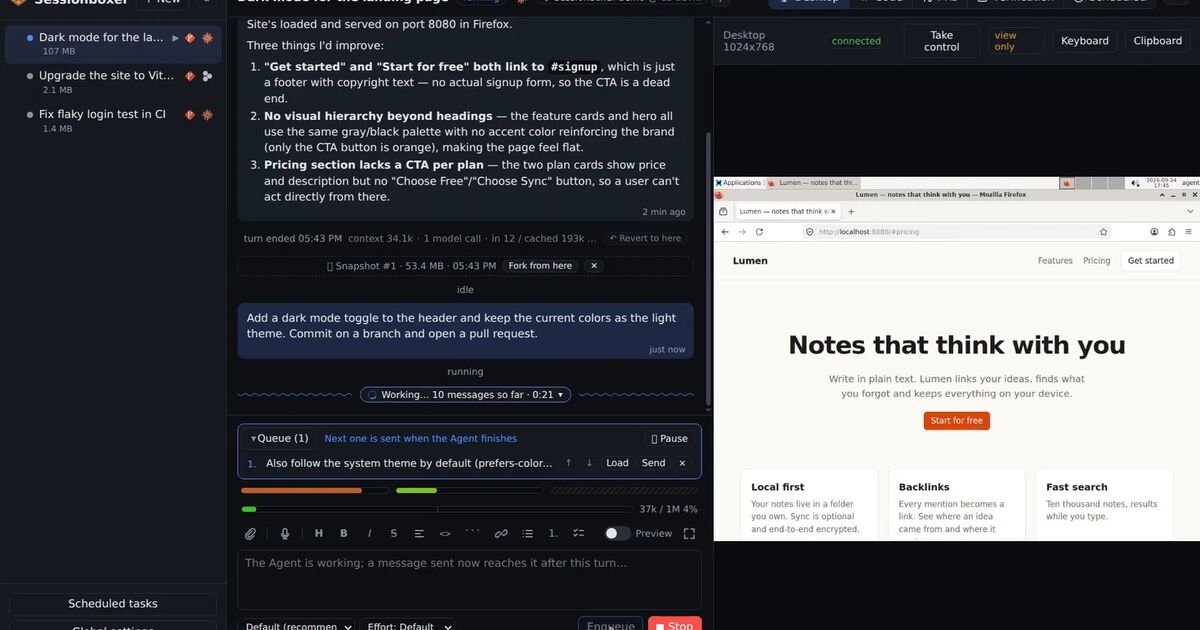
Sessionboxer drives the agent through the Agent Client Protocol and has its own chat, so the agent's terminal keys above do not apply there. The prompt box has an Enqueue button (Ctrl+S) that puts the message in the session's Queue. The queue plays by itself: each message goes out when the agent is idle, one turn at a time. If the agent is idle now, the first one goes right away. If it is working, it goes when the turn ends. If the session is stopped, it goes when you resume it.
Every queued message starts its own turn. Nothing is folded into the running one, so the behaviour is close to Codex's Tab. From the list you can load a message back into the box to edit it, send one now, reorder them or delete one. Pause lets the current turn finish and holds the rest; Resume lets them go again. The Talk to the agent chapter has the details.
Two other things in Sessionboxer go through the same queue, so you see them there:
- Automations that prompt an existing session. If it is busy, the prompt waits in the queue; if it is stopped, it is resumed first.
- Address on a failing check or a review comment of a pull request, while the agent is busy.
The queue is kept by the Control Plane, the server part of Sessionboxer, so it does not depend on a browser tab staying open. You can queue from your phone and close it. When the agent hits a subscription limit, the queue waits; with Auto-continue on, it plays on after the continued turn. Our post on what to do when Claude Code's usage limit is reached and the usage limits feature cover how that works.
Each session runs in its own container with all permissions granted inside the box, so a queued prompt does not stop on a permission dialog.
What it does not do:
- There is no steering. While the agent works, Send turns into Stop, which interrupts the turn. What you typed stays in the box, and you can send it once the turn has stopped.
- If a queued message cannot be sent, the queue pauses instead of trying the next one, and waits for you.
- An automation or a PR action that adds a prompt to a paused queue sets it playing again, including the messages you had held.
- With Verify each turn end to end on, a queued message waits until the verification run is over, and each verified turn costs a second turn of model time.
Which one to use
If you work in Claude Code's terminal, press Enter for both corrections and follow-ups, and expect a plain message to land in the current turn. When a follow-up must wait for the work to finish, ask for it in the message itself ("when the refactor is done, run the tests"), or queue it as a ! command, which waits for the turn to end.
If you work in Codex, use Enter to correct and Tab to line up the next task. Use codex queue when the message comes from a script.