
Your company keeps its code on bitbucket.yourcompany.com. You want a coding agent to do what the demos show: clone the repository, make the change, push a branch, open the pull request, then come back and answer the reviewer. Then you read the setup pages, and most of them start with "connect GitHub".
This post is for that situation. It covers what the agents' own integrations do with Bitbucket today, how to give an agent a Bitbucket Data Center login without handing it your password, and what Sessionboxer adds for pull requests and builds. We make Sessionboxer, so that part is about our own product, including what it does not cover.
What the agents' own integrations cover
Claude Code in your terminal runs git as you. If git clone and git push work for you against your Bitbucket, they work for the agent, because it uses the same credentials. What is missing is the pull request side: Claude Code has no built-in Bitbucket tool or MCP server, so the agent cannot open a PR, read comments or see a failed build unless you give it a way.
The cloud side is narrower. Claude Code's page on cloud sessions says it plainly under limitations: "repository cloning and pull request creation require GitHub." You can send a Bitbucket repository to a cloud session as a local bundle with CCR_FORCE_BUNDLE=1, "but the session can't push results back to that remote." Anthropic documents GitHub Actions and GitLab CI/CD integrations. The feature request for native Bitbucket support, which asks for self-hosted Bitbucket explicitly, was opened in March 2026 and is still open.
Atlassian has its own answer for Bitbucket Cloud. Agentic Pipelines, in beta, runs Rovo Dev, Claude Code or Codex inside a Bitbucket Pipelines step, with a built-in Bitbucket MCP server and scoped OAuth tokens. That page is in the Bitbucket Cloud documentation. If your Bitbucket is bitbucket.org, start there.
If it is Data Center, it is not going away soon. Atlassian's Data Center end of life page says most Data Center products become read-only in March 2029, but "Bitbucket and Bamboo Data Center will not end of life" and existing customers get a hybrid license instead.
Give the agent a token, not your password
Bitbucket Data Center has HTTP access tokens. You create one on your profile (Profile picture, then Manage account, then HTTP access tokens) and pick its permissions and expiry. Git over HTTPS accepts it as the password, and the REST API accepts it as a Bearer token.
For an agent, two permissions are enough: Project read and Repository write. Atlassian's table says that combination can push, pull, clone and "perform pull request actions", except merge. Atlassian's docs also say no token of any level can merge a pull request, "as the merge creates a commit (only users with a valid e-mail address can create a commit)." That is a useful limit here. The agent can open and update the PR, and a person presses the merge button.
A few habits that help:
- Give the token an expiry. If your administrator requires one, you have to.
- Make one token per integration, as Atlassian recommends, so you can revoke the agent's without breaking your other scripts.
- Do not put the token in the clone URL. Git saves the remote URL in
.git/config, and the agent can read that file and print it. Use a credential helper instead. - If you want the agent's work to show up under its own name, give it its own Bitbucket account and make the token there. The reasoning is the same as for GitHub in who pushed your agent's commits.
The pull request side, from the command line
For GitHub, agents lean on gh. Bitbucket Data Center has no official equivalent, so we wrote bb, a small open-source CLI that does the same job for a self-hosted Bitbucket. It is early, it needs Node.js 22.18 or newer, and today you install it from a checkout of the repository. It works without Sessionboxer.
bb auth login --hostname bitbucket.yourcompany.com   # paste the token once
bb auth setup-git                                    # prints the credential helper line for git
bb pr create -t "Fix login" -r alice                 # current branch to the default branch
bb pr view 12 --comments                             # threads, replies, tasks, file:line anchors
bb pr checks 12                                      # build statuses of the source commit
bb pr comment 12 --reply-to 345 --body "Fixed in the last push"
The credential helper answers only for the Bitbucket hosts it knows, with your username and the token, and stays silent for any other host. Tell the agent in its instructions file (CLAUDE.md or AGENTS.md) that bb exists and what it is for, and it can open the PR and read the review by itself. There is no bb pr merge, for the reason above.
If your machine is behind Zscaler or Cloudflare WARP, bb runs on Node and may fail with a certificate error that your browser does not show. The fix is the same as for the agents themselves, covered in Claude Code behind Zscaler or WARP.
What Sessionboxer does with a Bitbucket login
In Sessionboxer each session runs in its own container, with the agent and the subscription you connect. Bitbucket Data Center is one of the Git accounts you can connect. The Bitbucket chapter of the guide has the full steps. In short: Settings, Git accounts, Connect Bitbucket, type the host, follow the link to its token page, create a token with Project read and Repository write, paste it. Sessionboxer checks it against the host and shows whose it is.
While the entry is enabled for a session, git clone, git push and bb in the box work as that account. The token is kept like any other secret, written on tmpfs in the box, and left out of snapshots. Switching the entry off removes the login from the box. You can add one entry per host or per account, as described in your repositories, your subscription.
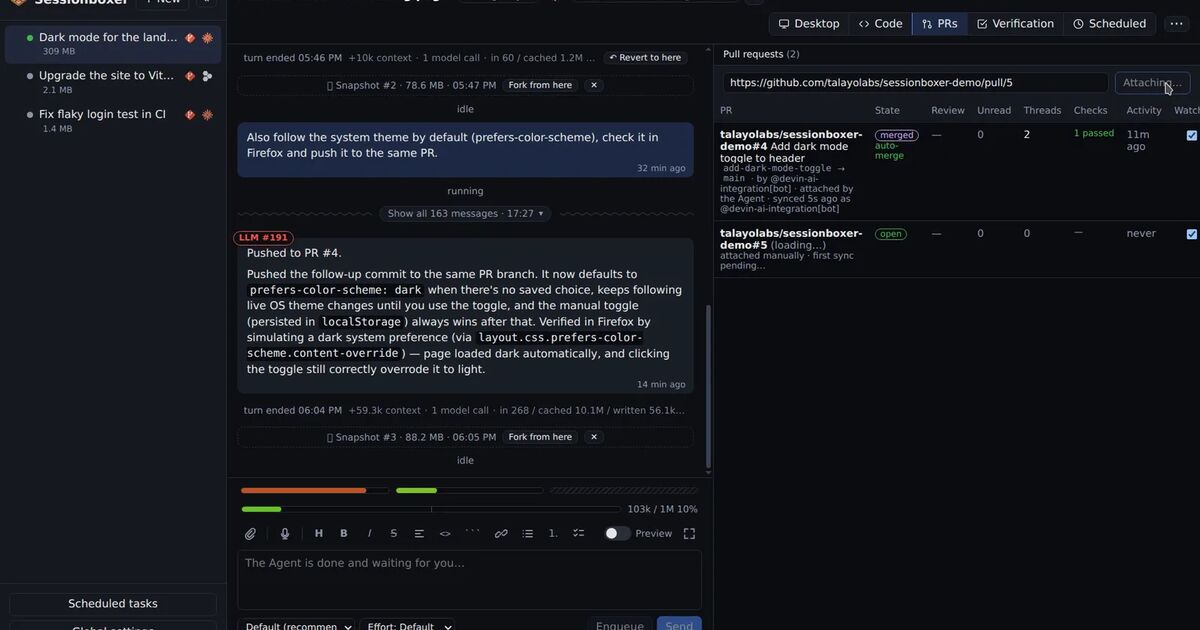
When the agent runs bb pr create, or you paste a Bitbucket pull request URL into the prompt, the PR is attached to the session. The PRs tab then shows:
- comments and replies, inline ones with their
path:line, tasks, resolved threads, approvals and "needs work"; - the build statuses on the head commit as checks, whether they come from Bamboo, Jenkins or GitHub Actions posting to Bitbucket, with the required builds of the target branch marked as required.
Each comment can go to the agent. Address has it make the change and commit. Address & reply also has it push and answer in the thread with bb pr comment --reply-to. A failed build has Fix & push: the agent opens the build's page, reproduces the failure in the box and pushes the fix. Bitbucket PRs are watched from the Sessionboxer server with the connected token, so a stopped session keeps watching. The pull requests chapter has the details.
You can also follow a whole repository (PROJECT/slug on your host) and attach automations to it. An Auto review starts a session on the PR head and, when it is done, Sessionboxer posts one Bitbucket comment per finding plus a summary. The box never holds the token for that. Auto QA records the agent testing the change on a desktop and posts a comment with a link to the video. A Bitbucket webhook is optional: Sessionboxer gives you the payload URL and secret to paste, and a delivery only makes it check that PR sooner. Triggers and limits are in the automations chapter.
What it does not do
- Bitbucket Cloud (
bitbucket.org) is not covered. The connect dialog refuses it. - There is no auto-merge for Bitbucket pull requests. That part of the PR toolbar is GitHub-only, because the token cannot merge. Merging stays in the browser.
- A Data Center served under a path, such as
https://host/bitbucket/, does not work yet. The host has to be the root. - The Bitbucket entry adds no MCP server. The agent works through
gitandbbin its terminal. - When the token expires, git and
bbget 401 errors. The entry's Reconnect takes a new one.
A setup you can do today
- Create an HTTP access token for the agent with Project read, Repository write and an expiry, ideally on an account of its own.
- Run the agent in a container or on a machine that does not have your own Bitbucket credentials, so that token is the only Bitbucket login it can find.
- Install
bbthere, or connect the token in Sessionboxer, and let the agent open the PR itself. - Keep a required approval and the required builds on your target branch. Then the agent can push and reply, and a person still approves and merges.