
You have two GitHub accounts. One is for work and belongs to your employer's organization. The other is yours, with side projects and a dotfiles repository. On your laptop you have a routine that mostly works. Then a coding agent runs git push in the work repository and gets this:
remote: Permission to acme/billing.git denied to jane-dev.
fatal: unable to access 'https://github.com/acme/billing.git/': The requested URL returned error: 403
The quiet failure is worse. Your personal account is also a member of the work organization, so the push goes through, the pull request opens under the wrong name, and the commits carry your personal email. Nobody notices until a colleague asks why the billing PR came from your hobby account.
This post explains how git and the GitHub CLI pick an account, the fixes GitHub documents, what changes when an agent is the one typing the commands, and how Sessionboxer binds each repository to one account. We make Sessionboxer, so that part is about our own product, including what it does not do.
Where the account comes from
Three separate settings decide who you are on GitHub, and nothing keeps them in step.
The push uses whatever your git credential helper returns for github.com. By default git ignores the path of an HTTPS URL when it asks the helper. The gitcredentials manual gives the example: a credential stored for https://example.com/foo.git will also be used for https://example.com/bar.git. One host means one stored login, for every repository on it.
The GitHub CLI keeps its own logins. It can hold several accounts per host, but only one is active at a time. gh auth switch changes the active account for that host, so every later gh command that reads the same configuration uses the new one, not only the shell where you typed it. A GH_TOKEN in the environment beats them all: the environment reference says it "takes precedence over previously stored credentials". And if you once ran gh auth setup-git, git asks gh for its credentials, so the active gh account also decides who pushes.
The commit author is the third setting. It is the user.email in your git config, and GitHub uses that email to link the commit to an account. You can push with your work login and still produce commits that GitHub shows under your personal account.
The fixes GitHub documents
GitHub has a page on managing multiple accounts from one workstation. For HTTPS, it tells git to store credentials per repository URL and gives each account its own personal access token:
git config --global credential.https://github.com.useHttpPath true
The next time you clone or fetch a repository, git asks for a credential. You paste the token of the account that has access, and git keeps it for that URL. The same page covers SSH too, with a separate key per account or with GIT_SSH_COMMAND set for each command.
For the author email, set it inside a repository with git config user.email, or for a whole folder with a conditional include in your global config:
[includeIf "gitdir:~/work/"]
    path = ~/.gitconfig-work
Every repository under ~/work/ then also reads ~/.gitconfig-work, which holds the work email. A pattern that ends in / covers everything below it.
These work well for a person who knows which folder they are in and which account they meant.
What changes when an agent types the commands
An agent running on your laptop inherits all of this. It can use every token in your keychain and every account gh knows about. That is convenient, and it is also where things go wrong.
The agent does not know which account a repository needs unless something tells it. The remote URL says github.com/acme/billing. It does not say "push as the work account".
When a push fails with a 403, the agent tries to get past it, because finishing the task is what you asked for. gh auth switch is right there. It fixes that push and changes the active account for the next gh command everywhere else too, including the terminal where you are about to open a pull request on your side project. Run two agents at once, one per account, and they share one gh configuration and one credential store. A switch in one changes the account under the other in the middle of its task.
And anything the agent can use, it can read. Two accounts' tokens on the machine means two accounts exposed if a prompt injection gets through. Keeping secrets away from your coding agent covers that side.
How Sessionboxer binds a repository to an account
Each Sessionboxer session runs in its own container, so the agent never sees your laptop's keychain or gh configuration. It only gets the GitHub logins you connect for that session.
You connect GitHub in Settings → Git accounts, through the GitHub CLI's login, the Sessionboxer OAuth App, or a personal access token. For two accounts, add the entry twice under different names, for example github-work and github-personal. The same entry gives the agent GitHub's own MCP server logged in as that account, and logs the box in for git and gh.
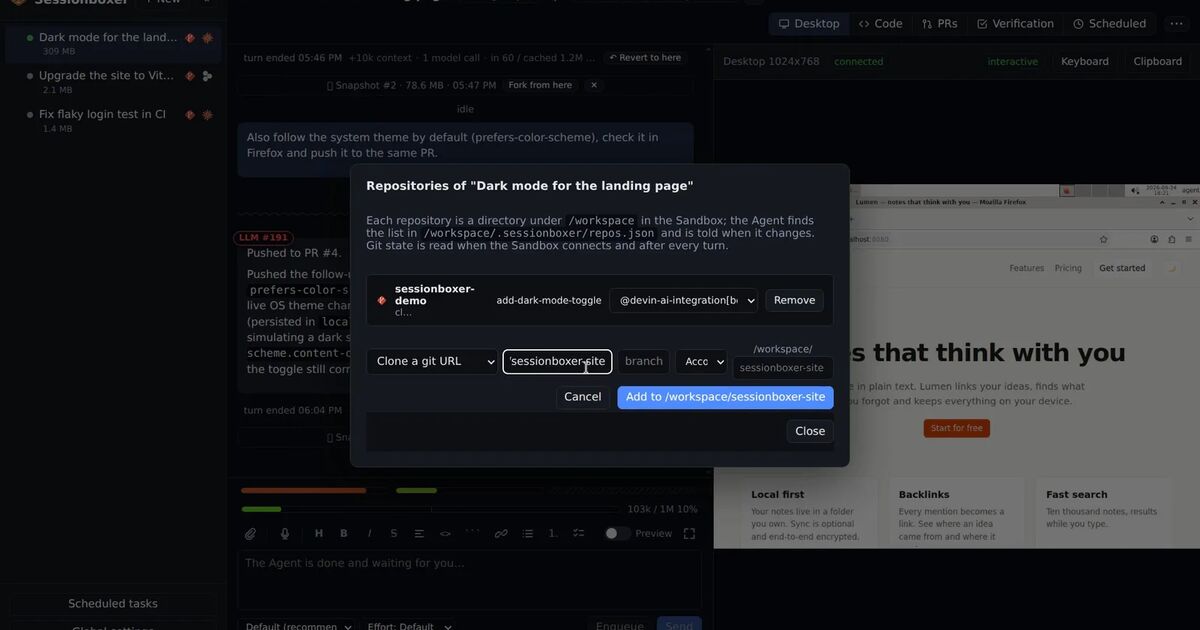
When you start a session, each git URL has an Account dropdown with every connected account. The default is auto: Sessionboxer asks GitHub which of the session's accounts can push to the repository, then which can see it, and otherwise takes the first. The repository is cloned as that account. Inside its directory, git push, git fetch and every gh command act as that account, whatever gh auth status says is active elsewhere in the box. The binding is a line in the repository's .git/config, sessionboxer.githubAccount, which names the login and never holds a token.
A session with acme/billing bound to the work account and jane-dev/dotfiles bound to the personal one can push to both in the same turn, without a switch. The header shows as @login for each repository, and the agent's briefing and repos.json say which account each one uses, so the agent does not have to guess. For pull requests attached to the session, watching, the fix actions and auto-merge use the bound account first.
From the command line, --as takes the GitHub login and applies to the --git URLs in order:
sessionboxer new \
  --git https://github.com/acme/billing --as jane-acme \
  --git https://github.com/jane-dev/dotfiles --as jane-dev
You can change a binding later in the header's repository dialog, even while the session is stopped (it applies on resume). The logins live on tmpfs in the box, so snapshots and stopped boxes never carry them. Switching an entry off in the session's MCP popover removes that login from the box. The GitHub login chapter has the full rules, and Your repositories, your subscription shows the dialog.
What Sessionboxer does not do
- The git author is set per session, not per repository. The name and email you pick when you start a session become the box's
user.nameanduser.emailfor every repository in it. If one repository needs another email, rungit config user.emailinside that repository in the box (or ask the agent to), or use two sessions. - The box has no SSH keys.
git@github.com:URLs are cloned over HTTPS with the bound login. - Folders copied from your machine are not bound to an account.
- The binding is for GitHub. Bitbucket Data Center gets one entry per host or account, and GitLab is not covered.
- The agent can still run
gh auth switchin the box. Bound repositories ignore it, but anything that falls back to the box's active account follows it.
A setup to start with
- Write down which account owns each repository. If your personal account is also in the work organization, watch that case closely, because pushes succeed with either account.
- Connect each account once. A fine-grained token limited to the repositories it needs keeps the scope narrow.
- Set the commit email for each account's repositories:
includeIfon your laptop, the session's git author (or a per-repositorygit config user.email) in a box. - Tell the agent in its instructions not to run
gh auth switchorgh auth login. If a push fails with a 403, it should stop and say which account it used. - Check the first pull request. The PR author, the commit avatars and, if you are in GitHub's preview, the pusher GitHub now records should all be the account you meant.