
You want Claude Code to stop asking before every command. Anthropic's docs say that is fine inside a container or a virtual machine. So you look for a box to put it in, and you find two official answers: a dev container from Anthropic and Docker Sandboxes from Docker. Both run Claude Code with --dangerously-skip-permissions. They draw the boundary in different places.
Below we compare them on four questions: where your project files live, where your Claude login lives, what the network allows, and whose Docker the agent gets when it runs docker. We make Sessionboxer, a third way to box an agent, so it is in the comparison too, together with what it does not do. Everything here comes from each project's documentation as of 20 October 2026.
The short version
| Claude Code dev container | Docker Sandboxes (sbx) |
Sessionboxer | |
|---|---|---|---|
| Boundary | A Docker container | A microVM with its own kernel | A Docker container (a Windows or macOS VM on Linux hosts with KVM) |
| Your project | Bind-mounted: edits appear on your host | Mounted read-write by default; --clone gives a private clone |
Cloned from a git URL or copied from a folder |
| Claude login | Inside the container, under ~/.claude |
Stays on the host; a proxy adds it to requests | Handed to the box as an environment variable |
| Network | Open, unless you add the reference firewall | Default deny with an allow list, if you pick Balanced | Not restricted |
| Docker for the agent | Up to your configuration | Its own Docker Engine in the VM | Optional; unprivileged with Sysbox |
| Where you work | Your editor | Your terminal, or an editor integration | A browser page with chat, desktop, VS Code and terminals |
The dev container: your editor, your files, a firewall you add
Anthropic ships Claude Code as a Dev Container Feature. You add ghcr.io/anthropics/devcontainer-features/claude-code:1.0 to .devcontainer/devcontainer.json, rebuild the container in VS Code, Codespaces, a JetBrains IDE or Cursor, and run claude in the integrated terminal.
Your project is bind-mounted. The docs say commands run inside the container "while edits to your project files appear in your local repository as you work." That is the convenient part, and also the limit. The section on running without prompts says it plainly: "Claude can still modify any file in the bind-mounted workspace, which appears directly on your host."
The login lives inside the container. Claude Code keeps its token under ~/.claude, and the docs show how to put that on a named volume so you do not sign in again after every rebuild. The warning at the top of the page tells you what that means with the flag on: dev containers "do not prevent a malicious project from exfiltrating anything accessible inside the container, including the Claude Code credentials stored in ~/.claude." Anthropic's advice is to use them only with trusted repositories.
The network is yours to close. The feature alone installs the CLI and nothing else. The reference container adds init-firewall.sh, which limits outbound traffic to an allow list, and the NET_ADMIN and NET_RAW capabilities it needs to run. Anthropic calls it "a working example rather than a maintained base image."
Two details trip people up. The CLI refuses --dangerously-skip-permissions as root, so remoteUser has to be a normal account. And a .devcontainer/ folder in the repository is a convention, not enforcement: Anthropic's sandbox comparison page says Claude Code does not require a container, so a developer can still run it outside one.
Docker Sandboxes: a microVM, a proxy and a choice of mount
sbx run claude starts Claude Code in a microVM, and the Claude Code agent page says the default command is claude --dangerously-skip-permissions. Each sandbox has its own kernel and its own Docker Engine, and the isolation page says "the agent has no path to your host Docker daemon."
The files are the part to read carefully. Without a path, sbx run mounts the current directory read-write, and Docker's docs say that in this mode "there is no boundary between the agent's edits and your host filesystem." That includes .git/hooks, CI workflows and the .claude/ folder. The safer mode is --clone: your repository is mounted read-only and the agent works on a private clone inside the VM. You get its work back with git fetch sandbox-<name>, as the Git workflows page explains. Clone mode is chosen when you create the sandbox and cannot be switched later.
The network goes through a proxy on your host. On the first run, sbx asks you to pick a policy: Open, Balanced (default deny, with common development sites allowed) or Locked Down. With Balanced, a connection to a destination that no rule allows is refused.
The login stays on the host. API keys go into your OS keychain with sbx secret set anthropic, and the proxy writes them into outgoing requests, so the agent only sees a placeholder. For a Claude subscription you run /login inside the sandbox, and the getting started page says "the session token stays on your host and is never stored inside the sandbox."
Docker lists limits, too. The sandbox does not read your user-level ~/.claude, only the project's configuration. Local stdio MCP servers registered through Docker's MCP gateway run on the host, outside the VM.
Sessionboxer: a box per session, with a screen
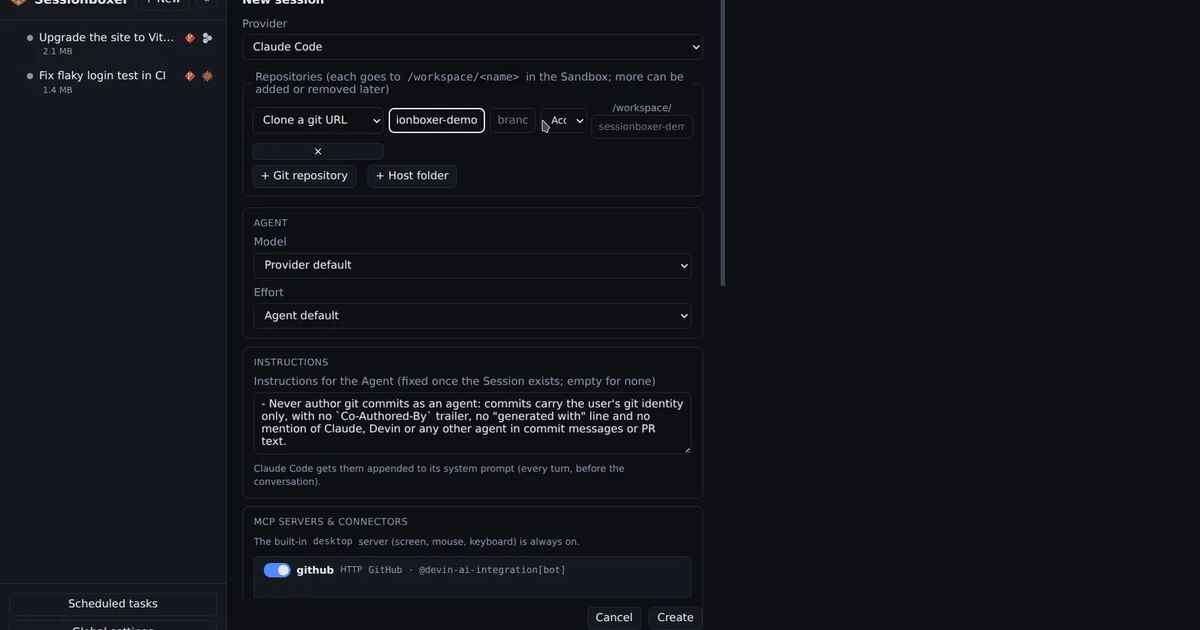
Sessionboxer runs one Docker container per session. Your repositories are cloned into it from a git URL, or a folder on your machine is copied in. A folder is copied, not mounted, so the agent's edits stay in the box until you use Pull to folder…, which shows what would change before it writes anything. Claude Code runs inside with all permissions granted, and the box publishes no ports on your machine.
You work in a browser page. The chat sits next to a Linux desktop the agent can drive, VS Code running inside the box, and terminals. The start a session chapter walks through creating one.
If the agent needs Docker, Docker inside the box is a checkbox per session. With Sysbox on the host the box stays an unprivileged container. Without it the box runs privileged, which means the agent could break out onto your machine; Sessionboxer allows it but marks those sessions and warns in Global settings. The Docker inside sessions chapter has the details, and our earlier post on Docker in Docker for coding agents compares the options.
What Sessionboxer does not do matters here, because it is where the other two are stronger:
- It does not filter outbound traffic. An agent in the box can reach any address your machine can. If you need an allow list, you have to put it in front of Docker yourself.
- With a Claude subscription, the token reaches the box as
CLAUDE_CODE_OAUTH_TOKENin the agent's environment. The agent can read it, and with an open network it could send it somewhere. Docker's proxy design keeps the token out of the sandbox; ours does not. - While a GitHub entry is enabled for a session, the box is logged in as that account. The agent can use that login too.
- A container shares the host's kernel. That is a weaker wall than Docker's microVM.
Which one fits
If your team already works in VS Code or Codespaces, wants the same environment on every machine and works on its own repositories, the dev container is the shortest path. Start from the reference container rather than the bare feature, so you get the firewall.
If you want to open a repository you do not trust, Docker Sandboxes in clone mode with the Balanced policy keeps your working tree read-only, your token out of the VM and the network closed by default. Anthropic's comparison page lists Docker Sandboxes under its virtual machine option and recommends a dedicated VM for untrusted repositories.
If you run several long tasks at once, want to watch the agent use a desktop, or want to reach it from a phone, that is what Sessionboxer is built for. Use it on code you trust, or add your own egress controls. Our post on running Claude Code with --dangerously-skip-permissions safely has a short checklist for that.
You can also layer. Anthropic's docs say the built-in Bash sandbox (/sandbox) can run inside a container for per-command limits, and that unprivileged containers need enableWeakerNestedSandbox for it.
Five questions for any box
Whatever you pick, ask it these before you turn the prompts off:
- Is my working tree mounted read-write, or does the agent work on a copy?
- Where does the model login live, and can the agent read it?
- What can the box reach on the network?
- When the agent runs
docker, whose daemon answers? - Do MCP servers and hooks run inside the boundary or on my host?
The last one is easy to miss. Anthropic's comparison page notes that with the sandboxed Bash tool alone, MCP servers and command hooks "run unconstrained on the host."