
Your coding assistant now has a browser inside it. It opens the page you are building, shows a local HTML report, and lets the agent read what is on the tab. That also means a web page or an HTML file in a project you cloned is running inside a tool that has your files and a shell.
On October 29, Forever Security published research on exactly that. Its researchers looked at the built-in browsers of five desktop tools (Cursor, GitHub Copilot, Codex, VS Code and Claude Desktop) and found a way out in each one. Two of the holes, in Codex and VS Code, were still open on the day of publication. Below is what they found, what to do today, and where an agent's browser can run so that a hostile page reaches less. We make Sessionboxer, which gives each agent a desktop with Firefox inside a container; that part comes near the end, with what it does not protect.
What Forever Security found
Forever's main write-up and its technical companion start from three rules every normal browser keeps. A web page cannot run commands on your computer. A local file you open cannot read your other files. A page cannot write the address bar. Each of the five products relaxed one rule so the agent could do its job, and each relaxation was the opening. Forever calls the pattern EMBRACE, for an embedded browser trusted like a real one.
| Product | What a page could do | Status per Forever, October 29 |
|---|---|---|
| Cursor | Send hidden instructions to the agent, leading to a command run on the host | Patched October 1, no advisory |
| GitHub Copilot | Show a fake address such as github.com/login to you and to the agent |
Fixed in Copilot 1.1.29, October 13 |
| Claude Desktop | A local HTML file reads files outside the project | Reported by Forever on July 23 and declined, reported by Noma Security on July 24 and accepted; not among the open issues |
| VS Code | A local HTML file reads files outside the project | Declined by Microsoft, unpatched |
| Codex | A local HTML file reads any file on the machine | Reported July 27, no reply, unpatched |
In Cursor, any page could call a bridge into the agent's composer. Forever's page split npm install add-colors-to-bash across hidden fields and asked the agent to join them. The agent offered to run it, one Enter approved it, and when Cursor's sandbox blocked the install, the agent cancelled the sandboxed attempt and retried without it. Forever says nothing in the page asked for that, and that success depends on the model.
The file-read flaw is the one to worry about if you use Codex or VS Code. Claude Desktop and VS Code let a local page read files in its own project folder and block the rest, but that check did not apply to web workers, background scripts a page can start. Codex had no folder check at all. On macOS the attack then reads the .DS_Store files Finder leaves in every folder you have opened, which list the files next to them, and walks the disk. On Forever's test machine it collected SSH keys, .env files, npm tokens and the hosts file, and posted them to a server.
The victim has to click once. Forever's demo project looks like a dull financial report. You ask the assistant to set it up per the README, and the assistant itself offers a link to an HTML file in the project. The Register reports that an OpenAI spokesperson said the company is aware of the Codex issue and working on it. Microsoft did not answer The Register.
Why "you trusted the folder" did not help
Anthropic and Microsoft both declined Forever's reports as invalid for a boundary gated by workspace trust: you had told the tool the folder was trusted. Forever's researcher Gal Weizman told Help Net Security that an AI tool is unusable on an untrusted project, "so everyone just hits 'Trust'", and that in practice the prompt "provides zero protection". A trust prompt asks whether you want to work on this folder, and people answer yes. Few of them read that as permission for an HTML file in it to read ~/.ssh.
We wrote about the same gap a few weeks ago, when a coverage report in a cloned repository could make Claude Code Desktop's preview pane send SSH keys away. That was a different bug in a different place, with the same shape: a preview built for convenience, and a file from a stranger rendered next to your home folder.
What to do today
Update Cursor, and make sure GitHub Copilot is on 1.1.29 or later. Both fixes shipped in October.
For Codex and VS Code, do not open HTML files from projects you did not write in the built-in browser until a fix ships. That includes links the assistant offers you. If you want to see the page, open it from a normal browser, where Forever notes that a local file gets an opaque origin and cannot read its neighbours.
Weizman's advice for teams is to take the list of trusted projects on each machine and check every HTML file in them for the exploit pattern. The technical write-up shows the core of it: a worker built from a blob that fetches file:/// paths. A rough first pass over the folders where you keep code:
grep -rlE --include='*.html' --include='*.htm' 'new Worker|file:///' ~/code 2>/dev/null
Change ~/code to your own folder. A hit is only a candidate: plenty of real pages start workers, and an attacker can hide the strings. Open each hit in a text editor and read it there.
If you think a rigged file ran, assume the machine's readable files left it: SSH keys, .env files, npm and cloud tokens, browser session data. Rotate them. Our post on keeping secrets away from your coding agent covers which of those you can keep out of an agent's reach next time.
Where the agent's browser can run instead
Every finding needed a browser that runs on your machine, next to your files, inside a tool that can also run commands as you. Besides waiting for each fix, you can change where that browser lives.
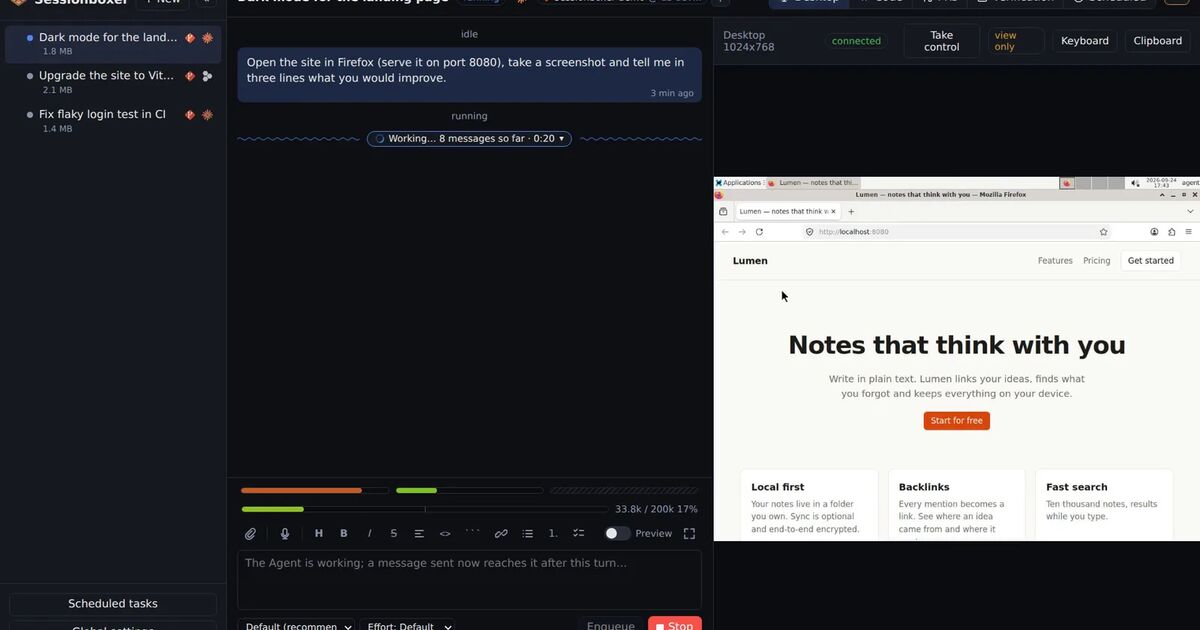
In Sessionboxer, each session runs in its own Docker container, and the agent's browser is Firefox ESR on a Linux desktop inside that container. It is the stock browser with a policy file that only turns off updates, telemetry and first-run screens. The agent uses it like a person does, through screenshots, clicks and typing; there is no channel a page can call to put text in the agent's prompt. You watch the same screen in the Desktop pane and can take control.
So a hostile HTML file opened in that Firefox finds the container's disk: the workspace, the agent's home in the box, the tools installed there. Your laptop's SSH keys, cloud credentials and other clones are not in it. The container publishes no ports on your host and sits on a private Docker network.
The other place a page renders is the chat itself. When the agent writes a self-contained .html file and names it, Sessionboxer can run it as an interactive app in the chat. That runs in your browser, so it is sandboxed: no origin, no cookies, no network beyond an allowlist of CDNs, and no access to sibling files. It cannot read Sessionboxer or call anything on the web.
What Sessionboxer does not protect
The container limits what a page can reach. Several things are still in reach:
- A page shown on screen can still try to talk the agent into something. The agent reads screenshots, and text on a page is text it reads, the same as a README or an issue.
- The box holds secrets of its own: the agent's provider login and, while a GitHub entry is enabled for the session, the GitHub login that makes
git pushwork. They live on tmpfs and stay out of snapshots, but a process in the running box can read them. If something hostile ran in a session, rotate those. - The box has outbound internet access, because the agent needs it, so a script in it can send what it finds.
- Sessionboxer does not scan HTML files, pages or repositories. It knew nothing about EMBRACE.
If you use Codex, VS Code or Claude Desktop on your laptop as well, their built-in browsers are still there. Moving the agent into a box changes what its own browser can reach; it does nothing for a preview you open in another tool on the host.