
You want three agents working on the same repository at once, and you do not want any of them running npm install or rm -rf on your laptop. One answer you will find is container-use, from the Dagger team. It gives every agent a fresh container and its own git branch, and it works with the agent you already use.
We build Sessionboxer, which also gives every agent its own container, so this is a comparison from the maker of one of them. Everything about container-use comes from its documentation and its GitHub repository, read on November 12, 2026. The two tools draw the container boundary in different places, and that choice decides most of what follows.
What container-use is
container-use is an open-source MCP server, Apache 2.0 licensed, written in Go. You install one binary and register it with your agent. For Claude Code the quickstart is one line:
cd /path/to/repository
claude mcp add container-use -- container-use stdio
The agent then has a set of environment_* tools: create an environment, read and write files in it, run a command in it, add a service. Each environment is a container built by Dagger plus a git branch. The environment workflow page describes the loop. The agent works, you look with container-use log and container-use diff, and then you merge the branch, apply the changes as staged edits, or delete the environment. container-use terminal drops you into the container's shell. container-use checkout puts the branch, cu-<id>, in your local repository so your own editor can open it.
It works with any agent that speaks MCP. The agent integration page has setups for Claude Code, Cursor, Windsurf, Amazon Q Developer, VS Code and others. The base image defaults to Ubuntu 24.04. You change it, and add setup and install commands, with container-use config; the result lives in .container-use/environment.json, which you can commit for your team.
The README calls the project "in early development". The latest tagged release is v0.4.2, from August 19, 2025. The main branch had commits as recently as August 2026, but nothing newer has been tagged.
Where the agent itself runs
With container-use, the agent stays on your machine. Claude Code, Cursor or Windsurf runs as a normal process with your home directory, your shell and your credentials. Only the work it sends through the container-use tools happens in the container.
So isolation depends on the agent choosing those tools. container-use ships an optional rules file for CLAUDE.md that begins "ALWAYS use ONLY Environments for ANY and ALL file, code, or shell operations". That is an instruction to the model. Claude Code's own Bash, Read and Edit tools are still there, and they run on the host.
The quickstart's "Trust Only Container Use Tools" step passes the container-use tools to --allowedTools. Claude Code's CLI reference defines that flag as the tools "that execute without prompting for permission". It does not remove the others; they keep asking. If you want the container to be the only way to touch files, Claude Code has a flag for it: --tools "" removes every built-in tool and leaves MCP tools in place.
claude --tools ""
With that, the agent can only reach your code through container-use. Without it, the setup works well as long as the model follows the rules file, and the permission prompts are your fallback when it does not.
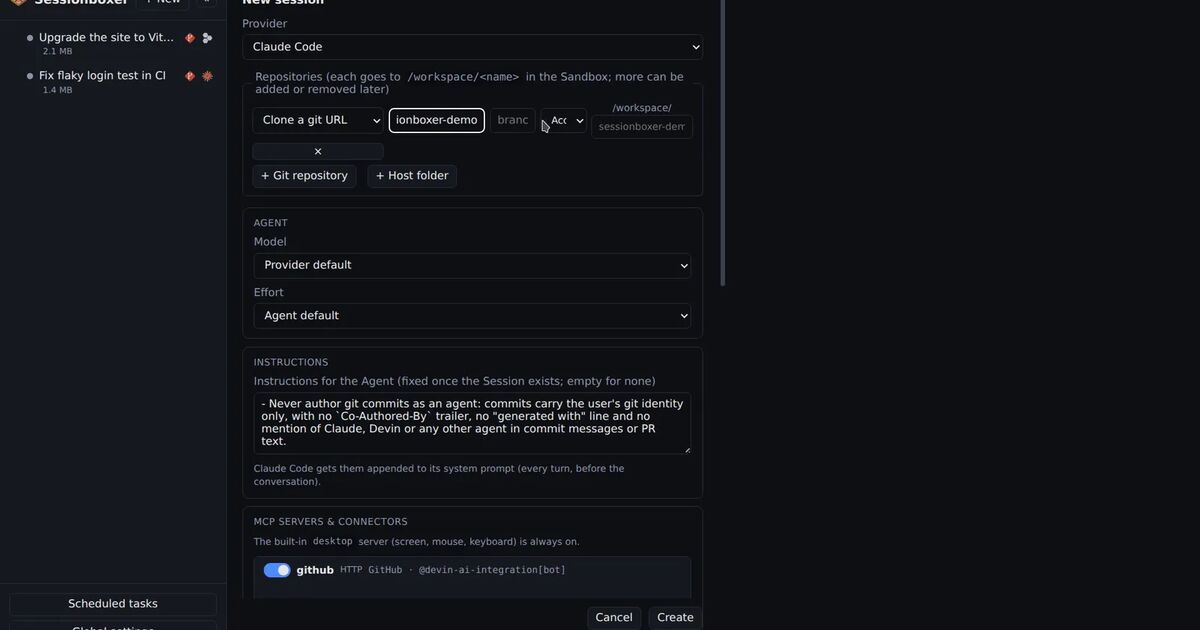
Sessionboxer puts the boundary further out. Every session is its own Docker container, and the agent process runs inside it, next to a Linux desktop and the workspace in /workspace. The code is cloned from a git URL or copied from a folder; nothing is bind-mounted from your machine. Because the agent itself is in the box, it runs with all permissions granted, and there is no tool layer it could step around. The cost is that Sessionboxer only runs the agents it knows how to drive: Claude Code, Codex, Cursor, OpenCode, Devin, pi, fx, Kimi CLI, GitHub Copilot, Mistral Vibe, Grok Build, Gemini CLI and Qwen Code. An IDE agent such as Windsurf's is out of reach.
Credentials
container-use has a careful answer for project secrets. You set a reference instead of a value, from 1Password (op://), HashiCorp Vault (vault://), an environment variable (env://) or a file (file://). The secrets page says the value is resolved inside the container when a command runs, stripped from logs and command output, and never shown to the model. Your app's code can read API_KEY; the transcript does not contain it.
The agent's own login is a different matter. It lives wherever the agent normally keeps it on your machine, along with your SSH keys and cloud CLIs, all within reach of the agent's built-in tools, behind their permission prompts.
In Sessionboxer, the agent's login token is inside the box, because the agent is. Code the agent runs could read it. Sessionboxer strips it from snapshots. Nothing from your home directory is mounted into the box, so your SSH keys and cloud CLI logins stay out of it. For the systems the agent should reach, Utilities hold credentials that are write-only and never appear in snapshots or the chat. The agent uses them through sb-util commands, or types a password into a login form with a placeholder that becomes the real value on the way to the screen.
Getting the work back
This is where container-use feels most at home. Every environment is a branch. You review it with git and your own editor, and container-use apply stages the changes so you write the commit message yourself. If you live in git, there is nothing new to learn.
Sessionboxer keeps the work in the box until you move it. A cloned repository is pushed by the agent, usually as a pull request. A copied folder has Pull to folder…, which shows added, changed and deleted files before anything touches your disk and skips files that changed on both sides. You can also read the diff in VS Code, which runs inside the box.
Side by side
| container-use | Sessionboxer | |
|---|---|---|
| What runs in the container | The agent's tool calls | The agent and everything it runs |
| Agents | Any MCP-capable agent | 13 CLI agents it drives over ACP |
| Interface | Your agent's own UI, plus a CLI | A web UI, also on the phone |
| Work comes back as | A git branch: merge, apply, checkout |
A push or PR, or Pull to folder… |
| Secrets for your app | References resolved in the container | Utilities, credentials kept out of the transcript |
| Desktop for the agent | Not in the docs | Linux desktop, Windows and macOS VMs on KVM hosts |
| Install | One binary, plus Docker and Git | npm with Node.js 22+, or Docker Compose; needs Docker |
| License | Apache 2.0 | MIT |
What Sessionboxer adds comes from running the whole agent in a machine of its own. The agent can drive a desktop to test a change in a browser, record a video of it, and snapshot the whole box after a turn so you can fork it or hand it to a different agent.
What container-use offers comes from being small. It is one binary that adds tools to the agent you already run, inside the editor you already use. There is no server to keep up, no web UI to learn and no list of supported agents to check.
Which one fits
Pick container-use if you work with an agent inside an IDE, such as Windsurf or Zed, and want its commands off your machine, if you think in branches and want to merge agent work like a colleague's, or if you need your app's secrets resolved from 1Password or Vault. With Claude Code, add --tools "" so the container is enforced.
Pick Sessionboxer if you want the agent itself in the box, so it can run without prompts and nothing it does touches your home directory, or if you want it to test its work on a desktop and be steered from your phone while it runs on a server. Our post on running agents in parallel covers the three-agents-on-one-repository case from the start of this post.
Both are open source and both run on your own Docker. Neither needs a new subscription: container-use uses whatever your agent uses, and Sessionboxer runs on the login you already have.