
You gave Jules a GitHub repository, a setup script and a few scheduled tasks, and it opened pull requests while you did something else. Since November 11 you can no longer start a task. On December 31 Jules goes away. If you still depend on it, you have about five weeks to get your data out and decide where the work goes next.
This post covers what Google announced, what the export contains, how each piece maps to a new home, and how Jules compares with running an agent on a machine you own. We build Sessionboxer, so the last part is a comparison from the maker of one of the options. Everything about Jules comes from the Jules documentation, read on November 22, 2026.
What Google announced
The Jules changelog has an entry dated October 29, 2026, titled "Jules Turndown". It says that "as part of our work to unify our agentic coding efforts, Jules will wind down on December 31, 2026." Users could keep finishing sessions until November 11. After that, Jules turned read-only "until the end of the year".
The entry names Google Antigravity as one of the products shaped by what Google learned from Jules. It does not say that Antigravity replaces Jules, and it does not move your tasks anywhere. Your code, branches and pull requests are already on GitHub, so they stay. What lives only inside Jules is the configuration and history, and that is what you need to export.
Export first
The same entry describes the export. You install Jules Tools, the Jules command line, and sign in:
npm install -g @google/jules
jules login
Then you open a command-line coding agent in your home folder and paste the export prompt from the changelog. The agent checks your login, runs a Python script that calls the Jules API, and prints what it saved. The script is in the prompt, so you can also read it and run it yourself.
Your data lands in ~/jules-export:
sources.jsonwith your connected repositories- a folder per repository with its setup script, test command and memories
- your settings, environment variables and scheduled tasks as JSON
- a folder per session with a
summary.md, the full activity log and its diffs
Two details from the changelog matter. Connect your GitHub account to Jules before you export, or the export has no repository data. And env-variables.json holds the values of your environment variables in plain text. Keep that folder private, out of every repository and out of any box an agent can read.
The announcement gives no separate export deadline. Read-only lasts until December 31, so plan to finish well before then.
What each part of Jules becomes
Jules did five things for most people. Each one needs a new home, and the export gives you most of the raw material.
The VM and its setup script
Jules ran each task in a fresh Ubuntu VM with Node.js, Python, Go, Java, Rust and Docker preinstalled, per the environment page. Your setup script ran first, and "Run and Snapshot" saved the result for later tasks. The export keeps that script as setup.sh in each repository's folder. Any new home needs a place to run it once and keep the result.
Memories
Jules learned facts about each repository. The export writes them to memories.md. Jules also read AGENTS.md from the root of your repository. Most coding agents read a file like that (Claude Code reads CLAUDE.md, Gemini CLI reads GEMINI.md by default), so moving the memories into that file is usually the simplest step.
Scheduled tasks
The scheduled tasks page describes daily or weekly prompts, with templates for performance, design and security work. The export lists them in scheduled-tasks.json. You will need a scheduler that can start an agent on a repository and stop it afterwards.
Pull requests and CI
Jules opened pull requests, acted on PR feedback, and since February 19 fixed failing GitHub Actions checks on its own PRs. You could also start a task from a GitHub issue by giving it the label jules.
The CLI and API
Scripts that call jules remote new or the Jules REST API stop working on December 31. Find them now, before they fail at night.
Where to run the agent next
If you liked Jules because the work happened on someone else's machine, the hosted agents from OpenAI, Cursor, GitHub and Anthropic do the same job. We compared three of them with Sessionboxer: Codex Cloud, Cursor Cloud Agents and the Copilot cloud agent. Each runs on its vendor's servers and bills through its vendor's plan.
If you want to stay with Google, Gemini CLI is its open-source terminal agent. The turndown note names Google Antigravity, which also has a command-line agent; we wrote about the Antigravity CLI's Auto mode. Both run on your own computer, so you also need to decide where the agent's commands should run.
That decision is what Sessionboxer is for. It puts each session in its own Docker container on your laptop or your server. The repositories you name are cloned into the box, and the agent runs there without permission prompts, since a bad command can only break that box. It runs the agent with the login you already have: Claude Code, Codex, Cursor, Gemini CLI and nine others. For Gemini CLI, that is your Google login or a Gemini API key, as the Connect your agent chapter explains.
Here is how the Jules pieces map:
- The setup script. Start a session on the repository, ask the agent to run your
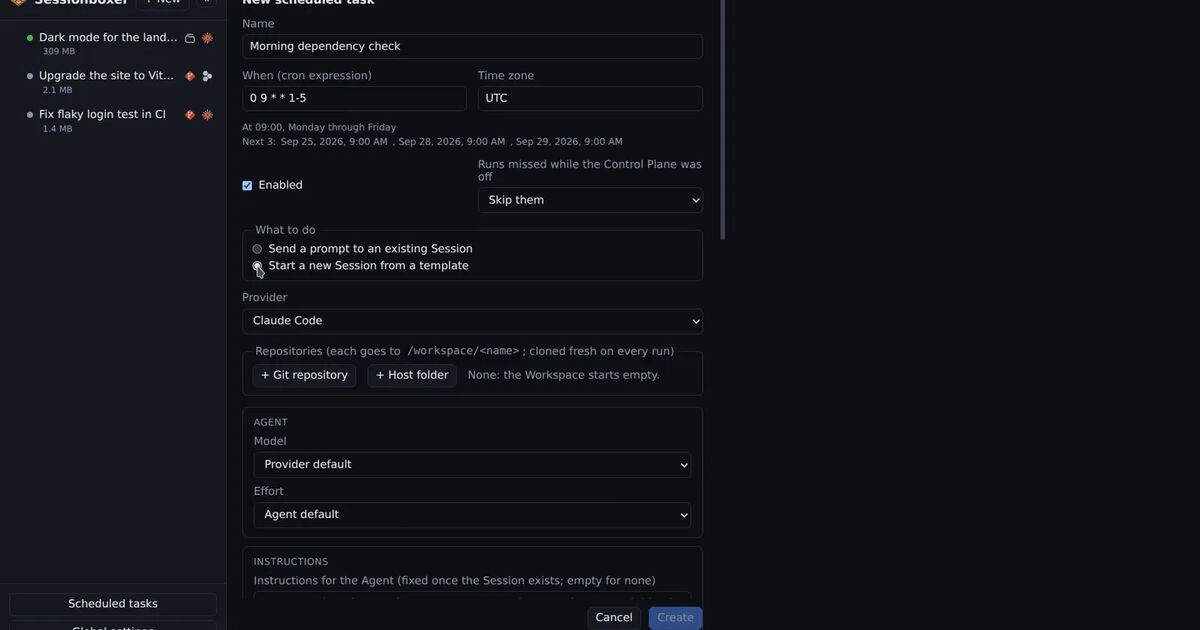
setup.sh, and take a snapshot. A new session, or an automation, can then start from that snapshot instead of installing everything again. - Scheduled tasks. Automations run a prompt on a cron schedule, in your time zone, either in an existing session or in a new one that stops when the turn ends. The Automations chapter shows the form.
- Pull requests. A PR the agent opens is attached to its session. Sessionboxer follows its comments and checks, and a failed check has a Fix & push button. An automation can also react when a followed PR gets a comment or a failing check.
- Memories. Put them in the instructions file your agent reads.
sessionboxer new . --instructions @rules.mdalso gives a session standing instructions from a file.
| Jules | Sessionboxer | |
|---|---|---|
| Where the agent runs | A VM in Google's cloud | A container on your machine or server |
| Agent and model | Jules, on Gemini models | 13 agents, including Gemini CLI |
| Billing | A free plan, or Jules in Google AI Pro and Ultra | The agent's own subscription or key |
| Git hosts | GitHub | Repositories cloned by URL or copied from a folder; PRs followed on GitHub and Bitbucket Data Center |
| Scheduled tasks | Daily, weekly and other cadences | Cron, with history and limits |
| Start from a GitHub issue label | Yes | No |
| Suggested tasks from TODO comments | Yes | No |
| Status after December 31, 2026 | Shut down | Open source, MIT |
What Sessionboxer does not do
It does not import the Jules export. You move the setup script, the memories and the schedules by hand, as described above. For a few repositories that takes an afternoon. For dozens, it is a real project.
There is no trigger on GitHub issues. You paste the issue into the first prompt, or ask the agent to read it with gh. There is no equivalent of Jules' suggested tasks, which scanned for #TODO comments. A nightly automation can ask the agent to look for them instead.
It also needs a machine. Jules ran while your laptop was closed. Sessionboxer runs on your laptop or a server you keep on, with Docker installed, and the scheduler only fires while the Control Plane is up. Each session is a container with a desktop, so it uses more memory and disk than a plain terminal agent. And the Antigravity CLI is not one of the agents it runs today.
If you ran Jules mostly from the web with no machine of your own, a hosted agent is the shorter move. If you want the work on hardware you control, export first, then start a session with your old setup.sh as the first prompt. The Vibe Kanban post covers a similar shutdown, for a tool that ran agents in worktrees on your own machine.