
You open Vibe Kanban to plan the week's work and your project shows a page that says it is now export-only. The board, the issues and their comments are gone from the app. Your workspaces still open, and Claude Code still runs in them. So you are left asking two things: what exactly still works, and is this the moment to move?
We build Sessionboxer, so this is a comparison from the maker of one of the two. Everything about Vibe Kanban below comes from its shutdown announcement, its GitHub repository and its docs, read on November 5, 2026.
What happened to Vibe Kanban
On April 10, 2026, Louis Knight-Webb announced that bloop, the company behind Vibe Kanban, was shutting down. Most users were on the free tier and the team "couldn't find a business model that we could get excited about." The project itself stays open source under the Apache 2.0 license and is now community maintained.
The announcement set out what changes. Remote services stayed up for 30 days, then Vibe Kanban moved to a fully local architecture. The removed services are "kanban issues, comments, projects and organisations." Paid invoices from the last 30 days were refunded. And, in their words, "local workspaces will continue to function."
In the code, version 0.1.44 (April 24) replaced the project board with a page that offers only an export of your project and issue data. The repository still gets commits: 0.1.45 shipped on npm on September 19, and fixes to the GitHub Copilot integration landed in late October. It is still maintained, but the planning half of the product is gone.
What still works, and what to do first
If you still have projects in Vibe Kanban, export them. Open the project and use the export button on the sunset page. That is the only way left to get your issues and their descriptions out.
The workspaces are the part that stays. Per the workspaces docs, each workspace creates a git worktree on a new branch for each repository you pick, then starts your coding agent there. You get a chat, a diff panel where you can leave inline comments for the agent, a built-in preview browser with devtools, a terminal, and buttons to open a GitHub pull request or merge locally. The supported agents are Claude Code, Codex, GitHub Copilot, Gemini CLI, Amp, Cursor CLI, OpenCode, Droid, Claude Code Router and Qwen Code.
So if you used Vibe Kanban mostly for workspaces and diffs, you can keep using it today. The question is how much you want to depend on a tool whose company is gone, and whether its model of where agents run fits what you do.
Where Vibe Kanban runs your agents
A Vibe Kanban workspace is a folder on your machine. The worktree lives in a temp directory by default (/var/tmp/vibe-kanban/worktrees on Linux), and the agent runs as your user. The docs call the workspace "an isolated environment", and that isolation is between branches. The agent can still read your home directory, your SSH keys and your shell history, the same as if you ran it in a terminal.
That matters most when you turn approvals off. The agent configurations page lists dangerously_skip_permissions for Claude Code, yolo for Gemini CLI and Qwen Code, and a skip-permissions-unsafe autonomy level for Droid, and warns that these "can perform destructive actions." Two parallel workspaces also share one set of ports, one Docker daemon and one database, which our post on running several coding agents in parallel covers in more detail.
How Sessionboxer does it instead
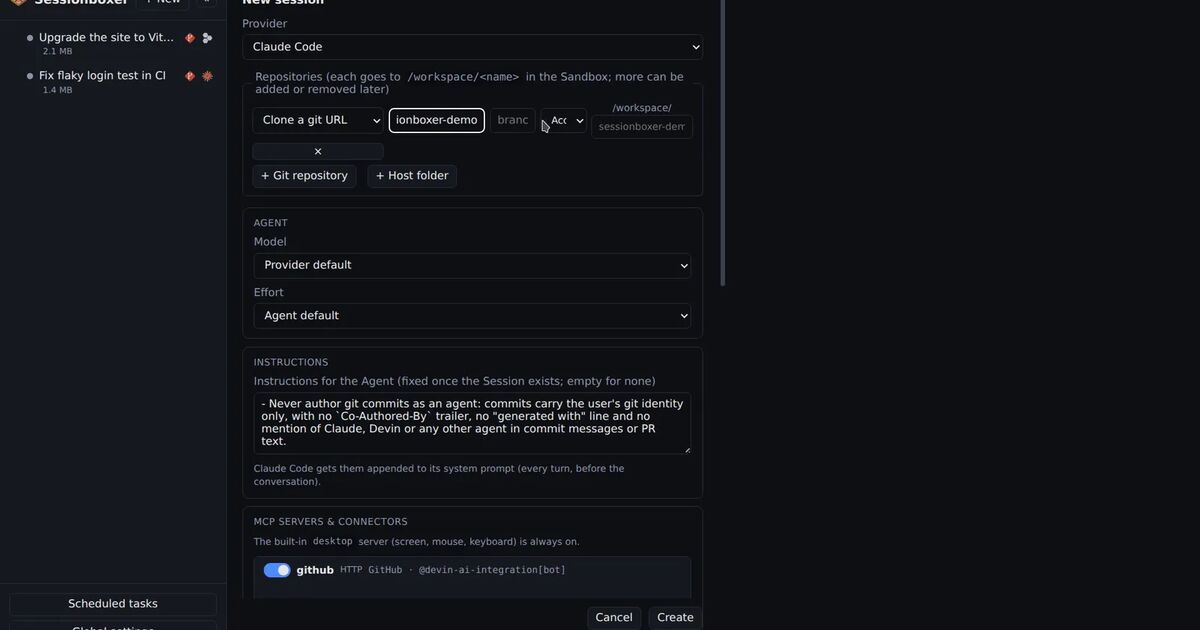
Sessionboxer puts each session in its own Docker container on your laptop or your server. The repositories you name are cloned into the box, or copied from a folder on your machine, and the agent runs inside it. Your home directory is not there. The agent runs without permission prompts, because a bad command can only break that box. Delete the session and the container goes with it.
The agent uses the login you already have. Sessionboxer supports Claude Code, Codex, Cursor, OpenCode, Devin, pi, fx, Kimi CLI, GitHub Copilot, Mistral Vibe, Grok Build, Gemini CLI and Qwen Code, through your own subscription. There is no Sessionboxer account, and it is MIT licensed.
Some of what Vibe Kanban users rely on has a counterpart:
- Pull requests. Ask the agent to open one, or paste a PR link, and it shows up in the session's PRs pane. Sessionboxer then watches the PR: new review comments, failing checks, and buttons to have the agent address a comment, push and reply. The Pull requests chapter of the guide has the details.
- Testing in a browser. Each box has a Linux desktop with Firefox. The agent drives it with mouse and keyboard, and you can watch the screen or take over.
- Reading the diff. VS Code runs inside the box, and its Git view shows the agent's changes file by file. There is no diff panel with inline comments sent straight to the agent, as Vibe Kanban has. You quote the lines in the chat instead.
- Recurring work. Automations prompt a session on a cron schedule, or when a pull request you follow gets a comment or a failing check.
| Vibe Kanban | Sessionboxer | |
|---|---|---|
| Where the agent runs | A git worktree on your machine, as your user | A container on your machine or server |
| Planning board | Removed, export only | None |
| Diff review with inline comments to the agent | Yes | No; VS Code's Git view in the box |
| Preview browser | Built-in, with devtools | A full Linux desktop with Firefox |
| PR comments and checks followed after opening | Not in its docs | Yes |
| Agents | 10, including Amp and Droid | 13, including Devin and Kimi CLI; no Amp or Droid |
| Maintained by | The community, since April 2026 | Talayo Labs |
| License | Apache 2.0 | MIT |
What Sessionboxer does not do
Sessionboxer has no kanban board and no issue tracker. Sessions sit in a sidebar list that you can pin and sort into folders, and that is all the planning it offers. If the board was why you used Vibe Kanban, Sessionboxer will not replace it. Keep your issues in GitHub Issues, Linear or wherever your team already tracks work, and paste the issue into the session's first prompt.
A worktree is also lighter than a container. A new Vibe Kanban workspace needs no image and no extra memory. A Sessionboxer session is a container with a desktop, so it uses more RAM and disk, and the first start pulls an image. You need Docker: Docker Engine on Linux, or OrbStack or Docker Desktop on a Mac. The tools on your laptop are not in the box until you or the agent install them.
If you use Amp or Droid, Sessionboxer does not run them today.
Which one to keep
Keep Vibe Kanban if you liked its workspaces and diff comments, your agents work on your own code with approvals on, and you are fine relying on a community-maintained project. Export your projects first either way.
Move to Sessionboxer if you want agents to run without prompts on a machine you control, if they open repositories you did not write, or if you want PRs followed after the agent opens them. Start a session walks through the first one.
If you are also looking at other tools that run agents in worktrees on your own machine, our Conductor comparison and T3 Code comparison cover two of them. For reviewing the agent's work before it lands, see how to review a coding agent's changes before you commit them.