
A pull request changes the checkout page. The description says "Updated the coupon field and fixed the layout on mobile." To see whether that is true, the reviewer has to pull the branch, install the dependencies, start the app and click through it. Most reviewers skip that and read the diff, which does not show what the page looks like.
A 30-second video at the top of the PR answers the question faster. Until recently, putting one there meant opening the browser and dragging the file into the comment box, which a coding agent working in a terminal cannot do. Since GitHub CLI 2.99 it can. This post covers the command, the limits GitHub puts on videos, how to record something worth attaching, and how we use it in Sessionboxer, which we make.
The command: --attach
GitHub CLI v2.99.0, released on September 1, 2026, added a repeatable --attach flag. It uploads a local image or video and puts it in the body of an issue, a pull request or a comment. The changelog post lists the commands: gh issue create, gh issue edit, gh issue comment, gh pr create, gh pr edit and gh pr comment.
The simplest use adds a comment with the video at the end:
gh pr comment 456 --attach ./checkout.mp4
You can also put it in the pull request when you open it:
gh pr create --title "Coupon field on the checkout page" \
  --body-file pr.md \
  --attach ./checkout.mp4
If pr.md already mentions the file, gh replaces the local path with the uploaded URL instead of adding a second copy at the end. GitHub's docs give one rule for videos: to get a player, the reference must be alone in its paragraph.
The coupon field now validates as you type:

If the same reference sits inside a sentence, it renders as a link instead of a player. Alt text after a # (./login.png#The error state) works for images only.
GitHub's limits on attached videos
The size limits are the same as for uploads in the browser. The attaching files page gives 10 MB for images and GIFs, 10 MB for videos in repositories owned by a user or organization on the Free plan, and 100 MB for videos on paid plans. The formats are .mp4, .mov and .webm, and GitHub recommends H.264 because whether a video plays depends on the browser.
The other limits:
| What | What GitHub's docs say |
|---|---|
| Access | You need push access to the repository |
| Tokens | The changelog names the OAuth token from gh auth login and classic personal access tokens |
| GitHub App tokens | Accepted since v2.103.2; the upload endpoint decides whether one can upload |
| GitHub Enterprise Server | Not supported by --attach yet |
| File types | Images and media only; PDFs and logs still go through the browser |
| Who can see it | In a public repository, anyone with the URL, without signing in |
The last row matters more for videos than for diffs. A recording shows whatever was on screen: the test account's email, a staging URL, a customer name in the seed data. In a public repository, that file can be opened by anyone who has its URL. Watch the video once before you post it, or have the agent use fake data.
If a 10 MB limit applies to you, a short screen recording usually fits after one re-encode with ffmpeg:
ffmpeg -i checkout.mp4 -vf "scale=1280:-2" -c:v libx264 -crf 28 \
  -preset slow -movflags +faststart -an checkout-small.mp4
A higher -crf gives a smaller file and a blurrier picture. -an drops the sound, so leave it out if the video is narrated.
Recording something worth attaching
The agent needs a screen to record. Without a desktop of its own, the usual way is a browser test that films itself. Playwright Test records a video per test when you set video: 'on' (or 'retain-on-failure') in its config, and saves the files to test-results when each browser context closes. Its video docs show the options. Ask the agent to write one test that walks through the change, run it, and attach the file. A test video shows only the page, scaled down to fit 800×800 unless you set a size, so pick a viewport that reads well.
What makes a PR video useful is the same as what makes a bug report useful:
- One flow per video, starting from a page the reviewer knows.
- The state before the change, if it is quick to show.
- The edge case the PR is about: the invalid coupon, the narrow screen, the empty list.
- Under a minute. Nobody watches a five-minute recording of a loading spinner.
A video does not replace reading the diff. It shows that the flow in the video works on the agent's machine, not that the code is right. Our post on reviewing a coding agent's changes before you commit them covers the reading part.
How Sessionboxer does it
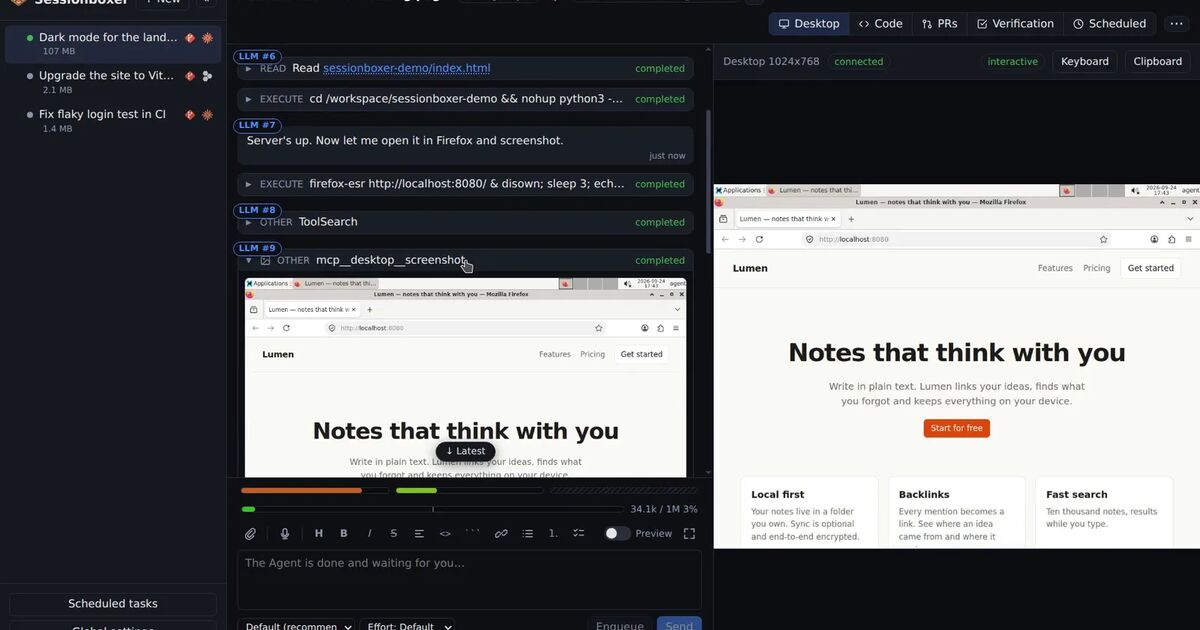
Each Sessionboxer session has its own Linux desktop, and the agent can record it. Ask "record a video of the checkout with an invalid coupon" and it saves an H.264 .mp4 under recordings/, with a caption for each step burned into a band under the desktop and also written as a .vtt file. Stretches where nothing changes on screen, such as a build or a page load, are cut down to a short hold. The video plays in the chat, and the guide chapter on videos and documents has the details, including optional narration from a text-to-speech model that runs in the box.
To get that video into the PR, the agent runs gh in its box. When a GitHub entry from Settings is enabled for the session, the box is logged in as that account (the GitHub login chapter says how), so gh pr create and gh pr comment --attach recordings/checkout.mp4 run as you. Check gh --version in the box's terminal first. Whether the upload is accepted depends on the token type, as in the table above.
You can also stop asking. With Auto QA on, every turn the agent finishes is followed by a verification turn: it plans two to five test cases from your request, runs them on the desktop while recording, fixes what fails, and replies with the video.
For pull requests that people or other agents open, an automation can do it. The Auto QA (video) action starts a session on the PR head, builds a brief from the PR's description plus setup notes you write (how to start the app, which test account), records the cases, and posts one comment on the PR with the verdict and one line per case. On GitHub, Publish the video has two choices:
- Attached to the PR comment (GitHub) is the default. The Control Plane runs
gh pr comment --attachon your machine, so the video plays in the comment. That needs GitHub CLI 2.99 or newer on the machine that runs Sessionboxer. - With Link to Sessionboxer only, the comment links to the video on your Sessionboxer instead.
If the attach fails, for example because gh is older or the upload is refused, the comment is posted with the link and the run's history says why. The link opens only for someone who can reach your Sessionboxer and sign in to it, so a reviewer outside your network sees the verdict but cannot play the video. On Bitbucket there is no attach step, and the comment always carries the link.
A few things it does not do. The Auto QA agent never fixes, pushes or comments on its own; the Control Plane posts the one comment. Sessionboxer does not shrink a video to fit GitHub's limits, and a recording of a long flow on a Free plan repository can be over 10 MB, so keep the time limit short (10 minutes by default, 30 at most) or ask for one flow per video. It does not blur anything in the recording either. And because each run is a full agent session on a desktop, it costs model time and minutes on your machine for every PR it runs on. The automation's limits (runs per day, runs per PR per day) are there for that.
If you want the agent to test its own work before anyone opens a PR, letting the coding agent test its own work covers the same desktop and recorder from that side.